Loading...
Install + connect Bitbucket in 2 minutes
Install →Bitbucket AI Code Review
AI Code Review for Bitbucket — the One That Actually Exists
Most AI review tools skip Bitbucket entirely. Git AutoReview covers Cloud, Server, and Data Center — with human-in-the-loop approval so nothing lands on your PR without you signing off. Five minutes from install to first review, and your code never leaves your machine.
Need help? Contact us at loading...
Which Bitbucket Are You On?
The setup differs depending on your Bitbucket flavour. Pick yours and we'll show exactly what you need.
Select your Bitbucket platform:
Hosted by Atlassian at bitbucket.org. Authentication uses App Passwords (legacy) or the newer API Tokens — both work with Git AutoReview.
Scopes needed: Account: Read, Repositories: Read, Write, Pull requests: Read, Write.
Bitbucket Support: Git AutoReview vs Competitors
We tested every major AI code review tool against Bitbucket in April 2026. The results weren't close.
| Feature | Git AutoReview | CodeRabbit | Qodo | Bito |
|---|---|---|---|---|
Bitbucket Cloud Native in VS Code for Git AutoReview; webhook/app integrations for the rest | ||||
Bitbucket Server Neither CodeRabbit nor Qodo documents Bitbucket Server | ||||
Bitbucket Data Center Qodo: existing installs only — new Data Center installs are paused | ||||
Human-in-the-loop Approve each suggestion before posting | ||||
BYOK (bring your own key) | ||||
Multi-model (Claude, Gemini, GPT) | ||||
VS Code native | ||||
Works behind firewall |
Last verified August 2026 against each vendor's own docs. Git AutoReview is the only VS Code extension covering Bitbucket Cloud, Server and Data Center natively.
See full comparisons →Bitbucket Cloud Setup
Cloud uses App Passwords or the newer API Tokens. Both work — API Tokens are workspace-scoped while App Passwords are account-wide. Here's the path with API Tokens (recommended for new setups).
Bitbucket Cloud
bitbucket.org hosted service
How to set up
- 1Go to Bitbucket Settings → App passwords
- 2Click "Create app password"
- 3Name it "Git AutoReview"
- 4Select the required permissions (see list →)
- 5Copy the generated password
- 6Open Git AutoReview Settings (Cmd+Shift+P → "Git AutoReview: Open Settings")
- 7Go to the Repositories tab and click "Add Repository"
- 8Select "Bitbucket Cloud" as the platform
- 9Enter your workspace slug and repository name
- 10Paste the App Password when prompted
Required Permissions
- Account: Read
- Repositories: Read, Write
- Pull requests: Read, Write
Authentication: App Password — stored encrypted in VS Code SecretStorage
Bitbucket Server & Data Center Setup
Server and Data Center share the same REST API, so the setup is identical. The only difference: for DC, use your load-balancer URL instead of a single-node address.
Bitbucket Server / Data Center
Self-hosted Bitbucket (v7.x+) or enterprise cluster
How to set up
- 1Go to your Bitbucket Server profile → Personal Access Tokens
- 2Click "Create token"
- 3Name it "Git AutoReview" and select Repository + Pull Request permissions
- 4Copy the generated token
- 5Open Git AutoReview Settings (Cmd+Shift+P → "Git AutoReview: Open Settings")
- 6Go to the Repositories tab and click "Add Repository"
- 7Select "Bitbucket Server" as the platform
- 8Enter your Bitbucket Server URL (e.g., https://bitbucket.company.com)
- 9Enter the project key and repository name
- 10Paste your token when prompted
Required Permissions
- Repository: Read, Write
- Pull Request: Read, Write
Authentication: HTTP Access Token — stored encrypted in VS Code SecretStorage
Self-signed certs? If your instance uses a custom CA certificate, VS Code respects the system trust store. Add your CA to the OS keychain and the extension picks it up automatically.
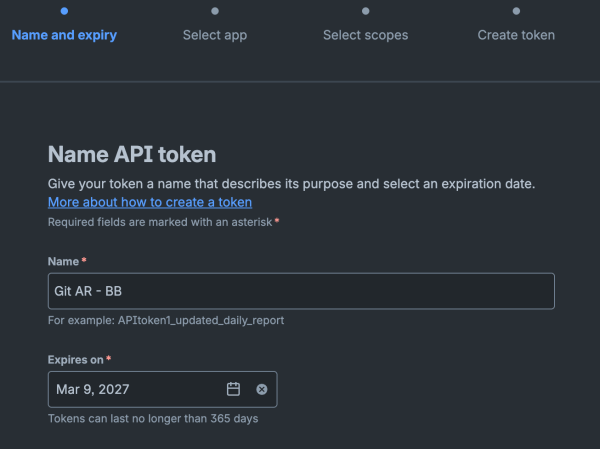
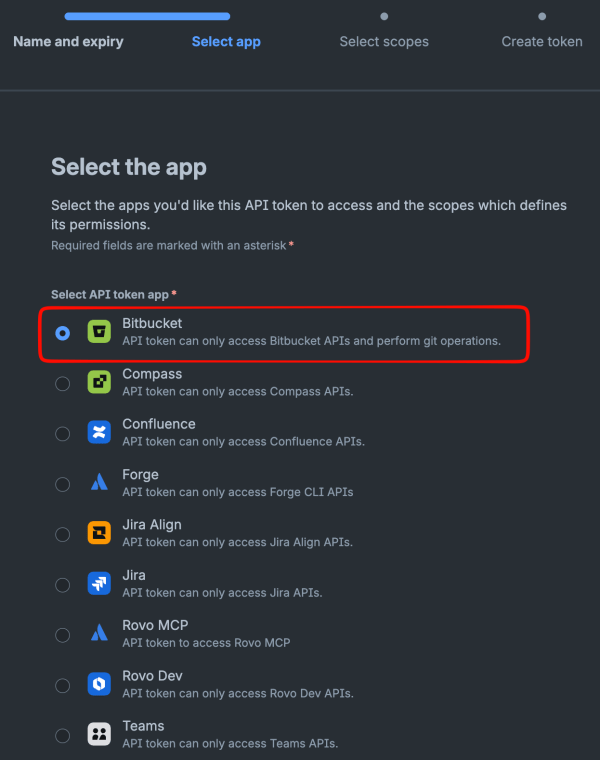
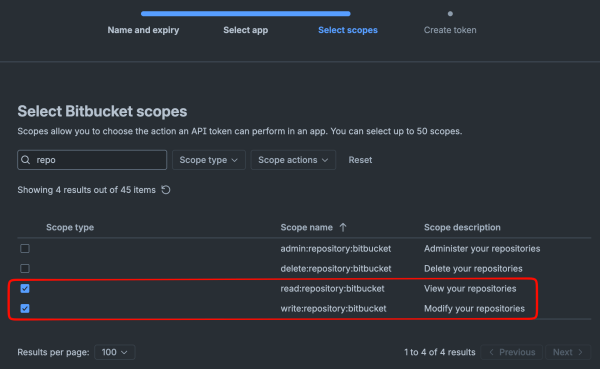
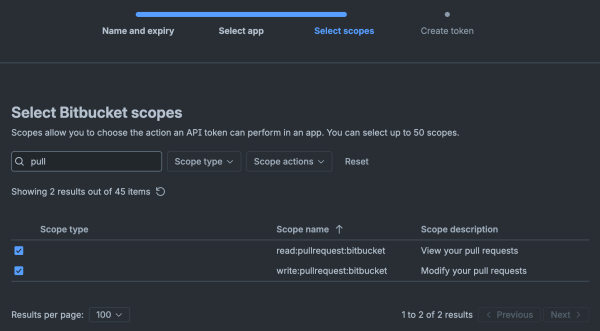
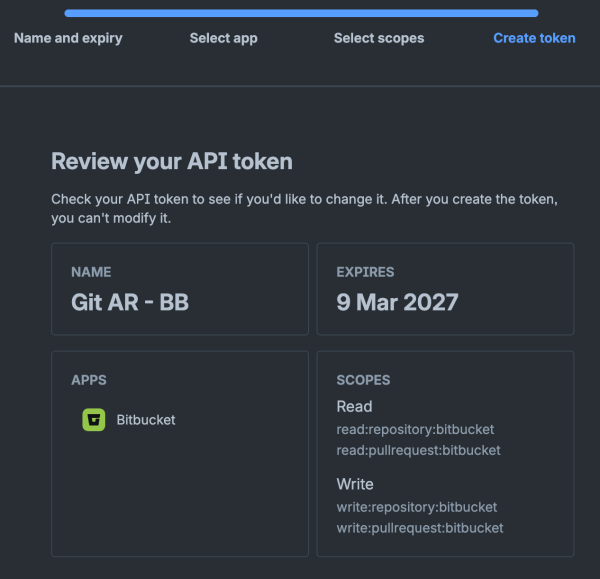
Visual Guide: Creating a Bitbucket Cloud API Token
Step-by-step screenshots showing exactly how to create an API token with the right permissions for Git AutoReview.
1Name your token and set expiry
Give it a descriptive name like "Git AR - BB". Tokens last up to 365 days.
2Select "Bitbucket" as the app
Choose the Bitbucket app to access repository and pull request APIs.
3Add repository scopes (read + write)
Search "repo" and select read:repository:bitbucket and write:repository:bitbucket.
4Add pull request scopes (read + write)
Search "pull" and select read:pullrequest:bitbucket and write:pullrequest:bitbucket.
5Review and create token
Verify all 4 scopes are selected, then create the token. Copy it immediately — you won't see it again.
Setup Checklist
Track your progress — checks persist in your browser so you can come back anytime.
Bitbucket setup progress
—Common Pitfalls
These are the four that tend to bite first-timers. Worth scanning before you start so the install runs clean on the first try.
Wrong token scopes
App Passwords need Account Read + Repo Read/Write + PR Read/Write. Missing any one of these and the extension can't post review comments.
App Password vs API Token
Cloud has both. App Passwords are account-level (older), API Tokens are workspace-scoped (newer). Both work with Git AutoReview — pick whichever your workspace admin prefers.
Self-signed CA certs (Server/DC)
If your Bitbucket instance uses a custom certificate authority, add the CA cert to your OS trust store. VS Code inherits system certificates — no extension config needed.
Workspace slug vs project key
Cloud asks for workspace slug + repo slug. Server/DC asks for project key + repo slug. They look similar but aren't interchangeable — check your Bitbucket URL path.
Security & Privacy
- Credentials stored in VS Code SecretStorage (encrypted via OS keychain)
- Code sent only to your chosen AI provider — Anthropic, Google, or OpenAI
- No data stored on Git AutoReview servers
- Works behind corporate firewalls (Server/DC) — VS Code connects directly to your instance
Why We Built Bitbucket Support
Bitbucket has roughly 10 million developers, and until Git AutoReview shipped, not one AI review tool covered all three deployment models. CodeRabbit and Bito never added it. Qodo Merge supports Server/DC only if you self-host their PR-Agent — Cloud is still out. That left a sizable gap we decided was worth filling.
The harder engineering problem was Data Center. DC nodes sit behind load balancers that rotate requests unpredictably, and the webhook delivery semantics differ from Cloud's. We tested against an actual clustered DC instance instead of mocking the API — clustering changes how state is read across requests, and you only see the failure modes when nodes disagree mid-write. That's why our DC support behaves the same in production as it does in a single-node test.
Human-in-the-loop approval lands differently on Bitbucket than on GitHub or GitLab. A lot of Bitbucket Server and Data Center installs are inside regulated industries — finance, healthcare, government — where an AI dropping comments on a PR autonomously is a compliance question, not a feature request. Our flow keeps every suggestion in VS Code first: review, edit or discard what doesn't fit, then publish. Developers stay in control and the audit trail stays clean.
Frequently Asked Questions
Why doesn't CodeRabbit support Bitbucket?
CodeRabbit does cover Bitbucket Cloud and Data Center, but not Bitbucket Server, and it runs as a bot that posts its review straight to the pull request. Bitbucket's different API structure and smaller user base still make it a lower priority for most AI code review tools. Git AutoReview is the only tool with full Bitbucket Cloud, Server, and Data Center support, reviewed inside VS Code with your approval before anything posts.
How long does setup take?
5 minutes. Install Git AutoReview from VS Code Marketplace (1 click), create an App Password or Personal Access Token in Bitbucket (2 minutes), add your repo in settings (1 minute), and start reviewing.
Is this secure for enterprise use?
Yes. Your code goes directly to your chosen AI provider (Anthropic, Google, OpenAI) via BYOK. Git AutoReview never stores your code. Works behind corporate firewall for Bitbucket Server/Data Center. App Passwords and tokens are stored encrypted in VS Code SecretStorage.
What permissions does Git AutoReview need?
For Bitbucket Cloud: Account Read, Repositories Read/Write, Pull Requests Read/Write. For Server/DC: Repository Read/Write, Pull Request Read/Write. These allow reading PR diffs and posting comments after your approval.
Can I try before buying?
Yes. Free tier includes 3 reviews per day without registration, or 10 per day after email registration. No credit card required.
Does Git AutoReview work behind a corporate firewall?
Yes, for Bitbucket Server/Data Center. Git AutoReview connects directly from your machine to your Bitbucket instance. No external services are involved except the AI provider you choose (Anthropic, Google, or OpenAI).
Ready to start reviewing Bitbucket PRs with AI?
Setup takes 5 minutes. Free tier: 3 reviews/day (10/day after email registration). No credit card required.
Need help? Contact us at loading...
Last updated
Edit this page on GitHub