Bitbucket Pull Request Automation: Complete Guide 2026
Bitbucket PR automation in 2026: Pipelines triggers, AI code review, merge checks, and how to cut review time by 60% without leaving VS Code. Works on Cloud and Data Center.
Using Bitbucket? Native support for Cloud, Server, and Data Center. No webhooks or Docker.
Bitbucket Pull Request Automation: Complete Guide 2026
Bitbucket's built-in pull request review is solid, but it is also entirely manual. Every PR sits in a queue. Reviewers check when they check. There is no AI pre-screen, no automatic linting block, no merge gate that actually refuses bad code unless someone wires it up. That gap is what this guide closes — Pipelines, merge checks, AI review, and the order they should fire in so a reviewer only opens a PR that has already cleared three layers of automation.
TL;DR: Bitbucket Pipelines triggers PR-scoped runs with a pull-requests: block. Merge checks on Premium plans hard-block merges that miss approvals, builds, or unresolved tasks. AI tools sit between the two — Git AutoReview supports Cloud, Server, and Data Center, CodeRabbit added DC in 2026, and most other AI vendors are Cloud-only.
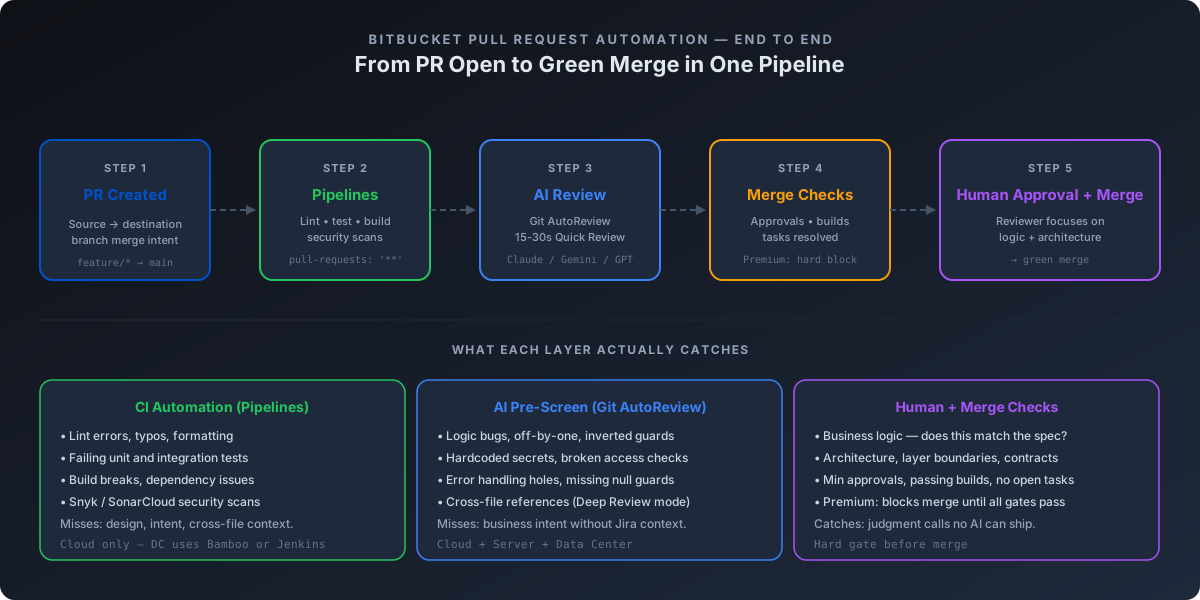
What Bitbucket PR automation actually means
Automation does not mean replacing the human reviewer. It means stacking three layers so that by the time a reviewer opens the PR, everything mechanical is already done.
Layer 1 — CI automation. Bitbucket Pipelines runs your tests, linter, type checker, and security scans on every PR. It catches build breaks, failing tests, dependency vulnerabilities. It does not understand intent.
Layer 2 — AI pre-screen. A model reads the diff, flags logic bugs, missing error handling, broken access checks, hardcoded secrets, and patterns that look wrong even when tests pass. It catches what CI misses but cannot judge architecture.
Layer 3 — Merge gates. Bitbucket merge checks enforce minimum approvals, passing builds, and resolved tasks. On Premium plans they block the merge button outright. They are the final filter before code lands.
The honest framing is that no single layer is sufficient. CI alone misses logic. AI alone misses business context. Humans alone burn out reviewing the same null-check mistakes every week. The point of stacking is that each layer catches what the layer above missed — and the reviewer only sees the PRs that survived all three.
Setting up Bitbucket Pipelines for pull request triggers
The PR trigger is a top-level key in bitbucket-pipelines.yml. Atlassian documents it as: "The pull-requests property defines pipelines that only run when a pull request is created. It merges the destination branch into your working branch before it runs." That merge-before-run is the critical detail — your pipeline tests the future merged state, not the source branch in isolation.
Here is the minimum working configuration:
image: node:20

pipelines:
  pull-requests:
    '**':
      - step:
          name: PR Checks
          script:
            - npm install
            - npm run lint
            - npm test
          caches:
            - node
The '**' pattern catches every PR regardless of source branch. You can scope tighter with patterns like feature/* or hotfix/* — Atlassian's docs note that the pattern "must be the source branch of the pull request," not the destination.
Available environment variables
Bitbucket exposes PR context through environment variables that your script can read directly. The three you actually need:
| Variable | What it is | When available |
|---|---|---|
BITBUCKET_PR_ID | The pull request ID | PR-triggered builds only |
BITBUCKET_PR_DESTINATION_BRANCH | The target branch | PR-triggered builds only |
BITBUCKET_BRANCH | The source branch | All branch builds, not tags |
A common pattern is gating destination-specific logic. Pattern filters apply to source branches only, so if you want different behavior when targeting main versus develop, you read BITBUCKET_PR_DESTINATION_BRANCH inside the script:
pipelines:
  pull-requests:
    '**':
      - step:
          name: PR Checks
          script:
            - npm install
            - npm test
            - |
              if [ "$BITBUCKET_PR_DESTINATION_BRANCH" = "main" ]; then
                npm run test:e2e
              fi
Cloud vs Data Center: a sharp line
This is the part most teams trip over. Bitbucket Pipelines is a Cloud-only feature. Atlassian's official Cloud vs Data Center comparison lists "Built-in CI/CD with Bitbucket Pipelines" under Cloud only — Data Center entries read "Via Bamboo, Jenkins" instead. Teams running Server or Data Center get powerful merge checks and Code Insights, but Pipelines is not in the box. CI runs elsewhere and reports back through the Code Insights API.
Pipeline minutes and what they actually cost
The Free plan ships 50 build minutes per month for up to 5 users — enough to test the workflow but not to run real automation. Standard at $3.65 per user per month and Premium at $7.25 per user per month expand the allocation. Overage is sold as 1,000 extra minutes plus 100 GB of storage for $10, which works out to roughly a cent per minute. Self-hosted runners stay free if you bring your own build machines. For a team running PR-only pipelines that finish in 3-5 minutes, even a busy week stays inside Standard's allocation. The cost trap is when teams enable Pipelines for every branch push and let CI fire on every commit — that is where minutes evaporate.
Merge checks — the quality gates that actually block bad merges
Merge checks are where Bitbucket separates teams that say "we have code review" from teams that actually enforce it. They live under Repository settings → Merge checks, and Atlassian lists eight standard checks available on all plans:
- Minimum number of approvals — fires when a PR is short on approvals
- Minimum number of approvals from default reviewers — same idea, scoped to the reviewer list you configured
- No changes are requested — warns if any reviewer has "Changes requested"
- No unresolved pull request tasks — every task must be closed
- Minimum number of successful builds — at least N green builds on the latest commit
- Maximum commits behind destination branch — flag stale PRs that need a rebase
- Reset requested changes when source branch is modified — automatic
- Allow automatic merge when builds pass — auto-merge once green
The honest catch is that on Standard, every one of those is a warning. The merge button still works. Atlassian only enforces hard blocking on Premium with one specific toggle: Prevent a merge with unresolved merge checks. Premium also adds two related gates — Reset approvals when source branch is modified (forces re-review after changes) and Keep approvals if there is no change to the diff (preserves approvals during clean rebases).
If you have ever shipped a PR with a failing build because a senior dev "needed it merged before standup," upgrade to Premium. The $7.25 per user per month is cheaper than one bad production rollback.
Git AutoReview runs Claude, Gemini, or GPT before your reviewer opens the PR. You approve every comment — your existing merge checks still apply.
Install the VS Code Extension →
Code Insights — pushing CI verdicts into the PR
Code Insights is the API piece most teams discover late. Bitbucket lets any tool publish a structured report to a PR — title, status (FAILED, PASSED, etc.), up to ten data points, and a link back to the source. Each report can carry up to 1,000 annotations, each with severity, a file path, and a line number. Reviewers see the verdict inline with the diff. Pipeline logs stop being the first place you look when a build fails.
The integrations that publish to Code Insights cover most stacks:
- SonarCloud / SonarQube — quality and security analysis posted as a Code Insights report with annotations on flagged lines (works on Cloud and Server/DC)
- Snyk — vulnerability findings published as line-level annotations through the Bitbucket Pipelines integration
- Custom scripts — any pipeline step can POST to the Code Insights REST API and ship its own report
The "Minimum number of successful builds" merge check counts Code Insights reports too. So a Sonar quality gate failure can hard-block a merge on Premium, the same way a failed Pipelines build would. That is the chain you want.
AI code review automation for Bitbucket
Here is where Bitbucket teams hit the wall most often: most AI code review tools are GitHub-first, GitLab-second, and Bitbucket-never. The landing page says "GitHub and GitLab" and you close the tab. The market has shifted in 2026 — but the gap is still wide enough that platform support is the first filter, not the last.
| Tool | Bitbucket Cloud | Bitbucket Server/DC | Mechanism | Price |
|---|---|---|---|---|
| Git AutoReview | ✅ Full | ✅ Full | VS Code extension, outbound PAT, BYOK | $14.99/mo flat (team) |
| CodeRabbit | ✅ Full | ✅ Full (2026) | Webhook + bot user + OAuth | $24/user/mo |
| Qodo Merge | ✅ Cloud | ⚠️ Existing installs only | Webhook deployment | $30/mo base + credits |
| SonarCloud | ✅ Code Insights | ✅ Code Insights | Pipeline step or scanner | $34/mo Team |
| Snyk | ✅ Cloud | ✅ Server | Marketplace app or Pipelines | Free + paid tiers |
| Sourcery | ❌ | ❌ | GitHub/GitLab only | — |
| GitHub Copilot Code Review | ❌ | ❌ | GitHub-only | $19-39/user |
* Git AutoReview subscription price only. AI compute (~$2–5/mo direct to your AI provider) is separate under the BYOK model. CodeRabbit and Qodo bundle AI compute into their per-user price.
What makes Git AutoReview different on Bitbucket
The architecture is the differentiator. Git AutoReview ships as a VS Code extension that authenticates with Bitbucket using a personal access token — no inbound webhook required, no public URL for your Bitbucket instance, no bot user to provision. For Data Center teams behind a corporate firewall, that is the difference between "we can use it" and "we cannot." Our full Bitbucket setup guide walks through the token scopes and authentication flow per deployment type.
A few specifics worth pinning down:
Two review modes. Quick Review reads the diff in 15-30 seconds and returns inline suggestions — fast enough to run on every PR before pushing. Deep Review runs an agent that reads referenced files, runs the linter, checks tests, and traces data flow before commenting; it takes 2-5 minutes typical and 5-8 minutes for very large PRs.
Human approval before publishing. Every AI comment lands as a draft in VS Code. You read, approve, or reject before anything posts to the Bitbucket PR. CodeRabbit and Qodo auto-publish — when the AI is wrong, the team sees the noise. That tradeoff matters more than the headline price.
BYOK on every plan. Your code goes directly from VS Code to Anthropic, Google, or OpenAI. We never see the diff or the review output. AI compute runs on your provider account, typically $2–5 per developer per month at normal review volume. The honest framing: the $14.99 subscription buys the extension, the orchestration, the platform integrations. The $2–5 buys the actual AI inference at the same rate everyone else pays.
Multi-model in parallel. Run Claude, Gemini, and GPT on the same PR, compare findings side-by-side, merge similar issues automatically. One model misses things another catches — concurrency bugs, framework-specific patterns, security anti-patterns. Three models in parallel finds more than one model alone.
Complete automation workflow: PR to merge
The order matters. Done right, a Bitbucket PR moves through five stages before merge, and your reviewer only opens the ones that survived stages one through four.
1. Developer opens PR in VS Code. Before pushing the branch or hitting Create Pull Request in the browser, the developer runs Git AutoReview Quick Review against the diff. Fifteen to thirty seconds. Obvious issues — missing null checks, hardcoded credentials, broken error handling — surface as drafts. The developer accepts, rejects, or fixes inline. Most catch their own bugs at this step instead of shipping them to the reviewer. If the branch name carries a Jira key (PROJ-412-fix-login), Git AutoReview pulls the ticket context into the review — Bitbucket and Jira ship the tightest native integration of any Git host, and our Jira-to-PR loop guide walks through smart commits, automation rules, and acceptance-criteria verification.
2. Bitbucket Pipelines triggers automatically. The pull-requests: block fires on PR creation. Lint, unit tests, integration tests, and security scans run in parallel. SonarCloud or Snyk push results to Code Insights. Anything red surfaces on the PR before a human opens it.
3. AI Deep Review runs (optional, agent mode). For PRs above a size threshold — say, more than 200 lines changed or touching critical paths — Deep Review explores the codebase: reads referenced files, runs the linter, checks tests, traces data flow across modules. Output lands as drafts the developer or designated reviewer approves before they post.
4. Merge checks gate the merge. Bitbucket enforces minimum approvals, successful builds (including Code Insights reports), no unresolved tasks. On Premium, the merge button stays disabled until everything is green. The reviewer cannot accidentally merge a PR with a failing Sonar gate.
5. Human reviewer focuses on what is left. Style is handled. Bugs are flagged. Security is scanned. What remains is judgment — does the architecture fit the system, does the change solve the right problem, are the tests testing the right things? The reviewer's time goes to the work only a human can do. Our AI code review checklist covers what the human still owns when AI handles the mechanical layer.
The cumulative effect is the time saving teams actually feel. Manual review on every PR is a slog. Manual review on the 30% of PRs that needed thinking is a fair afternoon.
Bitbucket Data Center specifics
Most of the Cloud playbook ports to Data Center with one substitution: Pipelines is replaced by your existing CI server. Bamboo, Jenkins, GitLab CI used as an external runner, GitHub Actions firing on Bitbucket webhooks — Atlassian's comparison lists "Via Bamboo, Jenkins" as the Data Center CI path. The merge-check engine, the Code Insights API, and the PR REST API are all there. CI is the only piece you wire separately.
A few practical points for Data Center setup:
Webhooks for external CI. Your CI server subscribes to PR events (pr:opened, pr:from_ref_updated, pr:merged) via Bitbucket Server webhooks. The pipeline reads the diff, runs its checks, and posts results back through the Code Insights API. The "Minimum successful builds" merge check picks up those Code Insights reports the same way it picks up native Pipelines status.
Branch permissions plus merge checks. Data Center has the same merge-check engine as Cloud, with the same Standard/Premium distinction. The Premium "Prevent a merge with unresolved merge checks" toggle is the gate that makes checks enforceable instead of advisory. Combine with branch permissions to lock main to merges via PR only.
Git AutoReview on Data Center. The outbound-only architecture is the entire point on DC. Your Bitbucket instance does not need a public URL, no incoming webhook, no bot user. The developer creates a personal access token with Repository Read+Write and Pull Request Read+Write scopes, pastes it into VS Code, and the extension makes outbound HTTPS calls to your DC instance. For air-gapped or VPN-only deployments, that is the difference between feasible and not. Our Bitbucket Data Center setup guide covers token scopes and certificate handling for self-signed corporate CAs.
CodeRabbit on Data Center. CodeRabbit added Data Center support in 2026, documented at docs.coderabbit.ai/platforms/bitbucket-data-center. Setup involves provisioning a bot user, generating access tokens, configuring OAuth, and installing per-repository. The webhook architecture means your DC instance has to be reachable by CodeRabbit's cloud — which works for many setups but blocks the internal-only deployments where Git AutoReview's outbound model is the only option.
What to automate first
If you are starting from a baseline Bitbucket setup with no automation, the order that gives the most return per hour invested:
Week 1 — Pipelines for PRs. Drop the YAML above into your repo. Run lint and tests on every PR. The setup is fifteen minutes and immediately catches the embarrassing stuff.
Week 2 — Merge checks. Enable minimum approvals, minimum successful builds, and no unresolved tasks. If you have Premium, turn on "Prevent a merge with unresolved merge checks." If you do not, weigh the cost — for a team of five at $7.25 per user, that is $36 per month for a hard merge gate.
Week 3 — AI pre-screen. Add Git AutoReview to your VS Code workflow. Start with Quick Review on every PR before pushing. Free tier gives 10 reviews per day per developer — enough to validate the workflow before paying for anything.
Week 4 — Code Insights integration. Wire SonarCloud or Snyk to push reports. The "Minimum successful builds" check picks them up automatically. You now have static analysis, security scans, and tests all hard-gated on Premium.
That is the staircase from "we review PRs when we get to them" to "the only PRs my reviewer opens are the ones that survived four automated layers." The work is real but the compounding is fast — every layer you add reduces the time the next layer needs to spend.
No credit card. BYOK on every plan. Install the VS Code extension, paste a token, run the first review in two minutes.
Install Git AutoReview →
FAQ
Does Bitbucket Pipelines support pull request triggers?
Yes. Bitbucket Pipelines runs PR-scoped pipelines using the pull-requests keyword in bitbucket-pipelines.yml. According to Atlassian docs, the trigger fires when a pull request is created and merges the destination branch into your working branch before running. Patterns like '**' or 'feature/*' filter by source branch.
What is the difference between Bitbucket Cloud and Data Center for PR automation?
Bitbucket Pipelines is exclusive to Cloud. Atlassian's own feature comparison lists "Built-in CI/CD with Bitbucket Pipelines" for Cloud and "Via Bamboo, Jenkins" for Data Center. Both platforms support merge checks, branch permissions, and Code Insights — but on Data Center you wire your CI separately and post results back via the REST API.
How do I block merges until CI passes in Bitbucket?
Configure merge checks under Repository settings. "Minimum number of successful builds" is the gate you want. On Premium plans, enable "Prevent a merge with unresolved merge checks" to make it a hard block — without it the check only warns. Combine with minimum approvals and "No unresolved pull request tasks" for a complete quality gate.
Does AI code review work on Bitbucket Data Center?
Git AutoReview is the only AI review tool with confirmed support for Cloud, Server, and Data Center via outbound-only personal access tokens — no public webhook needed. CodeRabbit added Data Center support in 2026 but requires a bot user, OAuth, and inbound webhooks. Qodo Merge ships as a webhook deployment for Server/DC. Most other tools are Cloud-only.
What are Bitbucket Code Insights?
Code Insights is Bitbucket's API for pushing third-party analysis results into pull requests. Each report carries a status (PASSED, FAILED), up to 10 data points, and up to 1,000 line-level annotations with severity. SonarCloud, Snyk, and any CI step can publish reports — reviewers see the verdict inline with the diff instead of digging through pipeline logs.
How much do Bitbucket Pipeline minutes cost?
The Free plan includes 50 build minutes monthly. Standard ($3.65/user/mo) and Premium ($7.25/user/mo) include larger allocations, and Atlassian sells overage as 1,000 minutes plus 100 GB storage for $10 — roughly $0.01 per extra minute. Self-hosted runners stay free, which keeps cost predictable for teams that already own build machines.
Related Resources
- AI Code Review for Bitbucket: Cloud, Server & Data Center — the full setup guide with comparison matrix
- Bitbucket Data Center AI Code Review — enterprise DC walkthrough
- How to Add AI Code Review to Bitbucket Pipelines — YAML examples and cost analysis
- Jira to Pull Request: Closing the Loop — smart commits, branch naming, and ticket-aware AI review
- Best AI Code Review Tools for Bitbucket 2026 — six tools scored across eight criteria
- Code Review Checklist for AI-Generated Code — what the human still owns
- Bitbucket vs GitHub for Teams — platform comparison
Using Bitbucket? Native support for Cloud, Server, and Data Center. No webhooks or Docker.
Frequently Asked Questions
Does Bitbucket Pipelines support pull request triggers?
What is the difference between Bitbucket Cloud and Data Center for PR automation?
How do I block merges until CI passes in Bitbucket?
Does AI code review work on Bitbucket Data Center?
What are Bitbucket Code Insights?
How much do Bitbucket Pipeline minutes cost?
Works with your Bitbucket setup
Cloud, Server, and Data Center. Connect in VS Code, pick your AI model, review your first PR.
Free: 10 AI reviews/day, 1 repo. No credit card.
Related Articles
OpenCode vs Claude Code: An Honest Comparison (2026)
OpenCode vs Claude Code compared on licence, models, cost and PR review. Verified GitHub and pricing data, plus the archived repo everyone still quotes.
Open VSX: AI Code Review in Cursor, VSCodium & Windsurf (2026)
VS Code forks cannot reach Microsoft's Marketplace. Here is the licence reason, and how to install AI code review in Cursor, VSCodium and Windsurf.
Jira to Pull Request: Closing the Loop Between Tickets and Code Review 2026
Most teams mark Jira tickets Done before the PR gets a real review. Here's how to wire Jira to GitHub, GitLab, and Bitbucket so ticket context drives code review — and nothing ships unverified.
Get the AI Code Review Checklist
25 PR bugs AI catches that humans miss — with real code examples. Free PDF, sent instantly.
One-click unsubscribe. We never share your email.