Loading...
Security ScanningAI Writes Code.
AI Writes Code.
Who Catches the Vulnerabilities?
40% of AI-generated code contains security flaws. Your AI assistant won't tell you. Git AutoReview scans every PR with 15 security rules + AI specialized security pass.
AI Code is Insecure. The Data is Clear.
Every major study reaches the same conclusion: AI-generated code introduces vulnerabilities at alarming rates.
40%
of AI-generated programs contain vulnerabilities
NYU Copilot Study (IEEE S&P 2022)
4,200+
CWE instances in 7,703 AI-generated GitHub files
CodeAnt AI 2025
37%
more critical vulnerabilities after 5 AI iterations
Kaspersky Vibe Coding Report
40%
higher secret leak rate in Copilot-active repos
GitGuardian Study
$4.44M
average data breach cost globally
IBM 2025 Report
241 days
average time to detect a breach
IBM 2025 Report
Real Security Incidents from AI-Generated Code
These happened in 2024-2025. Not hypotheticals. Not demos. Production systems, real users, real damage.
CamoLeak (CVSS 9.6)
CRITICALCopilot Chat prompt injection exfiltrated AWS keys from private repos via hidden PR comments. Affected ALL Copilot users. Fixed Aug 2025 after Legit Security disclosure.
CVE-2025-38561 — The Register, CSO Online
3,000+ Tickets Exposed
CRITICALVibe-coded startup app had zero auth. Customer credit cards accessible via URL for a week. AI never added authentication. Potential GDPR fines up to $200K.
Karo Zieminski — Substack
AWS Kiro Deletes Production
HIGHAmazon's AI coding tool autonomously deleted production environments, causing 13-hour outage. AI tools inherit engineer permissions without safety checks.
Tom's Hardware
1,184 Malicious Packages
HIGH1 in 5 skills in ClawHub (AI agent marketplace) were malicious. 135K exposed instances with insecure defaults. 9 CVEs, 3 with public exploits.
Antiy CERT, SecurityScorecard
Stanford Study: False Confidence
MEDIUMDevelopers using AI assistants wrote less secure code in 4 out of 5 tasks while feeling MORE confident about security. AI creates a dangerous illusion of safety.
Stanford/Boneh Research
“It Won't Happen to Me”
Nobody ships a PR thinking it has a security hole in it. That's the problem — breaches take 241 days to detect precisely because the code looked fine when it merged.
AI assistants don't warn you about the vulnerabilities they introduce. The Stanford study found developers using AI felt more confident while writing less secure code.
Your code review is the last line of defense. Is it catching security issues?
The Solution
Security Scanning Built Into Every Review
We added two layers of security scanning because one layer always misses something. The pattern-matching rules catch known vulnerability signatures — SQL injection, XSS, hardcoded secrets — while the AI layer traces your actual data flow to find the issues that rules-based tools are structurally blind to. It runs on every PR with zero configuration.
Layer 1: 15 Regex Rules
Fast, deterministic pattern matching runs locally in VS Code. Catches hardcoded secrets, SQL injection, eval(), XSS, weak crypto, CORS wildcards, and more. Zero false negatives for known patterns.
- Runs locally, no API call needed
- Instant results, no latency
- Severity-rated (Critical, High, Medium)
Layer 2: AI Security Pass
A specialized AI prompt focused exclusively on security. Claude, Gemini, or GPT analyzes your code changes for complex vulnerabilities that regex can't catch: logic flaws, auth bypasses, SSRF chains.
- Understands code context and intent
- Catches logic-level vulnerabilities
- BYOK — code goes direct to your AI provider
15 Built-in Security Rules
Every PR is scanned against these patterns. No configuration needed. Available on all plans including Free.
CRITICAL
Hardcoded Secrets
API keys, passwords, tokens, private keys in source code
CRITICAL
SQL Injection
Template literals and string concatenation in SQL queries
CRITICAL
eval() Usage
Dynamic code execution enabling code injection attacks
CRITICAL
Math.random for Crypto
Predictable values used where cryptographic randomness needed
HIGH
innerHTML / XSS
Cross-site scripting via unsanitized HTML insertion
HIGH
Weak Hashing (MD5/SHA1)
Broken cryptographic hash functions for passwords or tokens
HIGH
CORS Wildcards
Permissive Access-Control-Allow-Origin allowing any domain
HIGH
Empty Catch Blocks
Swallowed errors that hide security failures silently
HIGH
Disabled SSL Verification
rejectUnauthorized: false or verify=False in HTTP clients
HIGH
Prototype Pollution
Unsafe property assignment on Object.prototype chain
CRITICAL
Command Injection
User input passed to shell commands or exec functions
HIGH
Path Traversal
Unsanitized file paths allowing directory traversal (../)
4 Specialized AI Review Passes
Toggle each pass independently per repository. Security, Bugs, Performance, Style — enable what matters for each project.
Security
- SQL injection & NoSQL injection
- XSS & CSRF vulnerabilities
- Authentication & authorization flaws
- SSRF & path traversal
- Hardcoded secrets & credentials
- Insecure cryptography
Bugs
- Null/undefined dereferences
- Race conditions & deadlocks
- Resource leaks (memory, file handles)
- Infinite loops & recursion
- Off-by-one & boundary errors
- Unhandled promise rejections
Performance
- O(n²) nested loops
- N+1 database queries
- Memory leaks & large allocations
- Unnecessary re-renders (React)
- Missing indexes & slow queries
- Blocking I/O in async contexts
Style
- Long functions (>50 lines)
- Deep nesting (>3 levels)
- Magic numbers & strings
- SOLID principle violations
- Inconsistent naming conventions
- Dead code & unused imports
See It in Action
Security findings appear directly in your VS Code editor — pinned to the exact line, with severity scores and one-click actions.
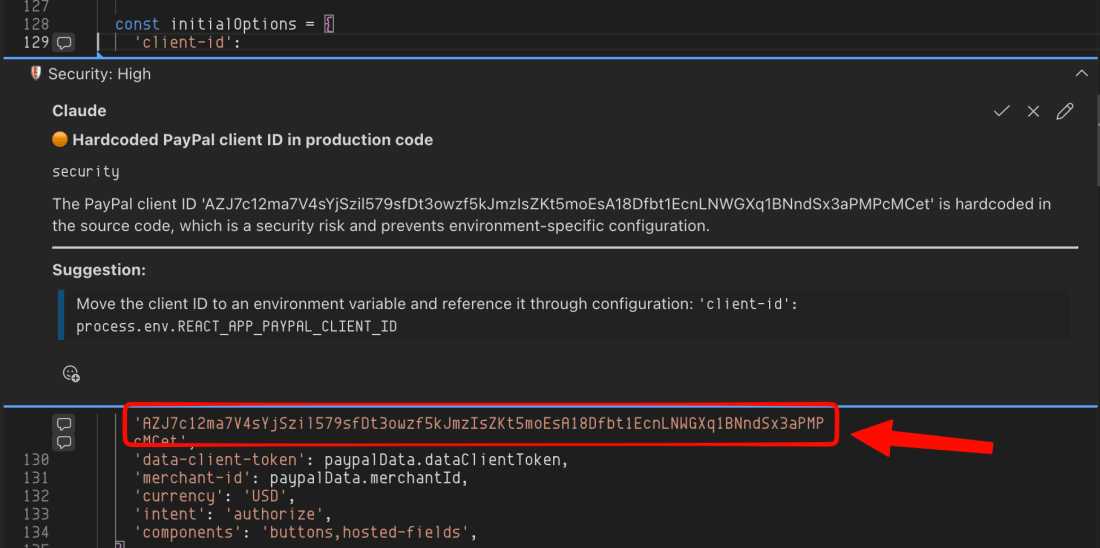
Inline Security Annotations
Security findings appear as comments pinned to the exact line — approve, reject, or navigate to the code in one click.
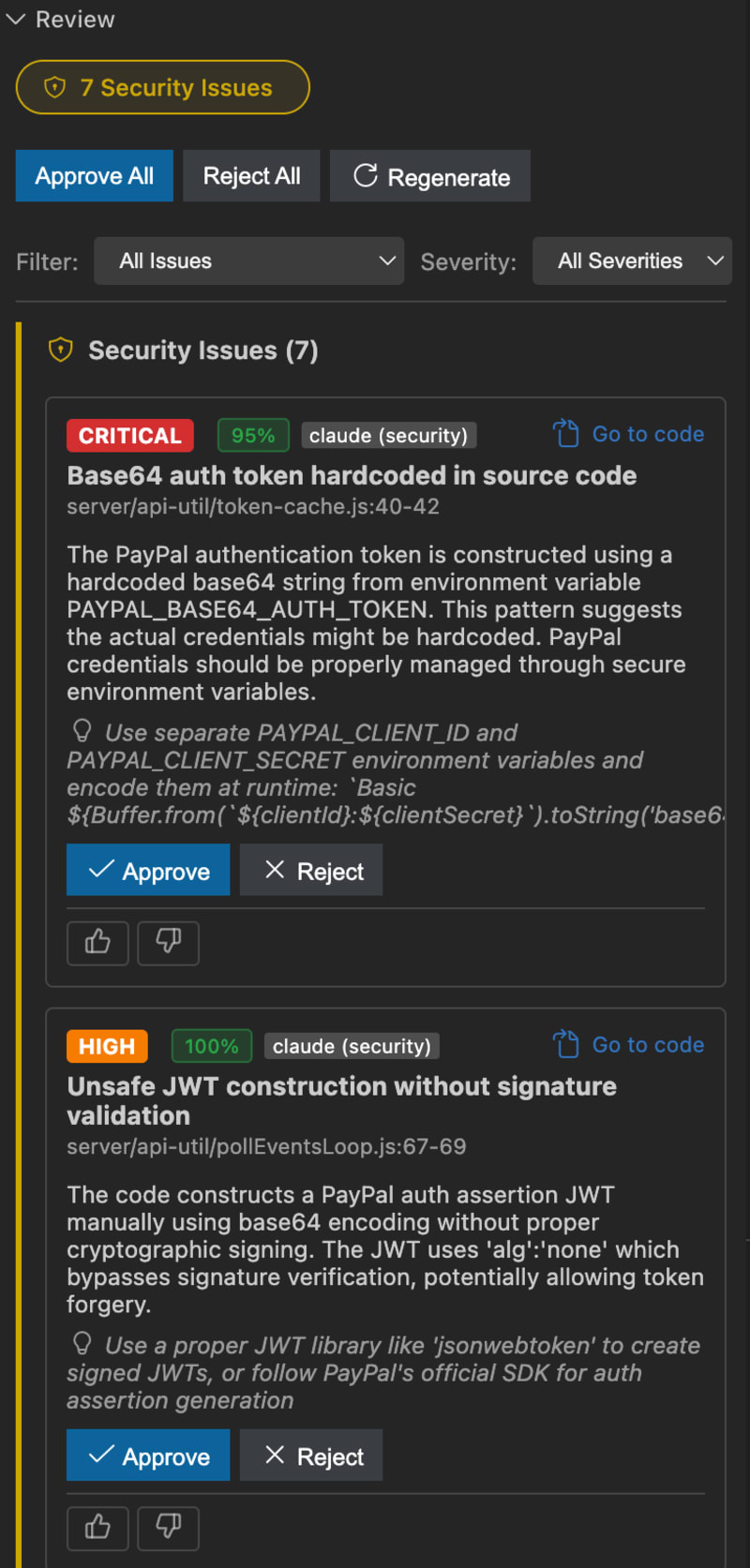
Security Scanning Results
Hardcoded secrets, SQL injection, XSS flagged with severity and confidence scores.
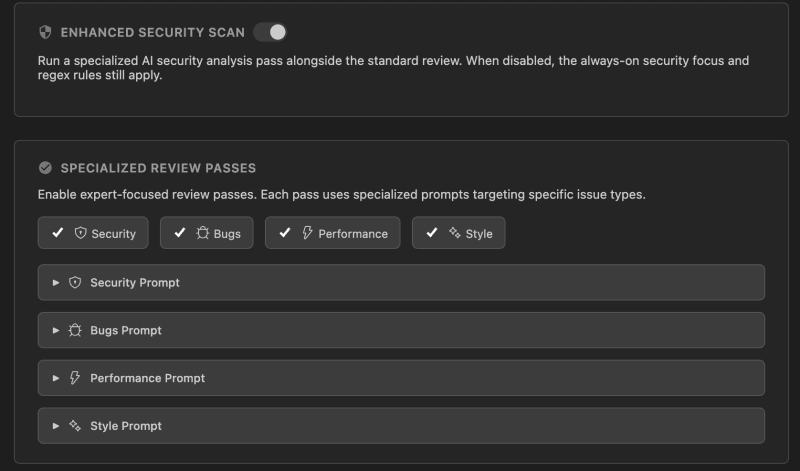
Specialized Review Passes
Four expert passes — Security, Bugs, Performance, Style — each with its own toggle.
Security Scanning: How We Compare
Git AutoReview combines AI code review with security scanning. Dedicated SAST tools have more rules; we have AI intelligence.
| Feature | Git AutoReview | CodeRabbit | Snyk | CodeQL |
|---|---|---|---|---|
| AI Code Review | 3 models (Claude, Gemini, GPT) | 1 model | No | No |
| Security Rules | 20+ regex + AI pass | Basic | 300+ rules | 2,000+ rules |
| IDE Integration | VS Code | GitHub only | VS Code, JetBrains | GitHub only |
| Human Approval | N/A | N/A | ||
| BYOK Privacy | Free (public repos) | |||
| Price | $9.99/mo | $24/user/mo | $98/mo | Free / Enterprise |
| Setup Time | 2 minutes | 10 minutes | 30 minutes | 1 hour |
| Bitbucket Support | Full (Cloud/Server/DC) | No | Limited | No |
The Cost of Inaction
Without Security Scanning
- $4.44M average breach cost
- 241 days average detection time
- Reputation damage, customer trust lost
- GDPR/regulatory fines
With Git AutoReview
- $9.99/mo Developer plan
- Instant detection during code review
- Zero code storage, BYOK privacy
- Human approval before publishing
What are vulnerability scanning tools?
Most teams discover their first serious vulnerability the hard way — a scanner fires after deployment, and suddenly a sprint gets hijacked by a triage meeting nobody planned. Tools like Nessus and QualysGuard catch network-level problems (open ports, outdated packages, misconfigurations), while Burp Suite and OWASP ZAP hammer web applications for injection flaws and broken authentication. Both categories do their job well, but they share a timing problem that frustrates developers: they find issues after code reaches a test environment, not while someone is still writing it.
Git AutoReview shifts vulnerability detection earlier. Instead of scanning a deployed application, it analyzes your pull request diff for SQL injection, XSS, hardcoded secrets, and OWASP Top 10 patterns while you review code in VS Code. This catches the same vulnerability classes that network scanners find — just weeks earlier in the development cycle, when fixes cost minutes instead of sprints.
What are SAST tools and how do they compare to AI code review?
The appeal of SAST is brute-force coverage — SonarQube ships over 6,500 rules across 30+ languages, and CodeQL traces data flow through your entire codebase with semantic queries. Snyk Code, Semgrep, Checkmarx, and Veracode each bring their own rule databases and CI/CD integrations. When a SAST scan runs, it checks everything against every rule it knows, which means zero false negatives on patterns the tool recognizes. That exhaustiveness is genuinely valuable for compliance audits and quarterly security reviews.
The trade-off is noise. Enterprise SAST deployments regularly generate hundreds of findings per scan, and teams struggle to triage them between sprint work. AI code review works differently — it reads the PR diff the way a senior engineer would, catching logic flaws, race conditions, and context-dependent bugs that no regex rule can express. The two approaches complement each other: SAST for exhaustive rule coverage, AI review for intelligent analysis of what changed.
Git AutoReview bridges the gap with 20+ built-in security rules (the SAST side) plus a specialized AI security pass that reasons about your code changes. Teams running SonarQube or Snyk for quarterly compliance audits add Git AutoReview for real-time, per-PR security feedback in VS Code — covering the gap between the last SAST scan and the next one.
What is static code analysis?
Every CI/CD pipeline already runs some form of static analysis — ESLint catches style issues, TypeScript catches type errors, and tools like Checkmarx catch security flaws. The difference between those layers matters: linters enforce conventions, type checkers prevent runtime crashes, and SAST scanners flag vulnerability patterns. Most teams stack all three without thinking about it, which is exactly the right approach because each one catches a different class of defect.
The challenge in 2026 is that AI coding assistants generate code faster than static analysis can keep up. Copilot and Cursor produce working code that passes linters and type checks while embedding subtle vulnerabilities — hardcoded tokens, missing input validation, insecure default configurations. Git AutoReview adds an AI layer on top of static analysis: it understands intent, not just syntax, and flags the security mistakes that rule-based tools miss because no one wrote a rule for that particular pattern yet.
Frequently Asked Questions
Does Git AutoReview replace Snyk or SonarQube?
Not entirely. Snyk and SonarQube are dedicated SAST/SCA tools with thousands of rules. Git AutoReview is an AI code review tool with 20+ built-in security rules plus an AI specialized security pass. It catches the most common and dangerous vulnerabilities during code review, before code merges. Many teams use Git AutoReview alongside dedicated security tools for defense in depth.
What security vulnerabilities does AI code review detect?
Git AutoReview detects SQL injection, XSS, CSRF, hardcoded secrets (API keys, passwords, tokens), eval() code injection, weak cryptography (MD5/SHA1), CORS misconfigurations, command injection, path traversal, prototype pollution, disabled SSL verification, empty catch blocks, and Math.random used for cryptographic purposes. The AI security pass also detects SSRF, authentication flaws, and authorization bypasses.
How is this different from SAST tools?
SAST tools like SonarQube scan your entire codebase and dump hundreds of alerts on you — great for a quarterly audit, exhausting for daily work. We focus on the PR diff only, which means you catch vulnerabilities at the exact moment they enter your codebase instead of discovering them three sprints later in a backlog of 200 SAST findings. Different tools for different moments in the workflow.
Does it work with AI-generated code from Copilot or Cursor?
Yes. Git AutoReview scans all code in a pull request regardless of how it was written. Since 40% of AI-generated code contains vulnerabilities (NYU, IEEE S&P 2022), this is especially important for teams using Copilot, Cursor, or other AI coding tools. The security scan catches what your AI assistant missed.
Can I customize security rules?
On the Developer plan ($9.99/mo) you get 15 custom review rules, and the Team plan ($14.99/mo) includes 20 custom rules. Custom rules let you enforce team-specific security patterns, naming conventions, or architectural constraints. The built-in security rules are available on all plans including Free.
How does the AI security pass work?
When security scanning is enabled, Git AutoReview runs a specialized AI prompt focused exclusively on security vulnerabilities. The AI analyzes your code changes looking for SQL injection, XSS, CSRF, SSRF, authentication flaws, authorization bypasses, hardcoded secrets, and insecure cryptography. This runs in addition to the 20+ regex-based rules for comprehensive coverage.
Is my code sent to your servers for security scanning?
No. Regex rules run locally in VS Code. The AI security pass sends your code diff directly to your chosen AI provider (Anthropic, Google, or OpenAI) via BYOK. We never store, cache, or process your code. Zero data retention.
What platforms support security scanning?
Security scanning works with all supported Git platforms: GitHub (Cloud & Enterprise), GitLab (Cloud & Self-Managed), and Bitbucket (Cloud, Server & Data Center). The security rules and AI pass work identically across all platforms.
How much does security scanning cost?
Security scanning is included on all plans, including the Free tier (10 reviews/day). The Developer plan at $9.99/mo gives you 100 reviews/day with 5 custom security rules. Compare this to dedicated security tools: Snyk starts at $98/mo, and enterprise SAST tools cost $10,000+/year.
Can I toggle security scanning on or off per repository?
Yes. Each of the 4 specialized review passes (Security, Bugs, Performance, Style) can be toggled independently per repository. This lets you enable security scanning for production repos while keeping it off for experimental projects.
What are SAST tools and which ones are most popular?
Here is the short version — SAST tools scan your code for known vulnerability patterns without running it, and the big names are SonarQube (6,500+ rules, free to $150+/dev/year), Snyk Code ($25/dev/month with AI-assisted fixes), Semgrep (open-source, custom pattern rules), Checkmarx ($10K-60K/year enterprise), and CodeQL (free on GitHub public repos). They excel at exhaustive rule coverage for compliance audits. Git AutoReview takes a different angle: 20+ security rules plus AI analysis at $9.99/mo, designed to complement your SAST tool by catching what rules miss in each PR.
What is static code analysis and when do you need it?
The simplest way to think about it — static analysis reads your code the way a spell checker reads text, flagging problems without running the program. You need it the moment your team pushes code to production, and doubly so if anyone uses Copilot or Cursor, because roughly 40% of AI-generated code ships with vulnerabilities (NYU, IEEE S&P 2022). For small teams, Git AutoReview's built-in scanning catches the critical stuff. Larger organizations stack a dedicated SAST tool like SonarQube or Checkmarx on top for compliance coverage.
How do vulnerability scanning tools fit into CI/CD pipelines?
The standard approach is a CLI plugin in your build stage — Snyk, SonarQube, and Checkmarx all have CI/CD integrations that scan after you push. The frustrating part is the timing: you discover a hardcoded secret or SQL injection twenty minutes after the commit, then context-switch back to fix it. Git AutoReview flips that order by scanning the PR diff in VS Code before you push, so the vulnerability never reaches the pipeline in the first place.
Don't Ship Vulnerable Code
Start scanning every PR for security vulnerabilities today. No credit card required. 10 free reviews per day. BYOK supported.