Loading...
Install + search PRs with AI
Install →Need help? Contact us at loading...
Back to Docs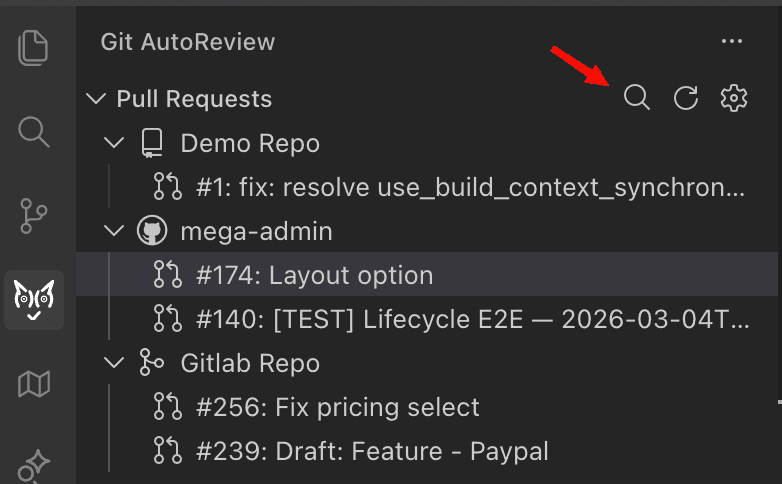

Search & Filter
PR Search & Filter
Find any pull request instantly by title, author, PR number, or branch name. Works across all your connected repositories.
When do you need PR search?
If your team has dozens of open PRs across multiple repos, scrolling through the list to find the one you need wastes time. The search filter narrows the list to exactly what you're looking for in one step.
How does PR search work?
1
Click the search icon
In the Pull Requests panel, click the magnifying glass icon in the top-right corner.
2
Type what you're looking for
A search box appears at the top of VS Code. Type any part of a PR title, author name, PR number, or branch name. Press Enter to apply the filter.
3
See filtered results
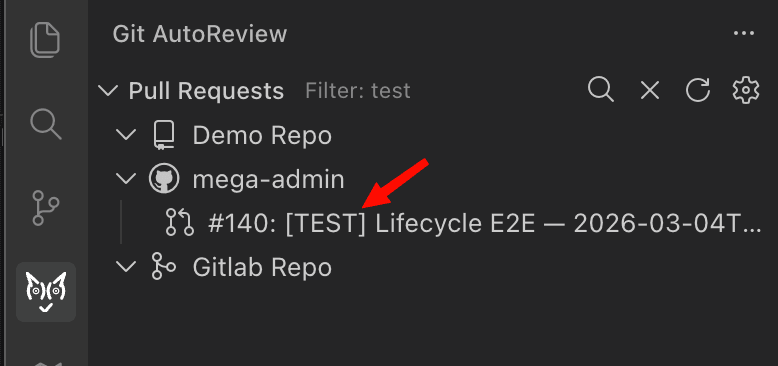
The PR list updates instantly to show only matching pull requests across all your connected repositories. The active filter is shown next to "Pull Requests" in the panel header.
4
Clear the filter
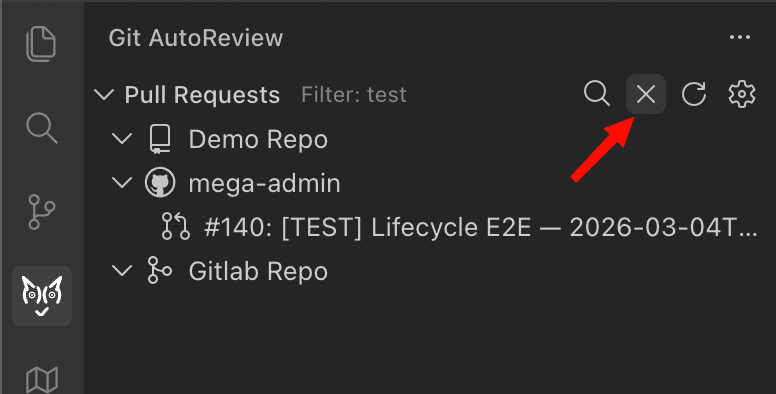
Click the X icon next to the search icon to remove the filter and see all PRs again.
What can you search for in PRs?
The filter matches against PR title, author name, PR number, and branch name all at once. One search box, multiple match types.
| You type | What it finds |
|---|---|
fix login | PR titles containing "fix login" |
Bobby | PRs authored by Bobby |
1445 | PR #1445 specifically |
feature/auth | PRs from the feature/auth branch |
test | Any PR with "test" in title, author, number, or branch |
Tips
- The filter persists until you clear it. Switch between repos and the filter stays active.
- Search is case-insensitive. Typing "fix" matches "Fix login", "HOTFIX", and "prefix-update".
- Press Escape in the search box to cancel without applying. Click the X icon to clear an active filter.
Try it now
PR search is available on all plans, including the free tier.
Need help? Contact us at loading...