GitHub Copilot Code Review 2026: 60M Reviews In — Is It Worth $10/Month?
GitHub Copilot hit 60 million code reviews. We break down how it works, what it catches, what it misses, real pricing math for teams, and when alternatives like Git AutoReview make more sense.
Reviewing GitHub PRs? Git AutoReview adds AI suggestions you approve before publishing.
GitHub Copilot Code Review 2026: 60M Reviews In — Is It Worth $10/Month?
GitHub's own blog put the number at 60 million code reviews and counting — one out of every five reviews on the platform now comes from Copilot rather than a human reviewer. That growth happened in under a year, from the April 2025 launch to early 2026, which tells you something about how desperate teams are to get PRs moving faster. The question worth asking at this point is not whether AI code review works, but whether Copilot's version of it is the right fit for your team — especially when the per-user pricing starts adding up and the GitHub-only lock-in rules out anyone on GitLab or Bitbucket.
This guide covers how Copilot code review actually works under the hood, what the real pricing math looks like for teams of different sizes, what it catches versus what it misses, and when a tool like Git AutoReview makes more financial and technical sense.
Git AutoReview supports GitHub, GitLab, and Bitbucket — with human approval before publishing. $14.99/month for your whole team.
Install Free Extension →
How does GitHub Copilot code review work?
Copilot code review runs as an agentic system inside GitHub's infrastructure, using ephemeral GitHub Actions environments to explore your code, run linters, and post inline comments on pull requests. You can trigger it two ways: manually by selecting Copilot from the Reviewers dropdown on any PR, or automatically through repository rulesets that assign Copilot to every PR when opened or updated.
When you request a review, the agent analyzes your diff in under 30 seconds and posts Comment-type reviews with inline suggestions. Each comment attaches to logical code ranges — not single lines — and the system deduplicates related findings so you don't get six separate comments about the same null check pattern across different files.
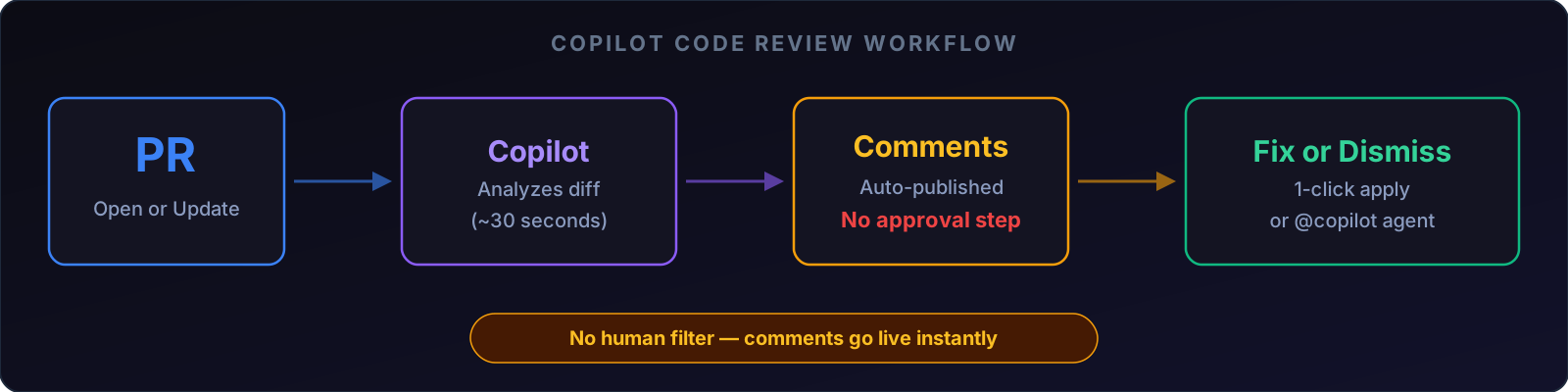
What the review process looks like
- Open a PR on github.com (or push an update to an existing one)
- Copilot gets assigned — either manually or via auto-review rulesets
- Analysis runs in an ephemeral environment (~30 seconds)
- Inline comments appear on the PR with explanations and suggested fixes
- You act on them — apply the fix with one click, dismiss, or tag @copilot to have the coding agent implement the change automatically
The @copilot mention is where it gets interesting. When you reply to a review comment with @copilot and ask it to fix the issue, the coding agent spins up a stacked PR with the implemented changes — but it never auto-merges. A human still has to approve.
In the IDE vs on github.com
Copilot also reviews code in VS Code, but with a different scope. In the IDE, you can review selected code snippets or uncommitted/staged changes before you even push — think of it as a pre-commit sanity check. On github.com, reviews cover the full PR diff and integrate with your team's workflow. The IDE version is useful for catching issues before they reach a PR; the web version is what your team actually sees.
How much does GitHub Copilot code review really cost?
The sticker price looks reasonable until you multiply by headcount. Every code review consumes one premium request, and each plan comes with a monthly cap.
| Plan | Price | Premium Requests | Code Review | Team of 5 | Team of 10 |
|---|---|---|---|---|---|
| Free | $0 | 50/mo | Selection only (VS Code) | — | — |
| Pro | $10/mo | 300/mo | Full PR review | $50/mo | $100/mo |
| Business | $19/user/mo | 300/user/mo | Full PR review | $95/mo | $190/mo |
| Enterprise | $39/user/mo | 1,000/user/mo | Full PR review | $195/mo | $390/mo |
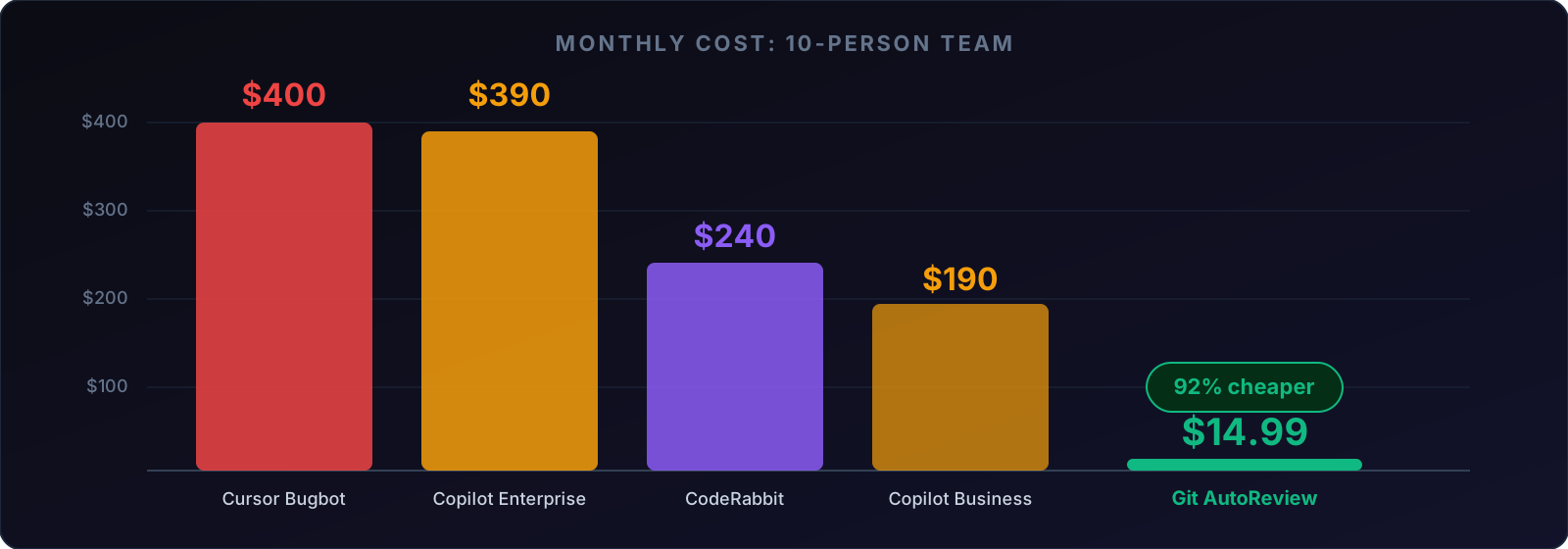
The Free plan is barely usable for code review — 50 premium requests per month covers about two reviews per working day, and you can only review code selections in VS Code, not full PRs on github.com. Most teams will land on Business at $19/user/month.
The premium request trap
Each review burns one premium request from your monthly allocation. A 10-person team on Business gets 3,000 requests total (300 per user). If your team averages 15 PRs per day, that is 300 reviews per month — right at the limit for the entire team. Go over, and GitHub charges $0.04 per extra request. Those overages add up fast on active repositories.
For comparison, Git AutoReview charges $14.99/month flat for the Team plan — not per user. The same 10-person team pays $14.99 total instead of $190, and reviews are unlimited within the plan. That is a 92% cost reduction with no premium request caps to worry about.
June 2026 update: GitHub is also changing how Copilot Code Review is billed starting June 1, 2026 — code reviews on private repos will start consuming GitHub Actions minutes on top of AI Credits. The full cost breakdown and team-size calculations are in the linked article.
Git AutoReview Team plan. Unlimited reviews. GitHub + GitLab + Bitbucket. Human approval before publishing.
Compare Plans →
What does Copilot code review actually catch?
GitHub's 60 million reviews blog post reported that 71% of reviews produce actionable feedback, averaging 5.1 comments per review. The remaining 29% come back clean — Copilot found nothing worth flagging and stays silent rather than generating noise.
Issue types Copilot handles well
- Logic bugs — operator confusion, off-by-one errors, missed edge cases
- Maintainability — suggestions for more readable code, common style patterns
- Static analysis — CodeQL, ESLint, and PMD findings surfaced through Copilot's comments
- Simple security patterns — via CodeQL integration (SQL injection, XSS in supported languages)
Where Copilot falls short
The honest gaps matter more than the feature list, and GitHub's own documentation acknowledges several of them.
Security scanning is shallow. In one academic test of 117 reviewed files, Copilot found zero security vulnerabilities despite the codebase containing them. The CodeQL integration helps, but it runs separately from the AI review — Copilot does not independently reason about security the way a dedicated SAST tool does.
Cross-file awareness is limited. Copilot reviews diffs, not your full codebase. It cannot trace a function call across three files to determine whether your refactor broke a downstream consumer. Enterprise teams managing monorepos or multi-service architectures hit this wall regularly — context limits of 128K-272K tokens mean large PRs can exceed what the AI can hold in working memory.
No human approval before publishing. Every comment goes live on the PR immediately. If 29-45% of AI code review suggestions contain issues (per DiffRay AI's blog), your team will see a mix of good and bad feedback without any filter. Over time, this trains developers to ignore AI comments — the opposite of what you want.
How did Copilot code review perform on Microsoft's .NET runtime?
Microsoft's .NET team published a detailed account of running the Copilot coding agent on the dotnet/runtime repository for ten months (May 2025 to March 2026). The numbers tell a nuanced story.
The agent created 878 pull requests across the period, merging 535 of them for a 67.9% success rate. Only 3 of those 535 merged PRs got reverted — a 0.6% revert rate that actually beats the human baseline of 0.8% on the same repository. The agent contributed 95,000+ lines added and 31,000+ deleted, with 65.7% of added code being tests and 29.6% production code.
What stood out was the trajectory: success rate climbed from 41.7% in May 2025 to 72.4% by December, then stabilized around 71%. The agent got better as it learned the codebase patterns, and the team got better at writing instructions for it.
The backlog impact was equally telling. Of 464 PRs linked to GitHub issues, the average issue age was 382 days — over a year. Twenty percent of the issues were more than two years old, some dating back nine years to the legacy coreclr repositories. The .NET team used the agent to chip away at technical debt that humans kept deprioritizing.
One quote from the blog post stuck with us: "One person with good judgment and a phone can generate PRs faster than a team can review them." That is the bottleneck shift in one sentence — AI can produce code faster than humans can verify it, which makes the review workflow more important, not less.
How do you set up custom review instructions?
Copilot code review supports custom instructions through Markdown files in your repository. This is the single most impactful configuration step — without instructions, reviews are generic and prone to flagging things your team does not care about.
Repository-wide instructions
Create a .github/copilot-instructions.md file:
# Code Review Standards

## Security
- Flag any hardcoded API keys or secrets
- Check for SQL parameterization in all database queries
- Verify authentication middleware on all route handlers

## Style
- Use async/await, never callbacks
- Prefer const over let where possible
- Maximum function length: 50 lines

## Ignore
- Do not comment on formatting (prettier handles it)
- Do not flag console.log in development files
Path-specific instructions
For different rules per directory, use .github/instructions/ files with applyTo frontmatter:
---
applyTo: "src/api/**"
---
Focus on input validation, authentication, and rate limiting.
Never suggest removing error handling blocks.
Keep instructions under 4,000 characters, use concrete examples, and iterate based on what Copilot actually flags. Vague rules like "be more accurate" do nothing — specific rules like "flag any function over 50 lines" produce consistent results.
GitHub Copilot code review vs alternatives
| Feature | Copilot | Git AutoReview | CodeRabbit | Cursor Bugbot |
|---|---|---|---|---|
| Monthly (solo) | $10 (Pro) | $9.99 (Developer) | $24/user | Cursor seat + usage |
| Monthly (10 devs) | $190 (Business) | $14.99 (Team) | $240 | $400+ |
| GitHub | Full | Full | Full | Full |
| GitLab | No | Full | Full | No |
| Bitbucket | No | Full | No (Cloud only) | No |
| Human approval | No | Yes | No | No |
| BYOK | Enterprise only | All plans | No | No |
| Review model | GitHub picks | You pick | CodeRabbit picks | Proprietary |
| Usage limits | Premium requests | Plan-based | Per-seat | Credit-based |
| Auto-review PRs | Yes (rulesets) | In VS Code | Yes | Yes |
| Security scanning | CodeQL (separate) | 20+ built-in | 40+ SAST tools | Custom rules |
| PR summaries | No | No | Yes (with diagrams) | No |
When Copilot is the right choice
Copilot makes sense for teams that are already all-in on GitHub, have a single repository, care mostly about code quality rather than security, and want the simplest possible setup. The frictionless integration — it just works if you already pay for Copilot — is a real advantage over tools that require separate accounts and configuration.
When alternatives make more sense
The math tilts away from Copilot the moment you add one of these variables:
- Multi-platform teams: GitLab or Bitbucket anywhere in your stack → Copilot is off the table
- Budget-conscious teams: $14.99/team vs $190/month for 10 developers is a 92% savings
- Human approval needs: Regulated industries, security-sensitive code, or teams that learned the hard way that auto-published AI comments erode trust
- BYOK requirements: Your code goes to GitHub's AI infrastructure with Copilot. With BYOK tools, it goes directly to the AI provider you choose
Git AutoReview shows AI suggestions in VS Code. You approve what makes sense, reject the rest. Nothing touches your PR without your sign-off.
Try Git AutoReview Free → Compare with CodeRabbit
Privacy and data handling
Starting April 24, 2026, GitHub changed its privacy terms. If you are on the Free, Pro, or Pro+ plans, your interaction data — inputs, outputs, code snippets from Copilot sessions — may be used to train AI models unless you opt out. Enterprise and Business plans are excluded from this change, and previous opt-out preferences carry over.
For teams handling proprietary or regulated code, this is a material consideration. Copilot processes your code through GitHub's infrastructure. With BYOK alternatives, your code goes directly to the AI provider (Anthropic, Google, or OpenAI) and is never stored by the review tool.
Should you use GitHub Copilot code review?
Sixty million reviews and one-in-five market share do not automatically make it the right choice for every team. The 71% actionable feedback rate is solid, the .NET runtime case study shows it can handle real-world complexity, and the zero-friction GitHub integration is hard to beat if you are already in the ecosystem.
But the per-user pricing stacks up fast, the GitHub-only lock-in excludes GitLab and Bitbucket teams entirely, the auto-publish behavior removes the human filter that catches AI hallucinations, and the April 2026 privacy change adds a data handling question that enterprises need to answer.
If your team is GitHub-only and values convenience over control, Copilot code review is a reasonable default. If you need multi-platform support, human approval, BYOK privacy, or team pricing that does not scale linearly with headcount — Git AutoReview was built for exactly those gaps.
Related Resources
Model Deep Dives:
- Claude Opus 4.6 for Code Review — deep reasoning, security audits
- Gemini 3.1 Pro Coding Performance — 2M context, budget-friendly
- GPT-5.3-Codex for Code Review — Terminal-Bench leader, speed
Tool Comparisons:
- Best AI Code Review Tools 2026 — 12 tools compared with pricing
- CodeRabbit Alternative — $24/user vs $14.99/team
- Cursor Bugbot Pricing — inside a Cursor Teams seat plus usage, GitHub only
- AI Code Review Pricing Comparison — Full cost math
Guides:
- AI Code Review: Complete Guide — Everything about AI-powered code review for GitHub & GitLab
- GitHub Code Review Best Practices — PR size, checklists, automation
- How to Reduce Code Review Time — From days to same-day
- Human-in-the-Loop Code Review — Why approval matters
- GitHub AI Code Review Without Auto-Posting: The Human-First Guide — Why Copilot's auto-publish model creates alert fatigue and how draft-then-publish review fixes it
Reviewing GitHub PRs? Git AutoReview adds AI suggestions you approve before publishing.
Frequently Asked Questions
Does GitHub Copilot code review work with GitLab or Bitbucket?
How much does GitHub Copilot code review cost per month?
Can GitHub Copilot approve or block a pull request merge?
Is GitHub Copilot code review accurate?
Does Copilot code review auto-publish comments on my PR?
What is the cheapest alternative to GitHub Copilot for AI code review?
Can I use my own AI API keys with GitHub Copilot code review?
How does Copilot code review handle large pull requests?
Try it on your next GitHub PR
AI reviews your pull request. You approve what gets published. Nothing goes live without your OK.
Free: 10 AI reviews/day, 1 repo. No credit card.
Related Articles
Bitbucket Pull Request Automation: Complete Guide 2026
Bitbucket PR automation in 2026: Pipelines triggers, AI code review, merge checks, and how to cut review time by 60% without leaving VS Code. Works on Cloud and Data Center.
Code Review Checklist for AI-Generated Code: 12 Things to Verify
96% of developers don't fully trust AI-generated code, yet only 48% always check it before committing. Here are the 12 things to verify in every AI-written PR, and which ones a tool can take off your plate.
GitHub Copilot Code Review Cost 2026: Actions Minutes Live June 1
June 1 happened: Copilot Code Review now burns GitHub Actions minutes plus AI Credits on private repos. We re-ran the cost math for teams of 5, 10, and 20 — one barely notices, one gets stung.
Get the AI Code Review Checklist
25 PR bugs AI catches that humans miss — with real code examples. Free PDF, sent instantly.
One-click unsubscribe. We never share your email.