AI PR Review in 2026: What Actually Works (And What Wastes Your Team's Time)
AI PR review tools compared: CodeRabbit, Copilot, Bugbot, Git AutoReview. Real stats from Microsoft (5,000 repos), Qodo (609 devs), and setup guides for GitHub, GitLab, Bitbucket.
Reviewing GitHub PRs? Git AutoReview adds AI suggestions you approve before publishing.
AI PR Review in 2026: What Actually Works and What Wastes Your Team's Time
TL;DR: AI coding tools pushed GitHub's merged PRs to 518.7 million last year — up 29% — but more PRs means more review work. Microsoft found a 10-20% drop in PR completion time after deploying AI review across 5,000 repos. The catch: CodeRabbit's analysis of 470 real PRs shows AI-authored code carries 1.7x more issues than human-written code. The right AI PR review tool catches those problems early. The wrong one buries your team in noise. Here is what we found after testing the major options.
What is AI PR review and why does it matter now?
AI PR review is the practice of using a large language model — Claude, GPT, Gemini, or similar — to automatically analyze pull request diffs and flag bugs, security gaps, and code quality issues before a human reviewer sees them. The tool reads the changed lines, builds context from surrounding code, and posts its findings as PR comments or IDE suggestions.
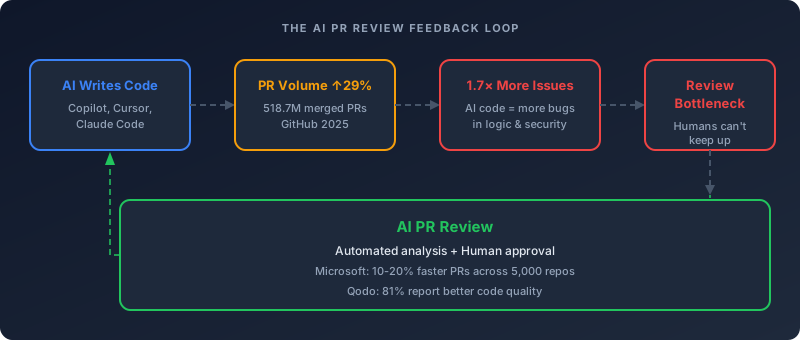
The timing matters because of a feedback loop most teams walked right into. AI coding assistants made developers faster at writing code, so PR volume jumped. GitHub's 2025 Octoverse report measured 518.7 million merged pull requests, a 29% year-over-year increase. Between May and September 2025 alone, coding agents created over one million pull requests on GitHub. All of that code needs review — and human reviewers did not scale at the same pace.
Microsoft published their internal numbers in July 2025: their AI code reviewer now processes over 600,000 pull requests per month, covering roughly 90% of the company's total PR volume. Across 5,000 onboarded repositories, they measured a 10-20% median improvement in PR completion time.
But here is the part that rarely makes it into the marketing copy. CodeRabbit analyzed 470 open-source GitHub pull requests and found that AI co-authored PRs produced approximately 1.7x more issues overall, concentrated in logic errors, error handling gaps, and security findings. Addy Osmani, an engineering leader at Google, put the number even higher: 75% higher error rates in logic for AI-generated code compared to human work.
More code ships faster. That code has more problems. AI PR review is not a nice-to-have — it is damage control for the speed AI already gave your team.
How automated PR review works under the hood
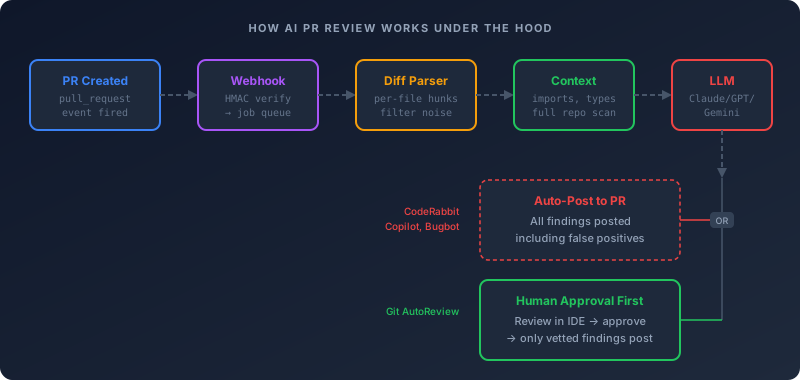
The mechanics are simpler than most teams expect. Every AI PR review tool follows the same basic pipeline, whether it runs as a GitHub App, a CI job, or a VS Code extension.
The trigger
When a developer opens or updates a pull request, the hosting platform — GitHub, GitLab, or Bitbucket — fires a webhook event. GitHub sends a pull_request event with the action set to opened or synchronize. GitLab sends a merge request webhook. Bitbucket sends a pullrequest:created or pullrequest:updated event. The review tool listens for these events and kicks off analysis.
Diff extraction and parsing
The tool fetches the unified diff through the platform's API. GitHub's REST API returns the diff as a patch, or the tool can use the GraphQL API for more structured data. The diff gets split into per-file hunks, and the tool filters out files that do not need review — generated files, lock files, assets, vendored dependencies.
Context building
The better tools do not just read the diff. They fetch surrounding code from unchanged files, pull in type definitions, check import chains, and sometimes scan the full repository for related patterns. This is where tool quality diverges most — a diff-only review misses that the function you changed is called from three other modules with different assumptions.
LLM analysis
The parsed diff and context get assembled into a prompt that instructs the model to look for specific categories: bugs, security vulnerabilities, performance issues, and style violations. Most tools use structured output (JSON) so they can map findings back to specific lines. The response typically takes 10-30 seconds for a medium-sized PR.
Comment posting
The tool maps each finding to a file and line number, then posts review comments through the platform's API. GitHub supports inline review comments attached to specific diff lines. Some tools batch everything into a single review submission to reduce notification noise.
The timeout problem
One implementation detail trips up most custom setups: GitHub's webhook delivery timeout is 10 seconds, and LLM inference routinely exceeds that. Production systems offload the actual analysis to a background queue and acknowledge the webhook immediately. Tools that skip this step get flagged for failed deliveries.
Git AutoReview runs as a VS Code extension — review happens in your IDE, not through a bot posting to your PR. You control what gets published.
Install Free Extension →
The noise problem: why most teams abandon AI review within 3 months
The Qodo 2025 State of AI Code Quality report surveyed 609 developers and found a sobering pattern: 65% say AI misses relevant context during critical tasks like refactoring, writing tests, or reviewing code. That 65% is not a minority opinion — it is a supermajority of working developers telling you the tools do not fully understand what they are reviewing.
The false positive problem compounds from there. Nobody publishes an audited false-positive rate for these tools, so treat any figure you see — including ours — as an estimate: from what we observe across the tools we test, the good ones sit somewhere around 5-15%. That sounds manageable until you do the math: a moderately active repository with 20 PRs per week, each generating 10-15 AI comments, produces 200-300 comments weekly. At a 10% false positive rate, that is 20-30 irrelevant comments your team has to read and dismiss every week.
The Qodo survey quantified the trust gap directly: 25% of developers estimate that one in five AI-generated suggestions contain factual errors or misleading code. When developers learn that roughly every fifth suggestion is wrong, they start skimming all of them — including the ones that caught a real bug.
CodeAnt AI's research measured the downstream effect: median PR merge time can increase from 6 hours to 2-3 days when AI review creates unnecessary back-and-forth. For a 10-person team at $100/hour loaded cost, that wasted time adds up to six figures annually.
The METR randomized controlled trial added another data point that surprised the industry: experienced developers using frontier AI tools actually took 19% longer to complete tasks, despite expecting to be faster. The extra time went to checking, debugging, and fixing the AI's output.
Why approval-based review solves the noise problem
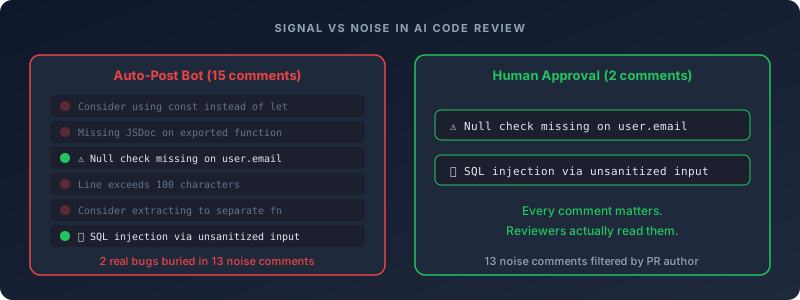
Auto-posting tools treat every AI finding as worth publishing to your PR thread. Your teammates see 15 comments, of which 2 matter. By the third PR, they stop reading any of them.
Approval-based tools show findings to the PR author first, in their editor. The author marks which suggestions are useful and publishes only those. The PR thread stays clean. Reviewers see 2 comments, both of which matter.
The difference is not just cosmetic. When every comment in a PR thread is a real finding, human reviewers actually read them. That is the whole point.
AI PR review tools compared: what you actually get for the money
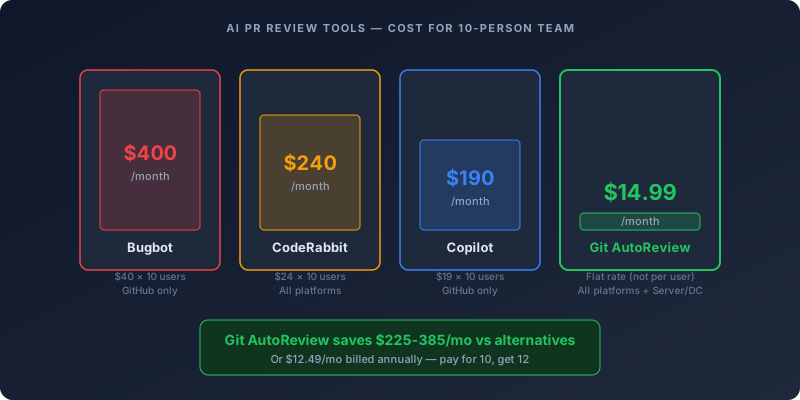
The market split into three tiers by early 2026. Here is what each tier looks like, with pricing and platform support verified as of April 2026.
Tier 1: Platform-native (cheapest, least flexible)
GitHub Copilot Code Review — $19/user/month (bundled with Copilot Business)
Copilot's code review reached general availability in April 2025. You assign copilot as a reviewer on any PR, and it posts inline suggestions. The integration is seamless if you already pay for Copilot Business. The limitations: GitHub-only, diff-based analysis with limited cross-file context, and suggestions lean more toward style than substance. For teams already on Copilot, it is a free add-on. For teams that need GitLab or Bitbucket support, it is not an option.
Tier 2: Dedicated review bots (most features, highest cost)
CodeRabbit — $24/dev/month
CodeRabbit covers all four major platforms: GitHub, GitLab, Azure DevOps, and Bitbucket (Cloud and Data Center, though not Bitbucket Server). It includes 40+ built-in linters and learns your team's preferences over time. CodeRabbit scored 51.5% F1 on code review benchmarks, with 52.5% recall — catching more issues than Copilot's 36.7% recall. The trade-off is noise: independent benchmarks consistently rank CodeRabbit as the noisiest tool, and several users report that the volume of comments becomes a cost in itself. Open-source projects get Essentials features free.
Cursor Bugbot — usage-based (~$1.00-1.50/run)
Bugbot focuses on high-confidence defect detection. Community sentiment describes reviews as "clean and focused," and it skips formatting and style nitpicks. The Autofix feature, launched February 2026, spawns cloud agents in virtual machines that fix the problems Bugbot identifies — over 35% of Autofix changes get merged into the base PR. The cost model changed in June 2026: Bugbot is now usage-based, charging per review run from on-demand spend. A Cursor Teams subscription ($40/user) or Individual plan ($20) is required for seat access; Bugbot runs add ~$1.00-1.50 each. It remains GitHub-only. Multiple users report a frustrating review loop where Bugbot surfaces new issues after each fix, requiring 3-4 rounds before a PR clears.
Qodo PR-Agent — open source (self-hosted)
Qodo's PR-Agent is open source and supports GitHub, GitLab, and Bitbucket. You bring your own API key and run it in your CI pipeline. This gives you full control over which model to use and where your code goes. The commercial version (Qodo Merge) adds more features at a $30/month base plus metered credits. Good choice for teams that want flexibility and already manage their own infrastructure.
Tier 3: IDE-native with human approval
Git AutoReview — from $9.99/month (flat, not per user)
Git AutoReview takes a different approach. Instead of a bot posting to your PR, it runs as a VS Code extension. AI suggestions appear in your editor first. You read each one, approve or discard it, and only approved findings get published as PR comments. This eliminates the noise problem at the source — your PR thread only contains suggestions that a human already vetted. It works across GitHub, GitLab (Cloud and Self-Managed), and Bitbucket (Cloud, Server, and Data Center). Pricing is flat per account, not per seat: $9.99/month for developers, $14.99/month for teams — or $8.33/$12.49 per month billed annually (pay for 10 months, get 12). BYOK support lets you use your own Claude, GPT, or Gemini API key.
$14.99/mo for unlimited team reviews — or $12.49/mo billed annually. Not per user. CodeRabbit charges $240/mo for 10 devs. Bugbot runs add ~$1.00-1.50 each on top of Cursor seats.
Start Free — 10 Reviews/Day →
Quick comparison table
| Feature | Copilot | CodeRabbit | Bugbot | PR-Agent | Git AutoReview |
|---|---|---|---|---|---|
| Price | $19/user/mo | $24/dev/mo | usage-based | Free (OSS) | $9.99/mo flat |
| GitHub | ✅ | ✅ | ✅ | ✅ | ✅ |
| GitLab | ❌ | ✅ | ❌ | ✅ | ✅ (+ Self-Managed) |
| Bitbucket | ❌ | ✅ Cloud | ❌ | ✅ | ✅ (+ Server/DC) |
| Human approval | ❌ | ❌ | ❌ | ❌ | ✅ |
| BYOK | ❌ | ❌ | ❌ | ✅ | ✅ |
| Auto-fix | ❌ | ❌ | ✅ | ❌ | ❌ |
| 10-person team cost | $190/mo | $240/mo | seats + usage | $0 | $14.99/mo |
How to set up AI PR review on each platform
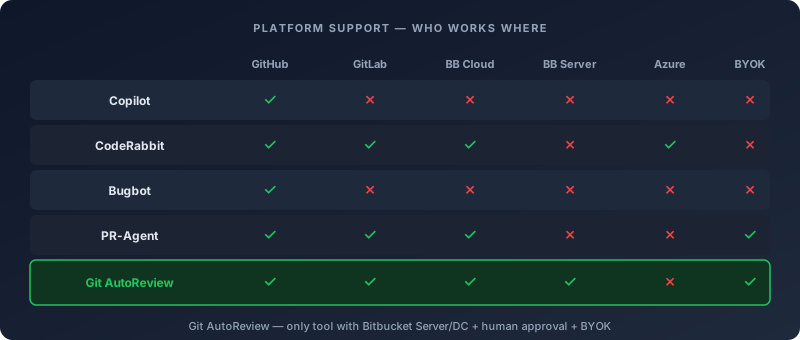
Setup is straightforward on every platform. The differences are mainly about where the review runs — as a bot, a CI step, or an IDE extension.
GitHub
Option A: Copilot (if you already have Copilot Business)
No additional setup needed. On any pull request, click "Reviewers" in the sidebar and select copilot. It posts inline comments within minutes.
Option B: CodeRabbit
Install the CodeRabbit GitHub App from the GitHub Marketplace. Grant it repository access. It starts reviewing PRs immediately. You can add a .coderabbit.yaml to your repo root to customize behavior — which files to skip, what severity threshold to enforce, and which linters to enable.
Option C: Git AutoReview
Install the VS Code extension. Follow the GitHub integration guide to connect your account — token creation, scope selection, and repo setup in one walkthrough. Open a PR in VS Code, click "Review with AI," and approve individual suggestions before they post to the PR thread.
GitLab
GitLab has fewer options. Copilot and Bugbot do not support GitLab at all.
CodeRabbit supports GitLab through a webhook integration. You add the webhook URL to your project settings under Settings → Webhooks, selecting the merge request events trigger.
Git AutoReview connects to GitLab Cloud and Self-Managed instances. You add your GitLab personal access token in the extension settings. Merge requests work the same as GitHub PRs — review in VS Code, approve findings, post to the merge request thread. For on-prem teams that cannot expose the instance to the internet, see our GitLab Self-Managed + VS Code 2026 walkthrough for the full outbound-only setup.
Qodo PR-Agent can run as a GitLab CI job. You add it to your .gitlab-ci.yml and it triggers on merge request pipelines.
Bitbucket
Bitbucket has the fewest options of any platform, and teams on Bitbucket Server or Data Center have even fewer.
CodeRabbit supports Bitbucket Cloud and Data Center, but not Server. Its reviews arrive as bot comments on the PR — there is no approval step before they post.
Git AutoReview supports Bitbucket Cloud, Server, and Data Center — one of the only AI review tools with full Bitbucket coverage. Connect your Bitbucket account in the extension settings. The workflow is the same: review in VS Code, approve, post.
Qodo PR-Agent can integrate with Bitbucket through a webhook setup.
For Bitbucket Server and Data Center specifically, Git AutoReview is currently the only commercial AI review tool that works. Most alternatives require Cloud APIs that Server/DC installations do not expose.
What the data actually says about AI PR review results
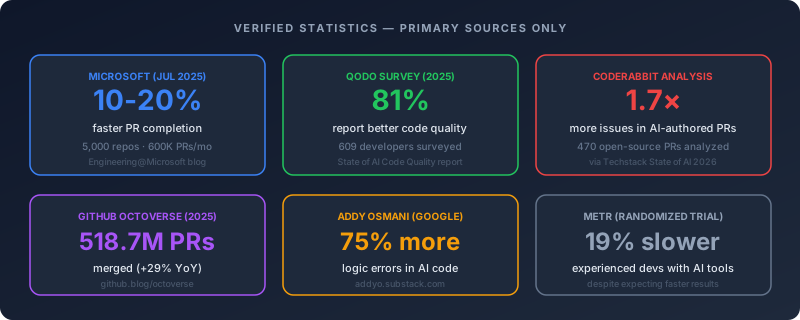
Marketing pages for AI review tools quote impressive numbers. Here is what holds up to scrutiny when you check the primary sources.
Microsoft's internal deployment (verified)
Microsoft's Engineering@Microsoft blog, published July 2025, reported that 5,000 repositories onboarded to their AI code reviewer saw a 10-20% median improvement in PR completion time. The system processes over 600,000 pull requests per month and covers roughly 90% of the company's total PR volume. The blog specifically mentions catching missing null-checks and incorrectly ordered API calls.
Two things to note: Microsoft built a custom internal tool, not a commercial product. And "PR completion time" includes more than just the review step — it measures time from PR creation to merge. So the review improvement is one factor in a broader metric.
Qodo's developer survey (verified)
Qodo surveyed 609 developers across company sizes and industries in early 2025. The headline finding: 81% of developers who use AI for code review reported improved code quality, compared to 55% among equally fast teams without AI review. But the same survey found that 65% say AI misses relevant context — and the number climbs to 52% among senior developers with 10+ years of experience.
There is also a confidence gap that should worry engineering leads. Senior developers reported the highest quality benefits (60%) but the lowest confidence in shipping AI code without review — only 22% would do it. Junior developers reported the lowest quality improvements (52%) but 60% said they would ship AI code without reviewing it. The people who benefit most from AI review are the most cautious about it. The people who benefit least are the most willing to skip review entirely.
The AI code quality paradox
CodeRabbit's analysis of 470 open-source PRs found AI co-authored code produces approximately 1.7x more issues. At the 90th percentile, AI PRs had 26 issues versus 12.3 for human-written code. Issues concentrated in logic errors, error handling gaps, and security findings.
Addy Osmani summarized the situation in his Substack: AI-generated code now shows 75% higher error rates in logic and 45% contain security flaws. Pull requests are 18% larger on average with AI adoption. Incidents per PR increased 24%.
The paradox: AI makes you write code faster, that code has more bugs, and the only reliable way to catch those bugs is — more code review. AI review tools exist because AI coding tools created the problem they solve. For the specific things to verify in every AI-generated PR — hallucinated packages, cross-file side effects, logic correctness, OWASP-class security gaps — our Code Review Checklist for AI-Generated Code gives reviewers a 12-item structured pass with code examples per item.
Git AutoReview catches issues in your editor — before they reach the PR thread, before your teammates review. You decide what gets published.
Try It Free →
Common objections and what actually addresses them
Teams considering AI PR review hit the same five objections. Some are valid. Some are not.
"AI reviews are too noisy — my team will just ignore them"
This is valid, and it is the most common reason teams abandon AI review tools. The fix is not a better model — it is a different workflow. Auto-posting tools will always generate noise because they treat every finding as worth publishing. Approval-based tools let the PR author filter first. The team only sees vetted suggestions.
"Our code is proprietary — I cannot send it to an external API"
Every commercial tool sends diffs to cloud LLM providers. The question is which provider and under what agreement. BYOK tools let you route through your enterprise API contract with Anthropic, OpenAI, or Google. Qodo PR-Agent can run with self-hosted models for fully air-gapped environments.
"We already have SonarQube / linters"
Static analysis and AI review solve different problems. SonarQube finds pattern-based issues — null pointer risks, resource leaks, complexity violations. AI review finds semantic issues — logic errors, wrong assumptions about API behavior, missing edge cases. Teams that layer AI review on top of static analysis report the best results.
"It is too expensive for our team size"
Per-user pricing punishes growing teams. At $24/user/month for CodeRabbit, a 10-person team pays $240/month. Qodo Merge went the other way in 2026 — $30/month covers up to 30 users, then credits meter what you actually review. Flat-rate pricing (Git AutoReview at $14.99/month for the whole team) or open-source options (Qodo PR-Agent) eliminate the scaling cost.
"Senior devs do not need AI telling them what to do"
Qodo's data actually supports this objection — in a different direction. Senior developers with 10+ years of experience reported the highest quality benefits from AI review (60%). They are not insulted by AI suggestions. They are the ones who benefit most, because they catch the issues the AI flags and add architectural context the AI misses. AI handles the mechanical checks. Seniors focus on design decisions.
Best practices for rolling out AI PR review
Teams that succeed with AI review follow a consistent pattern. Teams that abandon it skip one of these steps.
Start in advisory mode
Deploy the tool in non-blocking mode first. Let it post comments or surface suggestions without preventing merges. This gives the team time to calibrate expectations and configure filters before the tool becomes a gate.
Filter aggressively
Exclude generated files, lock files, migrations, vendored dependencies, and test fixtures from review scope. These files generate the most noise and the least value. Every tool supports file exclusion patterns — use them from day one.
Set severity thresholds
Not every finding deserves attention. Configure the tool to surface only high and critical issues initially. Expand to medium severity after the team trusts the signal quality. Never start with all severity levels enabled — that is how you get 200 comments per PR.
Measure what matters
Track three metrics: time to first review (does AI shorten the wait?), false positive rate (is the team dismissing too many comments?), and post-merge defect rate (are fewer bugs reaching production?). If any metric moves in the wrong direction after 30 days, reconfigure before concluding the tool does not work.
Maintain human accountability
Someone has to own every merged change. AI review does not transfer accountability — it transfers mechanical checking. The person who merges is still responsible for understanding what shipped.
Frequently asked questions
What is an AI PR review tool?
An AI PR review tool automatically analyzes pull request diffs using large language models and flags bugs, security issues, and code quality problems. Some tools auto-post comments to your PR (CodeRabbit, Copilot), while others let you approve each suggestion before publishing (Git AutoReview). The approval step matters because AI hallucination rates hit 20-25% in code review contexts.
Which AI PR review tools work with GitLab and Bitbucket?
Most AI PR review tools only work with GitHub. CodeRabbit supports GitHub, GitLab, Azure DevOps, and Bitbucket (Cloud and Data Center, not Server). Git AutoReview supports GitHub, GitLab (Cloud and Self-Managed), and Bitbucket (Cloud, Server, and Data Center). Copilot and Bugbot are GitHub-only.
How much do AI PR review tools cost in 2026?
Prices range from free to $24/user/month, plus usage-metered options. Git AutoReview offers 10 free reviews/day, with paid plans from $9.99/mo flat (not per user). Copilot Business bundles code review at $19/user/mo. CodeRabbit Essentials costs $24/dev/mo. Qodo Merge charges a $30/mo base for up to 30 users plus metered credits. For a 10-person team, that is $14.99 vs $190 vs $240 vs $30-plus-usage per month.
Do AI PR review tools actually catch real bugs?
Microsoft deployed AI review across 5,000 internal repositories and measured a 10-20% reduction in PR completion time. The Qodo 2025 survey of 609 developers found that 81% reported improved code quality when using AI review. But CodeRabbit's own analysis of 470 PRs showed AI-authored code produces 1.7x more issues, which means review tooling matters more than ever.
What is the false positive rate for AI code review?
The Qodo survey found that 25% of developers estimate one in five AI suggestions contain factual errors. False-positive rates for the better tools appear to sit around 5-15% from what we see in testing, though no audited figure exists, and even 10% compounds to hundreds of irrelevant comments per week on an active repo. Teams that use approval-based tools report significantly less alert fatigue.
Can I use my own API key with AI PR review tools?
Git AutoReview supports BYOK (Bring Your Own Key) for Claude, GPT, and Gemini models. You pay the API provider directly and the extension handles the review pipeline. Qodo PR-Agent is open source and uses your own API keys. CodeRabbit, Copilot, and Bugbot do not support BYOK — you pay their subscription fee which includes API costs.
How do I set up AI PR review on GitHub?
For GitHub, you have several options: install Copilot and assign it as a PR reviewer, add CodeRabbit as a GitHub App, or install Git AutoReview's VS Code extension and connect your GitHub account. Most tools take under 5 minutes to set up. Git AutoReview requires no GitHub App installation — it works directly from your IDE.
Is AI PR review safe for sensitive codebases?
All major tools send code diffs to cloud LLM providers. Git AutoReview's BYOK mode lets you choose which provider handles your code and use enterprise API agreements. For fully private setups, Qodo PR-Agent can run with self-hosted models. CodeRabbit and Bugbot process code through their own infrastructure. Always check your tool's data retention and SOC 2 status.
The bottom line
AI coding tools created a review bottleneck that did not exist two years ago. PR volume is up 29%. AI-authored code carries 1.7x more issues. Human reviewers cannot keep pace with the volume, and skipping review is how bugs reach production.
AI PR review tools address this — but only if you pick one that fits your workflow rather than fighting against it. Auto-posting bots work for teams comfortable with noise. Approval-based tools work for teams that want clean PR threads. Open-source options work for teams that want full control.
The safest bet for most teams: start with a tool that gives you control over what gets published. See what your team actually uses. Scale from there.
Git AutoReview works across GitHub, GitLab, and Bitbucket — including Server and Data Center. Human approval on every suggestion. No GitHub App needed.
Install Free Extension →
Related resources
- 14 Best AI Code Review Tools in 2026 — full feature and pricing comparison
- What Is Human-in-the-Loop AI? Why It Matters for Code Review — the case for approval-based review
- How to Reduce Code Review Time in Half — process improvements that compound with AI tools
- Pull Request Template Guide — structured PRs make AI review more accurate
- Claude vs Gemini vs ChatGPT for Code Review — which model catches more bugs
Reviewing GitHub PRs? Git AutoReview adds AI suggestions you approve before publishing.
Frequently Asked Questions
What is an AI PR review tool?
Which AI PR review tools work with GitLab and Bitbucket?
How much do AI PR review tools cost in 2026?
Do AI PR review tools actually catch real bugs?
What is the false positive rate for AI code review?
Can I use my own API key with AI PR review tools?
How do I set up AI PR review on GitHub?
Is AI PR review safe for sensitive codebases?
Try it on your next GitHub PR
AI reviews your pull request. You approve what gets published. Nothing goes live without your OK.
Free: 10 AI reviews/day, 1 repo. No credit card.
Related Articles
Code Review Checklist for AI-Generated Code: 12 Things to Verify
96% of developers don't fully trust AI-generated code, yet only 48% always check it before committing. Here are the 12 things to verify in every AI-written PR, and which ones a tool can take off your plate.
TypeScript Code Review: What AI Catches and Misses in 2026
TypeScript's type system catches some bugs automatically. AI code review catches others. Here's what tsc misses, what AI review adds, and what still needs a human eye in 2026.
Best AI Code Review Tools for Bitbucket 2026: How to Choose (Scoring Matrix)
Scored every AI code review tool on Bitbucket Cloud, Server, and Data Center support. Pricing, BYOK, human approval, setup complexity — compared in one place.
Get the AI Code Review Checklist
25 PR bugs AI catches that humans miss — with real code examples. Free PDF, sent instantly.
One-click unsubscribe. We never share your email.