Pull Request Template: Complete Guide for GitHub, GitLab & Bitbucket (2026)
Copy-paste PR templates for GitHub, GitLab, Bitbucket & Azure DevOps. Real examples from React, Angular, Next.js & Kubernetes. Setup, enforcement, and AI review integration.
Reviewing GitHub PRs? Git AutoReview adds AI suggestions you approve before publishing.
Pull Request Template: Complete Guide for GitHub, GitLab & Bitbucket
What is a pull request template?
A pull request template is a Markdown file in your repository that auto-fills the PR description every time someone opens a new pull request. Instead of staring at a blank text box — which is what happens on most teams — developers see a structured form with sections for what changed, why it changed, how to test it, and a checklist to verify nothing got missed.
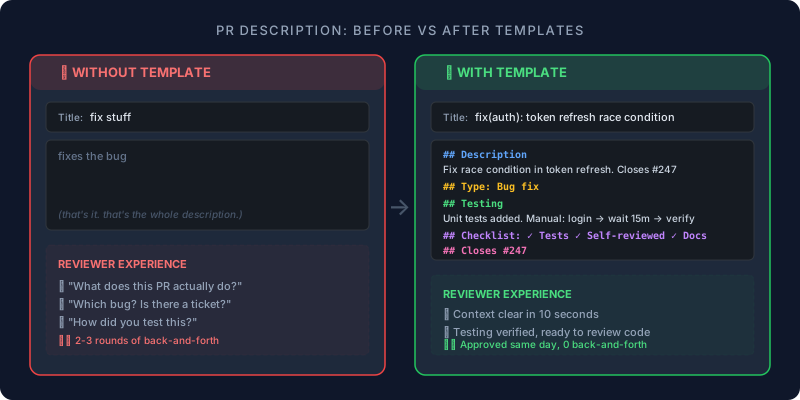
The practical value is hard to overstate: without a template, roughly half of all PRs arrive with a one-line description like "fix bug" or "update styles," and the reviewer has to reverse-engineer intent from the diff. With a template, that same reviewer opens the PR and immediately sees context, linked tickets, and testing notes — which cuts the back-and-forth that makes review cycles drag from days to hours.
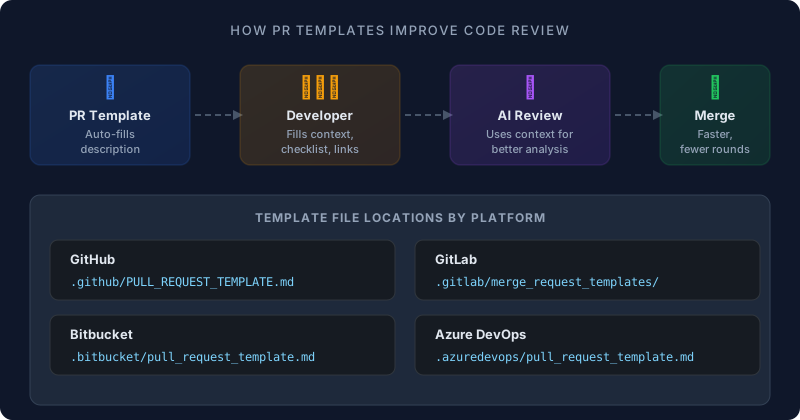
How to create a GitHub PR template
GitHub looks for a template file on the repository's default branch (usually main). Create the file, commit it, and every new PR automatically gets the template content.
File location (any of these work):
.github/PULL_REQUEST_TEMPLATE.md          ← recommended
PULL_REQUEST_TEMPLATE.md                   ← repo root
docs/PULL_REQUEST_TEMPLATE.md              ← docs folder
Step-by-step:
- In your repository, click Add file → Create new file
- Name it
.github/PULL_REQUEST_TEMPLATE.md - Add your template content (see examples below)
- Commit directly to your default branch
For organization-wide defaults, add the file to a special .github repository in your GitHub organization. Every repo without its own template inherits the org default.
GitHub PR template example (copy-paste ready)
## Description
<!-- What does this PR do and why? Link to relevant issue. -->

Closes #

## Type of Change
- [ ] Bug fix (non-breaking change that fixes an issue)
- [ ] New feature (non-breaking change that adds functionality)
- [ ] Breaking change (fix or feature that would break existing functionality)
- [ ] Refactoring (no functional changes)
- [ ] Documentation update

## How Has This Been Tested?
<!-- Describe the tests you ran. Include test configuration. -->

- [ ] Unit tests
- [ ] Integration tests
- [ ] Manual testing

## Checklist
- [ ] My code follows the project's style guidelines
- [ ] I have performed a self-review of my code
- [ ] I have added tests that prove my fix/feature works
- [ ] New and existing unit tests pass locally
- [ ] I have updated documentation as needed
- [ ] No new warnings introduced
Multiple templates on GitHub
For different PR types, create a directory with separate files:
.github/PULL_REQUEST_TEMPLATE/
├── feature.md
├── bugfix.md
├── hotfix.md
└── docs.md
Select a template by adding ?template=feature.md to the PR creation URL. GitHub does not show a dropdown — users either edit the URL manually or teams share template links in their contributing guide.
How to create a GitLab merge request template
GitLab uses a directory instead of a single file, and gives contributors a dropdown to choose their template.
File location:
.gitlab/merge_request_templates/Default.md
.gitlab/merge_request_templates/Feature.md
.gitlab/merge_request_templates/Bugfix.md
Step-by-step:
- Create the
.gitlab/merge_request_templates/directory - Add
.mdfiles for each template type - Commit to your default branch
- When creating a merge request, the Choose a template dropdown appears
GitLab supports template variables that auto-populate useful context:
%{source_branch}— the branch being merged%{target_branch}— the branch receiving changes%{all_commits}— list of all commits in the MR
On GitLab Premium/Ultimate, you can set a project default via Settings → Merge requests → Default description template.
GitLab MR template example
### Description
This merge request addresses:

### Changes Made
<!-- Provide code snippets or screenshots -->

### Related Issues
<!-- Link to GitLab issues -->

### Merge Request Checklist
- [ ] Code follows project guidelines
- [ ] Tests added and passing
- [ ] Documentation updated
- [ ] No new security vulnerabilities introduced
- [ ] Reviewed by at least one team member
How to create a Bitbucket pull request template
Bitbucket Cloud and Data Center both support PR templates via a single file in the repository.
File location:
.bitbucket/pull_request_template.md
The template from the source branch takes precedence over the destination branch. If no template file exists, Bitbucket falls back to whatever default description you set in Repository Settings → Pull Requests.
Step-by-step:
mkdir -p .bitbucket
# Create your template
cat > .bitbucket/pull_request_template.md << 'TEMPLATE'
## Summary
<!-- Brief description of the changes -->

## Jira Ticket
<!-- PROJ-123 -->

## Type of Change
- [ ] Bug fix
- [ ] Feature
- [ ] Refactor
- [ ] Documentation

## Testing
<!-- How were these changes tested? -->

## Checklist
- [ ] Tests pass
- [ ] Self-reviewed
- [ ] Documentation updated
TEMPLATE

git add .bitbucket/pull_request_template.md
git commit -m "Add PR template"
git push
Bitbucket supports one default template per repository. For Data Center deployments with advanced needs, marketplace apps like Pull Request Checklist Buddy add trackable checklists and merge-blocking checks.
Git AutoReview reads your PR description for context, then runs Claude, Gemini, and GPT on the diff. You approve before publishing. $14.99/team — not per user.
Install Free Extension →
How to create an Azure DevOps PR template
Azure DevOps searches multiple directories for templates, in this order:
/.azuredevops/pull_request_template.md    ← recommended
/.vsts/pull_request_template.md
/docs/pull_request_template.md
/pull_request_template.md                  ← repo root
Azure DevOps also supports branch-specific templates — store them in a pull_request_template/branches/ subdirectory. A file named main.md applies only to PRs targeting the main branch.
For additional templates that contributors can select from a dropdown, add extra .md files to the pull_request_template/ directory.
What do real PR templates look like? Examples from open source
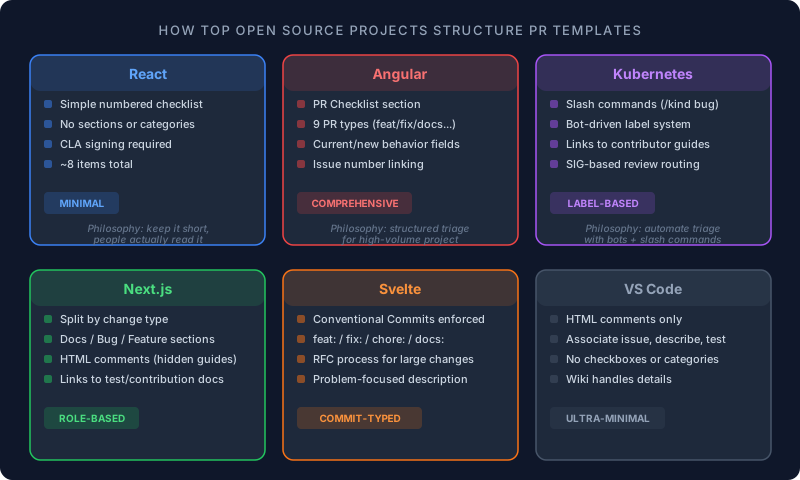
We checked 13 of the most active open source projects on GitHub — 10 out of 13 use PR templates (77%). The three that skip templates (Go, Express, Vue.js) rely on detailed contributing guides instead. Here is what the templates actually look like — verified by fetching the raw files from each repository.
React (Facebook) — checklist-based
React keeps it simple: a numbered checklist that walks contributors through the basics before submitting.
Before submitting a pull request, please make sure the following is done:

1. Fork the repository and create your branch from `main`.
2. Run `npm` in the repository and test suite `npm test` passes.
3. Make sure your code follows the style guide.
4. Make sure your changes are covered by tests.
5. Run `make build` and verify that nothing is broken.
6. If relevant, add an entry to the changelog.
7. Sign the CLA.
No sections, no checkboxes, no categories — just a list. For a project with thousands of contributors, keeping the template short means people actually read it.
Angular — comprehensive with PR type
Angular uses the most structured template of the five. It starts with a checklist, then asks for PR type (feature, bugfix, refactor, docs, CI), and ends with behavior description and issue linking.
The key feature: a categorized PR type list using checkbox format, which helps maintainers triage and label incoming PRs without reading the entire diff.
Next.js (Vercel) — separated by contributor type
Next.js splits guidance by what you are doing — improving docs, fixing a bug, or adding a feature. Each category has its own checklist with links to testing guides, contribution docs, and error formatting standards.
The template is mostly HTML comments (invisible in rendered view), which keeps the PR description clean while still guiding the contributor.
Kubernetes — label-based with slash commands
Kubernetes uses a unique approach: the template instructs contributors to type /kind bug, /kind feature, or /kind documentation as a comment, which triggers a bot to add labels automatically. The description section asks for what the PR does and why, with links to extensive contributor docs.
Svelte — Conventional Commits enforced
Svelte requires PR titles to use Conventional Commits prefixes (feat:, fix:, chore:, docs:) and asks contributors to clearly illustrate what problems the PR solves. The template also links to the RFC process for large changes — a pattern worth adopting if your project has a formal design proposal workflow.
VS Code (Microsoft) — minimal
VS Code uses the shortest template of any major project — just a few HTML comment lines reminding contributors to associate an issue, keep code up to date, and include a description. The philosophy: experienced contributors do not need guardrails, and the project's extensive contribution wiki covers everything else.
Other notable templates
Django links every PR to a Trac ticket number. Flutter points contributors to their "Tree Hygiene" documentation. Rust asks for tracking issue references. Flask requires an issue to be opened before the PR. Each project tailors the template to their specific contribution workflow rather than using a generic format.
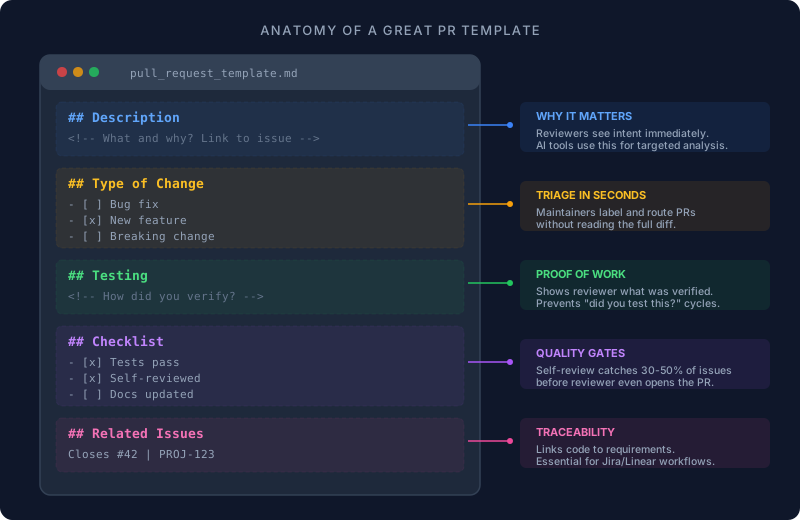
What sections should a PR template include?
The right template depends on your team size, risk tolerance, and how much context reviewers typically need. Start with these five sections and add more only when you hit a specific problem.
Essential sections (every team):
| Section | Purpose | Example prompt |
|---|---|---|
| Description | What changed and why | "Brief summary of changes and motivation" |
| Type of Change | Categorize the PR | Checkbox: bug fix, feature, refactor, docs |
| Testing | How you verified it works | "Describe tests run and environments" |
| Checklist | Quality gates | Tests pass, docs updated, self-reviewed |
| Related Issues | Link to tickets | "Closes #123" or "PROJ-456" |
Optional sections (add when needed):
| Section | When to add | What it covers |
|---|---|---|
| Screenshots | UI changes | Before/after comparisons |
| Breaking Changes | API/schema changes | Impact description + migration path |
| Security Review | Auth, payments, PII | OWASP checklist items |
| Rollback Plan | High-risk deploys | Steps to revert if something breaks |
| Dependencies | Multi-PR work | Links to blocking or dependent PRs |
Git AutoReview uses your PR description to understand context. Good templates mean fewer false positives and more targeted suggestions.
How Human-in-the-Loop Works →
How do PR templates improve AI code review?
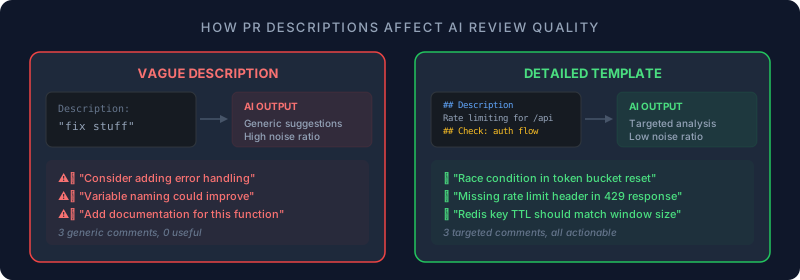
AI code review tools parse the PR description alongside the code diff. When that description is a blank field or a single line, the AI has nothing to work with except raw code changes — which leads to generic suggestions like "consider adding error handling" on code that already handles errors three functions up.
A well-structured template changes what the AI can do. When the description explains "this PR adds rate limiting to the /api/users endpoint because we hit 429s in production last Tuesday," the AI focuses its analysis on rate limiting patterns, concurrency issues, and edge cases specific to that endpoint. The review goes from noise to signal.
GitHub confirmed this pattern officially: their Copilot coding agent started using PR templates in November 2025 to generate better PR summaries. CodeRabbit generates walkthrough summaries from PR context. Git AutoReview reads the description and linked Jira tickets to verify acceptance criteria against the actual code changes.
What helps AI review tools most:
- Intent — "What does this PR do?" gives the AI a frame for analysis
- Risk areas — "Check the auth flow carefully" directs attention
- Testing notes — helps AI verify coverage completeness
- Related issues — context from tickets improves suggestion relevance
How to add a security review checklist to your PR template
For repositories that handle authentication, payments, PII, or infrastructure, add a conditional security section that authors fill out or delete if not applicable.
## Security Review (delete if not applicable)
- [ ] Authorization implemented for new endpoints
- [ ] Input validation added (no raw SQL, no eval)
- [ ] Output properly escaped (XSS prevention)
- [ ] Sensitive data identified and handled per policy
- [ ] No secrets or API keys hardcoded
- [ ] Dependencies checked for known CVEs
- [ ] Threat model considered for new attack surface

### If this PR changes authentication or permissions:
- [ ] Access control tested with multiple roles
- [ ] Session handling reviewed
- [ ] Rate limiting considered
Microsoft's Engineering Playbook recommends including security and compliance checkboxes in all templates for teams working on production services. The key is keeping it scannable — authors should be able to complete the security section in under a minute. For PRs that ship release artifacts or pin a binary dependency, the free Hash Generator produces SHA-256 and SHA-512 hex or Base64 in the browser — paste it next to the asset link in your PR description so reviewers can verify integrity without leaving the page.
How to enforce PR template compliance
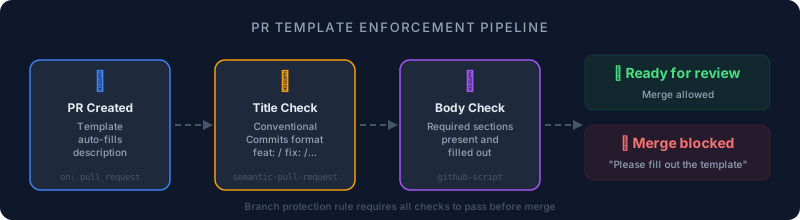
Templates only work if people actually fill them out. Without enforcement, developers delete the template text and type "fixes stuff" — which is exactly what you are trying to prevent.
GitHub Actions for enforcement
Enforce PR title format with amannn/action-semantic-pull-request (1,300+ stars, actively maintained):
name: PR Title Check
on:
  pull_request:
    types: [opened, edited, synchronize, reopened]

jobs:
  validate:
    runs-on: ubuntu-latest
    steps:
      - uses: amannn/action-semantic-pull-request@v5
        env:
          GITHUB_TOKEN: ${{ secrets.GITHUB_TOKEN }}
        with:
          types: |
            feat
            fix
            docs
            refactor
            test
            chore
          requireScope: false
          subjectPattern: ^.+$
          subjectPatternError: "PR title must not be empty after the type prefix."
This validates that every PR title follows feat: description or fix(scope): description format, and blocks the merge if it does not. Combine with branch protection rules to make it a hard gate.
Enforce PR description content with a custom github-script check:
name: PR Description Check
on:
  pull_request:
    types: [opened, edited, reopened]

jobs:
  check-description:
    runs-on: ubuntu-latest
    steps:
      - uses: actions/github-script@v7
        with:
          script: |
            const body = context.payload.pull_request.body || '';
            const required = ['## Description', '## Type of Change', '## Testing'];
            const missing = required.filter(s => !body.includes(s));
            if (missing.length > 0) {
              core.setFailed(`PR description missing sections: ${missing.join(', ')}`);
            }
This checks that the PR description actually contains your template sections — catching developers who delete the template and type "fixes stuff."
How to integrate Jira tickets with PR templates
For teams on the Atlassian stack, linking Jira issues to PRs can be automated at the template level.
GitHub + Jira:
Include the Jira key in the PR title using Conventional Commits format:
<!-- Title format: feat(PROJ-123): Brief description -->

## Jira Ticket
<!-- Include the full ticket key, e.g., PROJ-123 -->

## Acceptance Criteria
<!-- Copy ACs from the Jira ticket for reviewer reference -->
GitHub Actions like jira-pr-link-action auto-detect Jira keys in the PR title and add a clickable link to the description.
Bitbucket + Jira (Smart Commits):
Bitbucket supports Jira smart commits that transition issues automatically:
git commit -m "PROJ-123 #in-progress Add rate limiting to API endpoint"
# Later:
git commit -m "PROJ-123 #resolve Added tests and documentation"
This transitions the Jira issue, adds comments, and links the commit to the ticket — all from the commit message. Your PR template should remind developers to use this format.
GitLab + Jira:
Add the Jira key to the MR title or description. With Git Integration for Jira installed, the link appears automatically in Jira's Development panel.
Git AutoReview connects to Jira and verifies acceptance criteria against your code changes. Template + Jira + AI = PRs that reviewers can approve in minutes.
Install Free → See Pricing
How to measure if your PR template is working
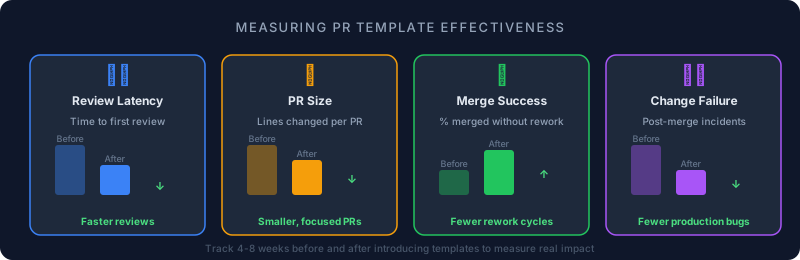
A template that nobody fills out is worse than no template — it creates the illusion of process while adding friction. Track these four metrics for 4-8 weeks before and after introducing your template to see if it actually helps.
| Metric | What it shows | Healthy signal |
|---|---|---|
| Review latency | Time from PR "ready" to first review | Downward trend — reviewers find context faster |
| PR size | Lines changed per PR | Smaller, focused PRs over time |
| Merge success rate | % of PRs merged without rework | Improves as templates clarify risks and testing |
| Change failure rate | Incidents within 1 week of merge | Declines with consistent pre-merge verification |
SoundCloud's engineering team reported that after introducing PR templates, reviews became easier, feedback grew more relevant, and the templates themselves became knowledge-sharing assets that helped onboard new engineers. Shopify's engineering blog emphasizes the same principle from a different angle: atomic commits, narrow PR scopes, and clear titles/bodies make reviews faster because the reviewer can build a mental model of the change in seconds instead of minutes.
If your metrics do not improve after a month, the template is probably too long or too rigid. Trim sections, make more items conditional, and watch the numbers again.
PR template mistakes that slow down reviews
Templates can backfire when they create more friction than they solve. Watch for these patterns:
Too long. A template with 15 sections and 30 checkboxes turns every PR into a compliance exercise. Developers start deleting the template entirely instead of filling it out. Google's engineering practices guide puts it best: the goal is small, focused changes — not exhaustive paperwork.
Forced fields that do not apply. If a documentation-only PR has to fill out "Security Review" and "Performance Benchmarks" sections, the template is training people to write "N/A" on autopilot. Use HTML comments (<!-- delete if not applicable -->) to make sections conditional.
No enforcement. A template without a CI check is a suggestion, not a standard. People fill it out for the first week, then stop when they realize nobody blocks a merge over an empty description.
Placeholder text left unchanged. The worst outcome: a PR gets merged with "Describe your changes here" still in the description. Use a GitHub Action to detect unedited placeholder text and block the merge.
Conventional Commits and PR templates
Conventional Commits standardize commit messages and PR titles using prefixes like feat:, fix:, chore:, and docs:. Combining this with PR templates enables automatic labeling, changelog generation, and release automation.
Template instruction example:
<!-- PR title format: {type}({scope}): {description}
  feat: New feature
  fix: Bug fix
  docs: Documentation only
  refactor: Code change that neither fixes a bug nor adds a feature
  test: Adding or updating tests
  chore: Build process or auxiliary tool changes
  Example: feat(auth): add OAuth2 login flow
-->
GitHub Actions like pr-conventional-commits validate the PR title against this format, auto-add labels (feat → feature label), and reject PRs with invalid titles — all without touching commit history.
Frequently Asked Questions
What is a pull request template?
A pull request template is a Markdown file in your repository that auto-fills the PR description when someone opens a new pull request. It guides developers to include context, testing details, and checklists — so reviewers spend less time asking "what does this do?" and more time reviewing actual code.
How do I create a GitHub PR template?
Create a file at .github/PULL_REQUEST_TEMPLATE.md in your repository's default branch. Add Markdown content with sections like Description, Type of Change, Testing, and Checklist. GitHub auto-populates this into every new PR description. For multiple templates, use the .github/PULL_REQUEST_TEMPLATE/ directory.
Does GitLab support merge request templates?
Yes. GitLab uses a directory at .gitlab/merge_request_templates/ where you add Markdown files like Default.md, Bugfix.md, or Feature.md. Contributors select from a dropdown when creating a merge request. GitLab also supports variables like %{source_branch} for auto-population.
Does Bitbucket support pull request templates?
Yes. Bitbucket Cloud and Data Center both support PR templates via .bitbucket/pull_request_template.md. The template from the source branch takes precedence. You can also set a default description in Repository Settings → Pull Requests.
What sections should a PR template include?
Five sections cover most teams: Description (what and why), Type of Change (feature/bugfix/refactor checklist), Testing (how you verified it works), Checklist (tests pass, docs updated, no secrets), and Related Issues (links to tickets). Add Security Review for sensitive repos.
How do PR templates improve AI code review?
AI code review tools like Git AutoReview, CodeRabbit, and GitHub Copilot parse the PR description for context alongside the diff. A well-filled template that explains intent, flags risk areas, and describes testing helps AI generate more targeted suggestions instead of generic noise. GitHub confirmed Copilot coding agent started using PR templates in November 2025.
Can I have multiple PR templates for different change types?
On GitHub, add files to .github/PULL_REQUEST_TEMPLATE/ and select via URL parameter ?template=feature.md. On GitLab, add multiple .md files to .gitlab/merge_request_templates/ — contributors pick from a dropdown. Bitbucket supports one default template per repository.
How do I enforce PR template compliance?
Use GitHub Actions like pr-description-enforcer or pr-template-fillout-verifier to check if the PR description was actually filled out vs left as placeholder text. Combine with branch protection rules that require the check to pass before merging.
Related Resources
Guides:
- How to Reduce Code Review Time — AI tools and workflow optimization
- AI Code Review: Complete Guide — Everything about AI-powered code review
- What is Human-in-the-Loop AI? — Why approval before publishing matters
- GitHub Code Review Best Practices 2026 — Comprehensive GitHub guide
AI Code Review Tools:
- Best AI Code Review Tools 2026 — Compare 12 tools with pricing
- AI Code Review Pricing Comparison — Cost breakdown across tools
- BYOK Code Review — Use your own API keys for privacy and cost control
Platform-Specific:
- AI Code Review for Bitbucket — The most comprehensive Bitbucket guide
- AI Code Review for GitLab — GitLab-specific setup and tools
- AI Code Review for GitHub — GitHub-specific workflows
Install the VS Code extension, connect your repo, and run your first AI review in 2 minutes. Free plan: 10 reviews/day. Works with GitHub, GitLab, and Bitbucket.
Install Free — No Credit Card → View Pricing
Reviewing GitHub PRs? Git AutoReview adds AI suggestions you approve before publishing.
Frequently Asked Questions
What is a pull request template?
How do I create a GitHub PR template?
Does GitLab support merge request templates?
Does Bitbucket support pull request templates?
What sections should a PR template include?
How do PR templates improve AI code review?
Can I have multiple PR templates for different change types?
How do I enforce PR template compliance?
Try it on your next GitHub PR
AI reviews your pull request. You approve what gets published. Nothing goes live without your OK.
Free: 10 AI reviews/day, 1 repo. No credit card.
Related Articles
OpenCode vs Claude Code: An Honest Comparison (2026)
OpenCode vs Claude Code compared on licence, models, cost and PR review. Verified GitHub and pricing data, plus the archived repo everyone still quotes.
Open VSX: AI Code Review in Cursor, VSCodium & Windsurf (2026)
VS Code forks cannot reach Microsoft's Marketplace. Here is the licence reason, and how to install AI code review in Cursor, VSCodium and Windsurf.
Code Review for Solo Developers 2026: Catch Bugs Without a Team
Solo developers miss bugs teams catch in peer review. Here is the cognitive reason self-review fails, 4 techniques that actually work, and how AI review fits a solo dev's ship cycle.
Get the AI Code Review Checklist
25 PR bugs AI catches that humans miss — with real code examples. Free PDF, sent instantly.
One-click unsubscribe. We never share your email.