Best VS Code Extensions for Bitbucket Code Review (2026)
Atlassian's official extension ships at 2.5 stars. The most-installed Bitbucket PR helper has not been updated since 2019. Here is what actually works for review in 2026.
Using Bitbucket? Native support for Cloud, Server, and Data Center. No webhooks or Docker.
Best VS Code Extensions for Bitbucket Code Review
Most "best VS Code extensions" lists pretend Bitbucket does not exist. The official Atlassian extension sits at a 2.5-star rating despite 3.15 million installs. The most-popular Bitbucket-specific extension last shipped a release in 2019. GitLens has 49 million installs and still treats Bitbucket as a second-class platform behind GitHub and GitLab. The result is teams on Bitbucket Cloud, Server, or Data Center hunting through stale marketplace pages and finding fewer working options than developers on competing platforms.
TL;DR: Atlassian for VS Code handles native PR management on Bitbucket Cloud and partial Server/DC. Git AutoReview layers AI code review on top with human approval, full Bitbucket Cloud + Server + Data Center coverage, and 10 free reviews per day. Skip the 2019-vintage standalone PR extensions — they still install but do not surface comments inside the editor. For a side-by-side scoring of Bitbucket AI review tools across pricing, BYOK, human approval, and platform tier coverage, see our Bitbucket AI code review tools scoring matrix.
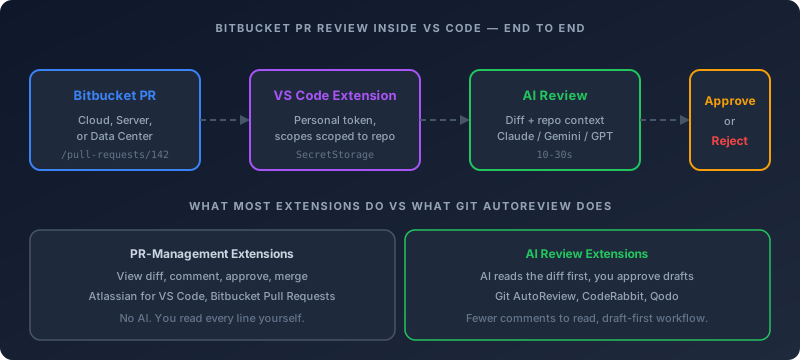
Why does Bitbucket get fewer VS Code options than GitHub or GitLab?
Bitbucket is the third-place player in the Git hosting market, and tool makers prioritize accordingly. JetBrains' 2025 Developer Ecosystem Survey placed Bitbucket at roughly 11% primary-platform share against GitHub's 52%. The math is brutal for any startup deciding which platform integration to ship first — Bitbucket is the third API to learn, the third webhook format to handle, and the third surface area for support tickets. Most VS Code extensions ship GitHub support, then GitLab if there is budget, then nothing.
The platform split makes things worse. Bitbucket Cloud, Bitbucket Server, and Bitbucket Data Center each have separate APIs, separate authentication patterns, and separate quirks around custom certificates and enterprise proxies. Building a "Bitbucket extension" really means building three integrations and testing each one. CodeRabbit's platform covers Bitbucket Cloud and Data Center, but not Server, and its review arrives as a bot comment on the pull request rather than in your editor. Sourcery, GitHub Copilot, and Cursor Bugbot skip Bitbucket entirely.
The good news for Bitbucket teams in 2026: a handful of extensions actually work, and the gaps left by the big-name tools are exactly where focused alternatives have stepped in. The bad news: you have to know which ones still ship updates, which ones support your specific deployment, and which ones quietly broke when Bitbucket rotated its API tokens last year.
What VS Code extensions work for Bitbucket pull request review in 2026?
Six extensions are worth the install today, and each one solves a different piece of the workflow. Two of them give you native PR management. One adds git context. The other three layer AI on top of the review process — and only one of those three covers Bitbucket Server and Data Center.
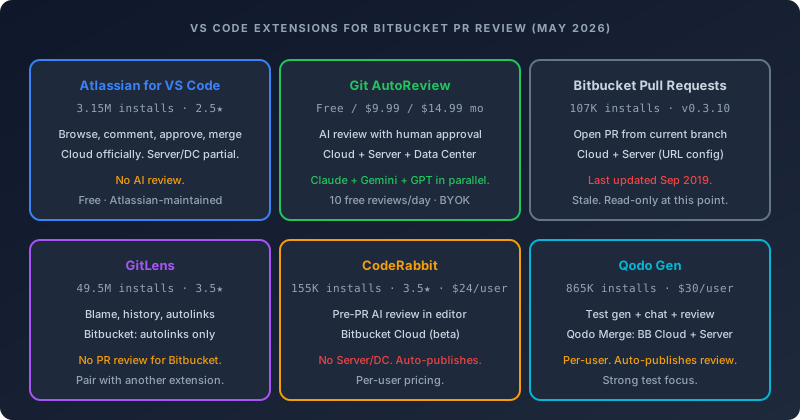
The headline numbers tell most of the story. Atlassian for VS Code is the de-facto default with 3.15 million installs, but its 2.5-star rating is the lowest of any extension covered here. Git AutoReview is the only AI review extension that confirms Bitbucket Server and Data Center support. The 2019-era standalone PR extensions still rack up installs but do not receive comments back into the editor. CodeRabbit and Qodo Gen each have strong AI features but with platform gaps that matter for self-hosted teams.
Atlassian for VS Code (atlascode) — native PR management
The official Atlassian extension is the table stakes install for anyone working in the Atlassian ecosystem. It bundles Jira and Bitbucket together: filterable PR tree views, inline comment threads on diffs, approve and merge from inside the editor, and a sidebar that surfaces related Jira work items next to each PR. Atlassian ships it from the atlassian/atlascode GitHub repo, which has 4,200 commits on main, an active release cadence, and version 4.1.164 published April 28, 2026.
The 2.5-star rating reflects three persistent issues. Performance degrades on large workspaces — a developer documented the extension struggling on a Mac Studio M1 Max with 64GB of RAM. Reviewer-picker bugs have an open Atlassian community thread running for over two years where the dropdown shows zero users despite Bitbucket Cloud listing dozens. Certificate validation breaks for some teams behind corporate proxies, with the extension failing to read the OS certificate store correctly.
Server and Data Center support exists but is narrower than the Cloud experience. The compatibility table on GitHub lists Jira and Bitbucket DC/Server with a checkmark, but it adds the qualifier that the instance must sit inside Atlassian's End of Support Policy window. RDE and WSL get Jira but not Bitbucket. The official help docs at support.atlassian.com walk through Cloud only, which is the experience Atlassian invests in heaviest. If you are on a recent Bitbucket Data Center release the extension works for browse and approve, but you are betting on the gaps closing rather than counting on first-party polish.
Verdict: Install it if you live in Jira and Bitbucket Cloud. Approach with caution if you are on Server or Data Center — verify your instance version and budget time for proxy and reviewer-list workarounds.
Cloud, Server, Data Center. Human approval before any comment posts. 10 free reviews per day.
Install Git AutoReview Free → Bitbucket setup guide
Git AutoReview — AI review with human approval
Git AutoReview is built specifically for AI code review with a human approval step before anything posts. The extension reads the diff plus surrounding code, runs Claude, Gemini, and GPT in parallel against the changes, and surfaces every finding as a draft you accept, edit, or reject. Nothing reaches the PR until you click approve.
Bitbucket coverage is the differentiator: Cloud, Server, and Data Center all work natively, including Server instances behind corporate proxies and self-signed certificates. Setup uses an App Password on Cloud or a Personal Access Token on Server/DC, scoped to repository read and write plus pull request read and write. Credentials live in VS Code's SecretStorage, which routes to the OS keychain on macOS, Windows, and Linux. Code itself goes directly from your editor to the chosen AI provider — no caching layer, no third-party servers between your code and Anthropic, Google, or OpenAI.
Pricing splits into three tiers. The free plan covers 10 AI reviews per day on a single repository with BYOK on every model. The Developer plan at $9.99 per month moves you to 100 reviews per day across 10 repositories. The Team plan at $14.99 per month removes the daily review cap and adds the full Jira integration, 20 custom rules, and basic analytics — flat-rate for the whole team, not per user. For teams of five or more this is the cheapest path to AI review on Bitbucket.
The trade-off is the workflow shift. If you are used to AI bots auto-posting suggestions, the approve-before-publish flow takes a session to internalize. The payoff is no noise — every comment that lands on the PR has been read by a human first, which means your team stops dismissing AI comments wholesale.
Bitbucket Pull Requests by RamiroBerrelleza — stale but still installs
This one is the trap. The marketplace listing shows 107,118 installs and a 5-star rating, which makes it sound credible. The last release shipped September 28, 2019 — version 0.3.10 — and the maintainer has not pushed an update since. The extension does one thing: opens a Bitbucket PR from your current branch using a command palette entry. That endpoint kept working because Bitbucket did not break it on the API side, but the extension does not surface PR comments back into the editor and does not stay current with API changes around App Password rotation or token formats.
It still supports both Bitbucket Cloud and Bitbucket Server through a URL config command, which is one reason it accumulated installs back when Atlassian's first-party extension did not exist. The 5-star rating comes from a tiny review pool that predates the Atlassian release. Today the official extension covers everything this one does and more.
Verdict: Skip. Install Atlassian for VS Code instead.
GitLens — git context, not Bitbucket PR review
GitLens carries 49.5 million installs and a 3.5-star rating, which is the highest install count of any git tooling on the marketplace by an order of magnitude. For Bitbucket users it is a complementary tool rather than a primary review extension. GitLens shows blame, file history, line-level authorship, and code lens annotations everywhere — including on Bitbucket-hosted repos. Where it falls short on Bitbucket is the rich PR detail views.
The official GitLens docs draw a line: "automatic linking of issues and pull requests" works across Bitbucket and Bitbucket Server, but the "rich integrations with GitHub, GitLab and Jira" that pull detailed hover information stop at Bitbucket's door. That means PR titles autolink correctly in commit messages, but you do not get the same GitLens experience around hover cards, Launchpad PR queues, or inline status that GitHub users see.
Verdict: Install for git context regardless of platform. Pair it with a separate PR review extension on Bitbucket.
CodeRabbit VS Code extension — pre-PR review for Bitbucket Cloud
CodeRabbit's VS Code extension is built for pre-PR feedback. It runs AI review on uncommitted changes inside the editor before you push, which catches noise early and shortens the round-trip to your team. The extension works against GitHub, GitLab, Azure DevOps, and Bitbucket Cloud — the install count sits at 155,265 as of May 2026 with a 3.5-star rating across 28 reviews.
The Bitbucket gap is Server and Data Center. CodeRabbit's hosted PR review pipeline (the GitHub-app-style integration) supports Bitbucket Cloud in beta but does not extend to self-hosted deployments. Pricing is $24 per user per month on the Pro plan, which is closer to per-seat enterprise SaaS than the flat-rate model. The free tier exists but is rate-limited at three reviews per hour and only covers open-source repositories.
Verdict: Install if you are on Bitbucket Cloud, want pre-PR feedback, and are comfortable with auto-publishing AI comments. Skip if you are on Server or Data Center, or if your team has more than five people and per-seat pricing matters.
Qodo Gen — test generation plus chat
Qodo's VS Code extension is the most-installed AI extension in this list at 865,535 installs. Its primary positioning is test generation and chat-based code Q&A — review is part of the offering but not the headline. The extension does not handle Bitbucket PR review directly inside VS Code; that lives in Qodo Merge, a separate webhook-based product that supports Bitbucket Cloud and Bitbucket Server through dedicated deployment.
Pricing for Qodo Merge starts at a $30 monthly base covering up to 30 users, then meters credits at $0.012 each. Test generation on the VS Code side is genuinely good — it builds happy-path and edge-case tests against the open file with reasonable coverage — and worth the install on its own merits. The review piece is fine but not differentiated against CodeRabbit or Git AutoReview, and the auto-publish default applies the same noise pressure as CodeRabbit.
Verdict: Install Qodo Gen for the test generation side. Consider Qodo Merge if you want a dedicated PR review service tied to a single tool family. Pick something else if you want everything inside VS Code without webhook configuration.
How do you set up AI code review for Bitbucket inside VS Code?
The path from a fresh VS Code install to your first AI review comment on a Bitbucket PR runs about five minutes if you have credentials handy. The flow is the same for Cloud, Server, and Data Center — only the token type and the URL field change.
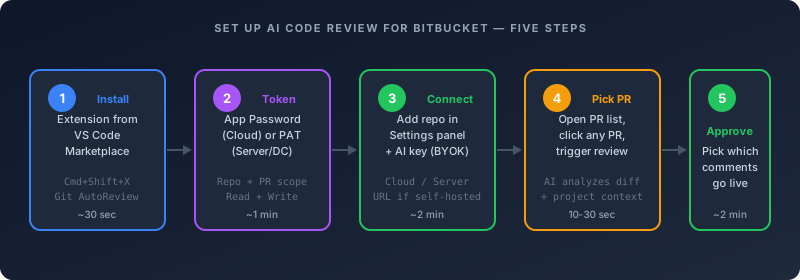
Step 1: Install the extension
Open the VS Code extensions sidebar with Cmd+Shift+X (or Ctrl+Shift+X on Windows and Linux). Search for Git AutoReview by vitalii4reva. Click install. The extension is free, registers a few new commands in the palette, and adds a Git AutoReview entry to the activity bar on the left.
For Cursor, Windsurf, and VS Codium, the same VSIX works — install via the marketplace or import the VSIX manually if your forked editor blocks the Microsoft marketplace.
Step 2: Generate a Bitbucket token
The token type depends on your deployment. For Bitbucket Cloud, go to Bitbucket Settings → App passwords → Create app password. Name it Git AutoReview. Grant Account: Read, Repositories: Read and Write, Pull requests: Read and Write. Copy the generated password — you only see it once.
For Bitbucket Server or Data Center, go to your profile → Personal Access Tokens → Create token. Name it Git AutoReview. Grant Repository: Read and Write, Pull Request: Read and Write. Copy the token. The Server/DC flow does not require an account email — the token alone authenticates you.
Step 3: Connect the repository
Open the Git AutoReview command palette entry (Cmd+Shift+P → Git AutoReview: Open Settings). Go to the Repositories tab. Click Add Repository.
For Cloud, choose Bitbucket Cloud as the platform, enter your workspace slug and repository name, paste the App Password. For Server or Data Center, choose Bitbucket Server, enter your full Bitbucket Server URL (something like https://bitbucket.company.com), the project key, and the repository name. Paste your Personal Access Token.
While you are in Settings, switch to the AI Models tab and add at least one provider key. Anthropic, Google, and OpenAI are all supported, and you can wire up multiple providers to run them in parallel. The Free tier supports BYOK with no upgrade required, so even a free-plan setup keeps your code going directly from VS Code to the AI provider.
Step 4: Trigger your first review
Open the Git AutoReview activity-bar entry. Click PR Search. Pick any open pull request in the connected repository. Click Review. The AI runs against the diff plus repo context, which takes 10 to 30 seconds for a medium PR and longer for monorepo-scale changes.
Step 5: Approve, edit, or reject
The findings appear in the side panel as drafts. Each comment has a confidence score, a category (logic, security, style, performance), and the file/line it targets. Pick which ones to publish. The ones you approve post to the PR as regular Bitbucket comments. The ones you reject stay in your local panel and never reach Bitbucket. You can edit the comment text before approving — useful for tightening up a finding the AI worded too verbosely.
This is the human-in-the-loop step that the auto-publish tools skip. The result is your team only sees comments a human already vetted.
Free tier covers 10 reviews per day on Cloud, Server, and Data Center. No credit card.
Install Free → Read the Bitbucket setup docs
Common Bitbucket plus VS Code problems and how to solve them
Five issues come up repeatedly when teams onboard Bitbucket inside VS Code. Each one has a fix that does not require switching tools.
Reviewer pickers come up empty
The Atlassian for VS Code extension surfaces a Reviewers field when you create a PR, but the dropdown often shows zero users despite the Bitbucket web UI listing dozens. The Atlassian community has an open thread on this running for over two years. The workaround is setting default reviewers at the repository level inside Bitbucket Cloud's repo settings — the extension reads from that list, not from the workspace member list. Once you wire up default reviewers on the web side, the picker populates correctly.
If you are creating PRs from Git AutoReview's flow, you skip this issue entirely because the extension does not gate the review on a reviewer assignment — it runs the AI review against the diff regardless of who is on the reviewer list.
App Passwords stop working after rotation
Bitbucket Cloud's App Password format changed during 2024 and again during 2025. Older extensions that hard-coded the auth header format break silently when teams rotate credentials. The symptom is a 401 error on the next review attempt with no meaningful UI message. Fix: regenerate the App Password and paste it into the extension settings. Git AutoReview accepts both the legacy and current formats; the 2019 standalone Bitbucket Pull Requests extension does not handle the new format reliably.
Self-signed certificates fail the TLS handshake
Bitbucket Server and Data Center deployments behind corporate proxies often use self-signed or internal-CA certificates. Node-based VS Code extensions inherit the OS certificate store on macOS but not always on Windows or Linux. The Atlassian community thread on this has been open for years. The fix on the Git AutoReview side is the Settings → Advanced toggle for "Trust system certificates," which routes the TLS handshake through the OS trust store instead of bundled Node certs. For deeper customization, set the NODE_EXTRA_CA_CERTS environment variable to your internal CA bundle path before launching VS Code.
Personal Access Tokens hit scope errors
The most common Server/DC error is "permission denied" when the token has Repository read but not Pull Request write. Bitbucket Server splits these scopes more granularly than Cloud. The minimum working set for AI review is Repository: Read and Write, Pull Request: Read and Write. If you are also using Jira context, add a separate Jira API token with Read access — the Bitbucket PAT does not extend to Jira.
Large monorepo slowdowns
The Atlassian extension specifically struggles with large JavaScript and TypeScript codebases. Performance degradation has been documented even on high-end hardware. The trigger is usually the file watcher hitting too many node_modules paths. The fix is the standard files.watcherExclude pattern in your VS Code settings:
{
  "files.watcherExclude": {
    "**/node_modules/**": true,
    "**/.git/**": true,
    "**/dist/**": true,
    "**/build/**": true
  }
}
This applies broadly across extensions and is one of the highest-leverage VS Code config changes for any monorepo team.
Which Bitbucket VS Code extension fits which team?
The right combination depends on whether you live in Jira, whether you need AI review, and whether you are on Cloud, Server, or Data Center. Five common patterns cover most teams.
Solo developer on Bitbucket Cloud
Atlassian for VS Code for native PR management plus Git AutoReview Free for 10 daily AI reviews. Setup time: 10 minutes total. Cost: $0. The combination gives you native browse-comment-approve plus AI review with human approval, all inside the editor.
Bitbucket Cloud team of 5–15 developers
Atlassian for VS Code plus Git AutoReview Team plan at $14.99 per month flat. Cost: $14.99/month for the whole team. The Team plan adds Jira AC verification, 20 custom rules, and removes the daily review cap. CodeRabbit at $24 per user per month equivalent runs $120-$360 for the same team — the math compounds quickly past five seats.
Bitbucket Server or Data Center team
Git AutoReview Team plan plus the Atlassian extension for native PR management on supported instances. The Atlassian extension's Server/DC support is narrower than Cloud, so test it against your specific instance version. Git AutoReview is the only confirmed AI review extension covering Server and Data Center from inside the editor — CodeRabbit's platform does reach Data Center, but as a bot on the pull request and with no Server support, while Sourcery and Cursor Bugbot skip self-hosted Bitbucket entirely.
Atlassian-heavy enterprise
Atlassian for VS Code for the Jira sidebar and PR management, Git AutoReview for AI review with Jira acceptance criteria verification baked into each review pass. The Jira AC verification reads ticket descriptions and custom AC fields, then checks each criterion against the diff inside the AI review. This is the workflow that closes the loop between requirements and code.
Polyglot team using multiple platforms
Git AutoReview alone covers GitHub, GitLab, and Bitbucket Cloud, Server, and Data Center from one extension. Pair it with GitHub Pull Requests for native GitHub PR management and Atlassian for VS Code for the Bitbucket Cloud and Jira side. The combination keeps each platform's native UX while standardizing the AI review layer across all three.
Where do these extensions actually save time?
The honest framing is that AI review is not magic — it shifts where the bottleneck sits. Microsoft published their internal numbers in mid-2025: their AI reviewer processes over 600,000 PRs per month across 5,000 onboarded repositories, and they measured a 10-20% median improvement in PR completion time. Qodo's 2025 survey of 609 developers found that 81% reported improved code quality when using AI review. CodeRabbit's analysis of 470 open-source GitHub PRs found that AI-authored code carries roughly 1.7x more issues than human-written code, mostly in logic and security categories.
Those numbers translate to a specific shape of savings on Bitbucket. Reviewers stop spending time on the obvious bugs the AI catches up front — null checks, missing error handling, hard-coded test values left in production code. Senior reviewers focus on architecture, naming, and the design choices the AI cannot evaluate. The PR turnaround drops because more findings land before the first human review pass instead of in the second or third round.
The catch is the noise problem. Auto-publishing AI comments produces 200-300 comments per week on a moderately active repository at a 10% false-positive rate, which is enough to teach your team to skim everything. Approval-based review trades a small upfront human-time cost for a much higher signal ratio in the comments your team actually reads. This is why the human-in-the-loop pattern matters more on Bitbucket teams that already have fewer reviewers per PR than on GitHub-scale teams.
For deeper reading on the AI review tooling space, the AI PR review guide breaks down the underlying pipeline and the Bitbucket-specific guide covers Cloud, Server, and Data Center setup in more depth. The CodeRabbit alternative page goes head-to-head on Bitbucket coverage and pricing.
Frequently asked questions
Which VS Code extension supports both Bitbucket Cloud and Bitbucket Server for pull request review?
Atlassian for VS Code lists both as supported per its compatibility table, with Server and Data Center conditional on the Atlassian End of Support Policy window. Git AutoReview supports Cloud, Server, and Data Center natively for AI review with human approval. The 2019-vintage Bitbucket Pull Requests extension by RamiroBerrelleza technically supports both via URL config but has not shipped updates in over six years.
Is the Atlassian for VS Code extension safe to install on enterprise Bitbucket Data Center?
Yes for browse and approve workflows, with caveats. The extension is open source under atlassian/atlascode, ships from Atlassian directly, and authenticates via your existing Bitbucket credentials. The caveats are version compatibility (Server must be inside Atlassian's End of Support window) and the documented certificate-validation issues behind some corporate proxies. Pilot it on a single repo before rolling out to a wider team.
Can I use Claude or GPT for code review on Bitbucket from VS Code?
Yes. Git AutoReview supports Claude (Opus 4.7, Opus 4.6, Sonnet 4.6, Haiku 4.5), Gemini (3.1 Pro, 3 Flash, 2.5 Pro), and GPT (5.4, 5.4 mini, o3, o4-mini) through BYOK on every plan, including Free. The extension runs the chosen models in parallel against the same Bitbucket diff and merges duplicate findings. CodeRabbit's VS Code extension supports Claude and GPT but only for Bitbucket Cloud, not Server or Data Center.
How does Git AutoReview's Bitbucket support compare to CodeRabbit's?
Git AutoReview supports Bitbucket Cloud, Server, and Data Center with confirmed coverage. CodeRabbit reaches Cloud and Data Center but not Server, and its review runs as a bot on the pull request rather than inside the editor. Pricing differs sharply too: Git AutoReview's Team plan is $14.99 per month flat for the whole team. CodeRabbit Essentials is $24 per user per month — for a 10-developer team that runs $240 per month against Git AutoReview's $14.99. The full breakdown is on the CodeRabbit alternative page.
Does GitLens add anything to Bitbucket pull request review?
GitLens does not surface Bitbucket PR comments inside the editor the way it does for GitHub. Its Bitbucket integration is limited to autolinks for issues and PR references in commit messages and code. The full rich-integration features — hover cards, Launchpad, PR detail views — only apply to GitHub and GitLab. Install GitLens for blame, history, and code lens regardless of your platform, but pair it with a dedicated PR extension for Bitbucket.
What is the difference between Atlassian for VS Code and the legacy Bitbucket Pull Requests extension?
Atlassian for VS Code is the official, actively-maintained Atlassian extension covering Jira and Bitbucket together. Bitbucket Pull Requests by RamiroBerrelleza is a community extension that hasn't shipped a release since September 2019. The official extension covers everything the older one did and adds the Jira sidebar, the PR detail screen with inline comments, and Atlassian-maintained API compatibility. Skip the older one.
Can I run multiple Bitbucket VS Code extensions at the same time?
Yes, and that is the recommended setup for most Bitbucket teams in 2026. GitLens for git context, Atlassian for VS Code for native PR management on Cloud, and Git AutoReview for AI review with human approval — the three keep their state separate and do not collide. Install all three and they coexist cleanly. Avoid running two AI review extensions side-by-side (Git AutoReview and CodeRabbit, for example) because both will try to attach review commands to the PR detail view and you end up with duplicate buttons.
Is there a free option for AI code review on Bitbucket Server or Data Center?
Git AutoReview's free tier covers Bitbucket Server and Data Center with 10 reviews per day, BYOK on every model, and a single repository. No credit card. CodeRabbit's free tier does not cover Server or Data Center. Qodo Merge does not have a meaningful free tier for Bitbucket workflows. Cursor Bugbot is GitHub-only. The free options for AI review on self-hosted Bitbucket effectively narrow to Git AutoReview as of May 2026.
Related resources
- AI Code Review for Bitbucket: Cloud, Server & Data Center (2026) — full Bitbucket setup walkthrough
- Bitbucket setup docs — App Password and PAT setup, scope reference
- AI PR Review Guide 2026 — how the AI review pipeline works under the hood
- CodeRabbit Alternative — head-to-head pricing and Bitbucket coverage
- Best VS Code Code Review Extensions — the broader extension comparison
- JWT Decoder — inspect Bitbucket OAuth tokens during debugging
- Jira Integration — pair Bitbucket review with Jira acceptance criteria verification
Using Bitbucket? Native support for Cloud, Server, and Data Center. No webhooks or Docker.
Frequently Asked Questions
What is the best VS Code extension for Bitbucket pull request review?
Does the Atlassian for VS Code extension support Bitbucket Server and Data Center?
Is there an AI code review extension that works with Bitbucket inside VS Code?
Why is the Bitbucket Pull Requests extension by RamiroBerrelleza still listed in the marketplace if it has not been updated since 2019?
Can GitLens review Bitbucket pull requests inside VS Code?
What VS Code extensions does Git AutoReview pair well with on Bitbucket?
Do I need a paid plan to do AI code review on Bitbucket from VS Code?
Why does the Atlassian for VS Code extension have a 2.5-star rating?
How do I install the Git AutoReview VS Code extension for Bitbucket Server?
Does CodeRabbit's VS Code extension work with Bitbucket Server or Data Center?
Works with your Bitbucket setup
Cloud, Server, and Data Center. Connect in VS Code, pick your AI model, review your first PR.
Free: 10 AI reviews/day, 1 repo. No credit card.
Related Articles
OpenCode vs Claude Code: An Honest Comparison (2026)
OpenCode vs Claude Code compared on licence, models, cost and PR review. Verified GitHub and pricing data, plus the archived repo everyone still quotes.
Open VSX: AI Code Review in Cursor, VSCodium & Windsurf (2026)
VS Code forks cannot reach Microsoft's Marketplace. Here is the licence reason, and how to install AI code review in Cursor, VSCodium and Windsurf.
Jira to Pull Request: Closing the Loop Between Tickets and Code Review 2026
Most teams mark Jira tickets Done before the PR gets a real review. Here's how to wire Jira to GitHub, GitLab, and Bitbucket so ticket context drives code review — and nothing ships unverified.
Get the AI Code Review Checklist
25 PR bugs AI catches that humans miss — with real code examples. Free PDF, sent instantly.
One-click unsubscribe. We never share your email.