Open VSX: AI Code Review in Cursor, VSCodium & Windsurf (2026)
VS Code forks cannot reach Microsoft's Marketplace. Here is the licence reason, and how to install AI code review in Cursor, VSCodium and Windsurf.
Tired of slow code reviews? AI catches issues in seconds. You decide what gets published.
What is Open VSX?
Open VSX is an extension registry run by the Eclipse Foundation, and it is the only reason the Extensions panel in your VS Code fork returns anything at all. The Eclipse Foundation's Open VSX Registry FAQ describes it as "a community driven, fully open platform for publishing and consuming VS Code extensions," governed by the Open VSX Working Group. That governance detail matters more than it sounds: the registry is not a company's side project that can be switched off in a strategy review, which is exactly the property a fork needs from its only source of extensions.
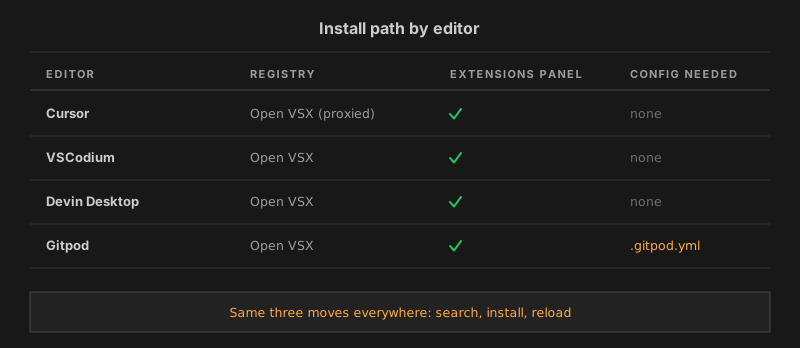
Here is the short version if you came for the install and not the history. Cursor, VSCodium, Devin Desktop (the editor that was called Windsurf until June 2026) and Gitpod all read from Open VSX by default. Git AutoReview is published there under the same extension ID it uses on the Microsoft Marketplace, so installing it in a fork is a search-and-click in the Extensions panel. Nothing gets downloaded from a browser, and nothing gets sideloaded from a .vsix file.
The rest of this guide covers why the split exists, the exact steps per editor, and the failure cases that make an extension quietly invisible instead of throwing an error.
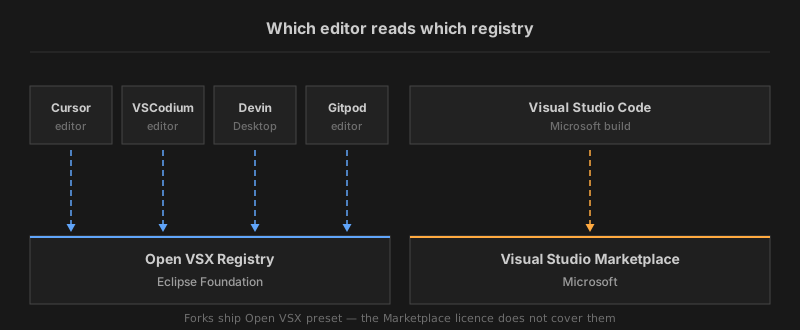
Why can't forks use the Marketplace?
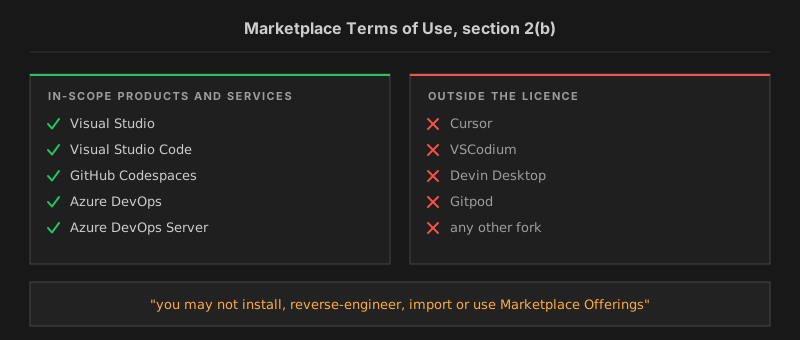
Microsoft's licence terms draw the line, and the current wording is stricter than the version most articles still quote. The Visual Studio Marketplace and NuGet.org Terms of Use, last updated September 2025, says in section 2(b): "Marketplace Offerings are intended for use only with In-Scope Products and Services and you may not install, reverse-engineer, import or use Marketplace Offerings in products and services except for the In-Scope Products and Services." The older text that circulates in blog posts and GitHub threads said only that offerings were "intended for use only with Visual Studio Products and Services". The current version adds an explicit prohibition, which is a meaningful upgrade in how hard that boundary is drawn.
The same document defines the in-scope list in section 1: Visual Studio, Visual Studio Code, GitHub Codespaces, Azure DevOps, Azure DevOps Server, and successor products and services. Every fork sits outside it. A fork is a different product, however faithfully it reproduces the editor.
VSCodium's maintainers put the practical consequence in their own extensions documentation: Microsoft "prohibits usages of the Microsoft marketplace by any other products or redistribution of .vsix files from it," so extensions have to be installed differently. That is the whole origin story of Open VSX in one sentence. The registry is not a philosophical statement about open source, it is the workaround a licence boundary forced into existence.
Which editors default to Open VSX?
Four of the editors developers actually use ship with Open VSX preset, each confirmed by its own documentation rather than by reputation.
| Editor | Registry behaviour | Source |
|---|---|---|
| Cursor | Open VSX, served through Cursor's own marketplace proxy | Cursor docs |
| VSCodium | product.json preset to open-vsx.org | VSCodium docs |
| Devin Desktop (ex-Windsurf) | Open VSX Registry, via Extensions panel or website | Cognition docs |
| Gitpod | Open VSX for VS Code Browser | Gitpod docs |
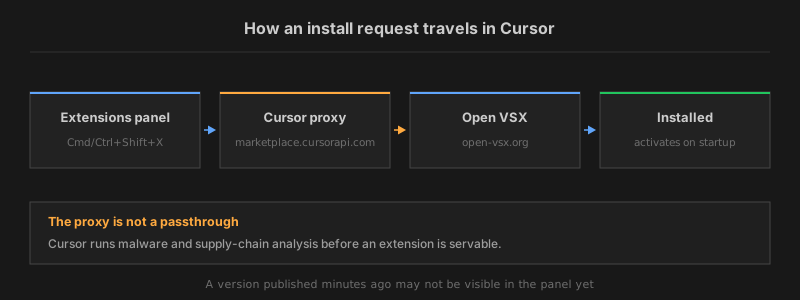
Cursor is the one worth reading twice. Its documentation states that Cursor "uses the Open VSX extension registry for third-party extensions, with Cursor's marketplace proxy applying automated malware and supply-chain analysis before extensions are offered for install," and names the proxy host as marketplace.cursorapi.com. So Cursor is not a passthrough to Open VSX. Search results and downloads are mediated, extensions that fail review get blocked, and Anysphere publishes first-party replacements for some widely used extensions that are unavailable on Open VSX. For a reader that means two things: the catalogue you see in Cursor can differ slightly from what open-vsx.org shows in a browser, and a newly published version can take a moment to appear on the Cursor side.
Catalogue size is the honest trade here, and it is worth putting a number on rather than hand-waving. Open VSX listed about 16,500 extensions on August 13, 2026. The Marketplace side resists precision: its count endpoint returned totals swinging between roughly 128,000 and 144,000 across nine consecutive queries the same afternoon, so any exact figure you see quoted is one sample of a moving number. The ratio is the part that survives the noise, and it puts Open VSX at somewhere near an eighth of what the Marketplace lists. The gap is not spread evenly, and both ends of it are documented. VSCodium's docs single out Microsoft's C# and C++ debuggers and the Remote Development extensions as licensed to run only on the official Visual Studio Code build, which is the part of the catalogue a fork structurally cannot have. At the other end, Cognition's recommended-extensions list for Devin Desktop is built entirely from Open VSX listings and covers GitLens, the GitHub Pull Requests extension, GitLab Workflow, Python, Ruff and the Java pack. The everyday layer is present.
How do you install in Cursor?
Four steps, and none of them involve a browser download.
- Open the Extensions panel —
Cmd+Shift+Xon macOS,Ctrl+Shift+Xon Windows and Linux. - Type Git AutoReview into the search box.
- Click Install on the entry published by
vitalii4reva. - Reload if Cursor asks. The extension activates on startup.
Check the publisher name before clicking. Cursor's own documentation warns that "the same publisher.extension name can point to different publishers or code on Open VSX than on the Microsoft Marketplace," and recommends treating extension IDs like dependencies.
That warning is good advice generally, not just for us. Extension identifiers are unique within a registry, not across registries, so a name you trust in one place is not automatically the same code in another. Teams running Cursor at scale can tighten this further: the docs describe publisher allowlists, an install cooldown that defers new versions by a set number of hours, and optional Open VSX signature verification for enterprise plans. Any team that has ever been burned by a supply-chain incident should turn on at least the allowlist.
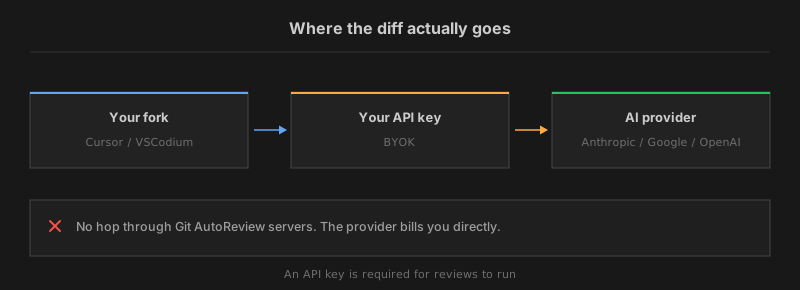
Free tier covers 10 reviews a day across GitHub, GitLab and Bitbucket. BYOK means the diff goes from your editor straight to Anthropic, Google or OpenAI — we never see it.
Open VSX listing →
How do you install in VSCodium?
Identical muscle memory, because VSCodium ships Open VSX as the preset gallery rather than as an option you enable.
- Open the Extensions panel with
Cmd/Ctrl+Shift+X. - Search for Git AutoReview.
- Click Install, then reload the window.
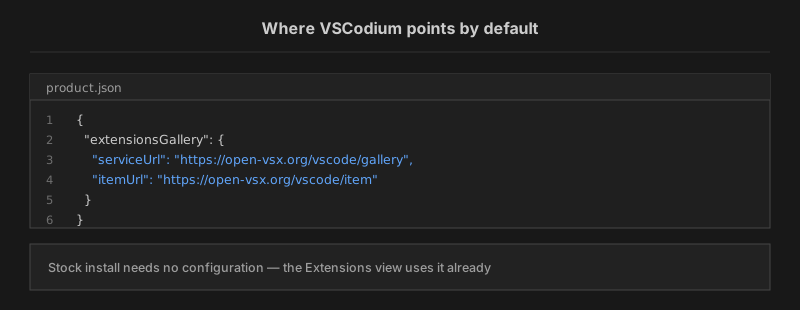
VSCodium's documentation states the default plainly: "the product.json file is set up to use open-vsx.org as extension gallery," and the Extensions view "will therefore by default use it." Nothing needs configuring on a stock install.
The wrinkle with VSCodium is version drift rather than registry configuration. VSCodium is packaged by Homebrew, WinGet, Chocolatey, Scoop, snap, Nixpkgs, the AUR and several distro repositories, and those channels do not move in lockstep. A build that has been sitting in a slow repository for a year can fall below an extension's declared engine floor, and the Extensions panel handles that by hiding the entry rather than telling you why. Git AutoReview declares a floor of VS Code 1.85, the release Microsoft shipped in November 2023, so most channels clear it comfortably. But if the extension is missing from search entirely, check codium --version before assuming anything else is wrong.
Is Windsurf now Devin Desktop?
Yes, since June 2, 2026, and this is the detail most current guides have not caught up with. Cognition's Devin Desktop FAQ states it directly: "On June 2, 2026, Windsurf is becoming Devin Desktop."
The same FAQ calls it "the new name for Windsurf," with the same IDE, editor and features unified under the Devin brand. Plans, pricing and existing settings carried over untouched. Extensions and keybindings stayed where they were.
For anyone searching "windsurf extensions" the practical answer is that nothing about extension handling changed in the rename. The Devin Desktop extensions documentation says the editor "uses the Open VSX Registry for extensions, accessible via the Extensions panel or website." The registry, the panel and the install flow are all where they were.
How do you install in Devin Desktop?
Same three moves as the other two editors.
- Open the Extensions panel with
Cmd/Ctrl+Shift+X. - Search for Git AutoReview.
- Click Install and reload.
One editor-specific note: Devin Desktop exposes the registry endpoint in its settings. The advanced configuration docs describe changing "the marketplace you use to download extensions from" under the General section.
Enterprise teams running a private gallery use that field. Everyone else should leave it alone, because pointing it somewhere unsupported is how a working Extensions panel becomes an empty one.
Does this work in Gitpod?
For the browser editor, yes, and Gitpod says so in its own documentation: "For VS Code Browser, we use the Open VSX registry." The Extensions view behaves the same as in a desktop fork — search, click, install.
Gitpod adds one thing the desktop editors do not. An extension you install can be written into the repository's .gitpod.yml from the extension page's settings menu, which then installs it for everyone opening a workspace on that project.
For a review tool that property is genuinely useful. The whole team gets the same setup on first launch, instead of each developer configuring it separately.
The Eclipse Foundation's FAQ lists Gitpod alongside VSCodium and the Eclipse Theia IDE as the environments where consuming extensions from Open VSX means "no usage impact" for the user. Theia earns its place on that list the same way the others do. The FAQ describes Open VSX as integrated into multiple applications that support VS Code extensions, and names the Theia IDE among them.
One caveat specific to ephemeral workspaces. Anything that stores credentials, including the AI provider key an AI review tool needs, has to be re-supplied or injected as a workspace variable when the container is rebuilt. That is a property of disposable environments rather than of any extension, but it catches people the first time.
Is it the same extension build?
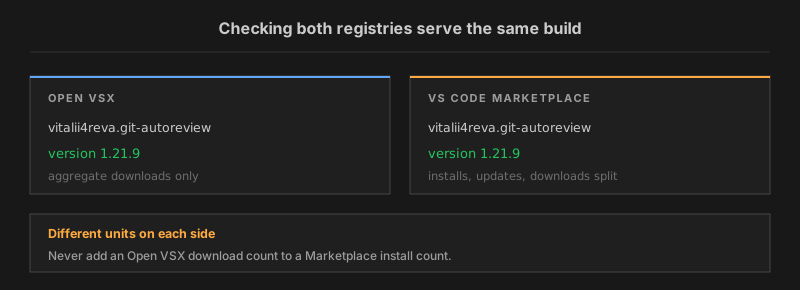
Same publisher, same extension ID, same version. On August 13, 2026 both registries served vitalii4reva.git-autoreview at version 1.21.9. The Marketplace API and the Open VSX API returned the same string within the same minute. There is no separate fork edition, no reduced feature set, and no delayed release train for Open VSX users.
The download figures need stating precisely, because the two registries do not publish the same unit. The Marketplace reports installs, updates and downloads as three separate counters, and on that date it showed 460 installs against 3,260 downloads.
Open VSX publishes a single aggregate number, 4,194 downloads, and it cannot be split into first installs versus auto-updates. The two counters are not the same kind of thing.
Adding an Open VSX download count to a Marketplace install count produces a figure that means nothing. So the number we publish is the one both sides honestly contribute to: 5,500+ downloads across both registries.
Verifying this for any extension takes two API calls and no account. Open VSX answers https://open-vsx.org/api/<publisher>/<extension> with the current version and download count, and the Marketplace answers a POST to its extensionquery endpoint. Comparing the two version strings before installing is a habit worth building, given that IDs are not reserved across registries.
Human-in-the-loop AI review inside Cursor, VSCodium, Devin Desktop or stock VS Code. Every finding is a draft until you approve it.
See how it works in the editor →
Why doesn't the extension appear?
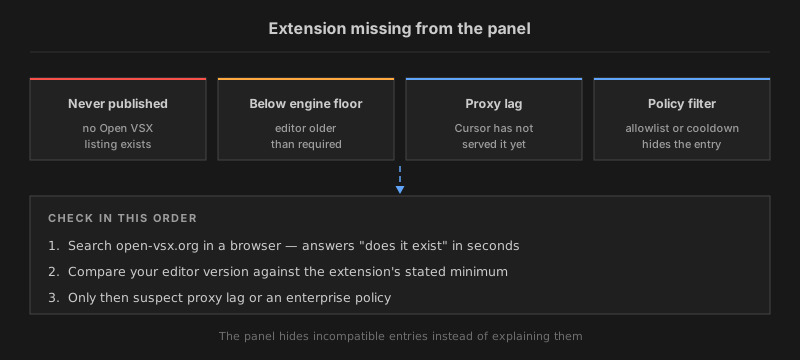
When an extension is missing from a fork's Extensions panel, the panel almost never says why. Four causes cover nearly all of it.
It was never published to Open VSX. Most extensions on the Microsoft Marketplace have no Open VSX listing at all, and no automatic mirror exists. Publishing is an action the maintainer takes.
The editor is below the engine floor. Every extension declares a minimum VS Code version. Below it, the entry is hidden rather than shown as incompatible.
The proxy has not caught up. In Cursor, search runs through marketplace.cursorapi.com and its analysis step, so a version published minutes ago may not be servable yet.
An enterprise policy is filtering it. Allowlists, install cooldowns and signature requirements all remove entries from view without an explanation in the panel.
The fix order that saves the most time is: search open-vsx.org in a browser first, because that answers "does it exist" in seconds and costs nothing. Then check the editor version against the extension's stated requirement. Only after both come back clean is it worth suspecting policy or proxy, and by then you have narrowed the problem enough to ask an admin a precise question rather than a vague one.
Can you switch a fork's registry?
You can, and we would not. VSCodium documents the mechanism honestly — the VSCODE_GALLERY_SERVICE_URL, VSCODE_GALLERY_ITEM_URL and VSCODE_GALLERY_EXTENSION_URL_TEMPLATE environment variables, or an extensionsGallery block in a custom product.json — and then draws its own line: "we can't provide any help if you intend to infringe their terms of use."
That is the correct read of section 2(b) above. Pointing a fork at Microsoft's gallery is the specific thing the current Terms of Use prohibit, and the prohibition now names importing and installing explicitly rather than describing intended use. The workaround is also fragile in ways that have nothing to do with legal risk: VSCodium's docs note that some Marketplace extensions are licensed to run only on the official Visual Studio Code build, and a few are hard-coded to refuse anything else. You can end up with a legally questionable configuration that still does not run the extension you wanted.
Three legitimate routes exist when something you need is missing, and the fork maintainers document all of them.
- Ask the publisher to ship to Open VSX alongside the Marketplace.
- Open a pull request against
EclipseFdn/publish-extensionsso the Open VSX service account publishes it for them. - Install a
.vsixfrom the project's own release page. That is a maintainer distributing their own build, not anyone redistributing Microsoft's.
How do you install a VSIX?
Sometimes the extension you need has no Open VSX listing and the maintainer publishes builds on their own release page. That case is the one legitimate use of manual installation, and it takes about thirty seconds.
- Download the
.vsixfrom the project's own releases — its GitHub or Forgejo page, not a mirror. - In the editor, open the Extensions panel and choose Install from VSIX from the
...menu. - Pick the file and reload the window.
The command line does the same job. VS Code's CLI reference documents --install-extension, which accepts either a publisher.extension ID or a path to a VSIX file — substitute your editor's own binary for code.
What you give up is worth knowing before you rely on it. A manually installed extension does not auto-update, so it sits at whatever version you fetched until you repeat the process, and security fixes arrive only when you go looking for them. VSCodium's maintainers ship a tool for exactly this problem: the VSIX Manager extension, written by VSCodium's main maintainer, which tracks extensions across several registries and GitHub release pages and handles the updating. Teams that depend on more than one or two sideloaded extensions should use something like it rather than a folder of downloaded files.
For Git AutoReview none of this applies, since the extension is published to Open VSX directly. The VSIX route is what you fall back to for the extensions that are not.
What does it cost to run?
Git AutoReview is BYOK, which changes the shape of the bill rather than just its size. You bring your own key from Anthropic, Google or OpenAI — or an existing Claude Code or GitHub Copilot subscription — and the AI provider bills you directly at their rate, typically around $2-5/mo for a developer reviewing daily. The subscription tiers sit on top of that: Free at $0 for 10 reviews a day on one repository, Developer at $9.99/mo, Team at $14.99/mo. An API key is required for reviews to run at all, so budget for both lines.
The reason we built it this way is a privacy property, not a pricing trick. Your diff goes from the editor to the AI provider you chose and stops there. It does not pass through our infrastructure, which means there is no third party to add to a data-processing inventory and no vendor log holding your source. For anyone installing an AI tool into a fork specifically because they wanted fewer opaque dependencies in their editor, that data path is the part worth checking before the price is.
Which platforms does it review?
Three Git hosts, and the coverage is deliberately even across them. GitHub, GitLab (both SaaS and self-managed), and Bitbucket. On the Bitbucket side Git AutoReview is the only VS Code extension covering Cloud, Server and Data Center natively, a claim that needs its qualifier every time, because Qodo and CodeRabbit do reach some Bitbucket deployments through webhooks. The distinction is architectural: a webhook integration needs your Bitbucket instance reachable from the vendor's servers, and an editor extension makes outbound calls from your machine instead.
That difference gets sharper on self-hosted infrastructure. A GitLab or Bitbucket Server instance behind a firewall has no route in from a vendor's servers, so a webhook integration turns into a network-team conversation before it turns into a code review. An extension calling outward from the developer's own machine skips that entirely, because nothing has to be opened to the internet. For the deeper setup walkthroughs, AI code review for Bitbucket and GitLab self-managed code review in VS Code cover the connection steps per platform.
How does this compare to Bugbot?
Different layer of the stack, and the comparison is worth making explicitly since Cursor users have a review tool sitting right there. Cursor Bugbot reviews pull requests as part of Cursor's own platform and billing. Git AutoReview is an extension you install into the editor, works the same in Cursor as in VSCodium or stock VS Code, and holds every finding as a draft until you approve it. Running both is not contradictory: one is a platform feature, the other is portable across every editor on your team.
Teams weighing the cost side specifically should read our Cursor Bugbot pricing breakdown, which covers what the seat maths looks like at renewal. For a broader field, the best VS Code code review extensions compares the extensions that live in the editor rather than in a CI pipeline.
One extension, four editors, three Git hosts. Free tier is 10 reviews a day — Developer $9.99/mo, Team $14.99/mo, plus ~$2-5/mo paid directly to your AI provider.
See pricing →
What changed recently?
Three things moved in the last year, and every one of them breaks an instruction you will find in older guides.
Microsoft tightened the Marketplace wording. The Terms of Use dated September 2025 swapped "Visual Studio Products and Services" for the defined term "In-Scope Products and Services", and added an explicit prohibition on importing offerings elsewhere. Guides quoting the older sentence quote a document that no longer exists.
Windsurf became Devin Desktop on June 2, 2026. Any article still telling you to look for Windsurf in your applications folder is describing a product name Cognition retired. The editor and its Open VSX behaviour carried over intact, so the instructions still work — the name on the window does not match.
Cursor moved extension traffic behind its own proxy. Older write-ups describe Cursor as reading Open VSX directly. Its documentation now describes marketplace.cursorapi.com sitting in front, running malware and supply-chain analysis and maintaining a blocklist. That explains behaviour people otherwise report as a bug: an extension visible on open-vsx.org in a browser but not yet visible in Cursor's panel.
The stable part underneath all three is the registry itself. Open VSX has been the default gallery for VS Code forks throughout, and an extension published there stays installable regardless of what the editors around it rename themselves to.
Related resources
- Git AutoReview on Open VSX — the listing every fork installs from
- VS Code integration — what the review flow looks like in the editor
- Cursor Bugbot pricing 2026 — the seat maths teams miss at renewal
- Best VS Code code review extensions — the in-editor field, compared
- How to review pull requests in VS Code — three methods and what each gives up
- AI code review for Bitbucket — Cloud, Server and Data Center setup
Tired of slow code reviews? AI catches issues in seconds. You decide what gets published.
Frequently Asked Questions
Does Git AutoReview work in Cursor?
What is Open VSX?
Why can't Cursor install from the VS Code Marketplace?
Can I point VSCodium at the Microsoft Marketplace?
Is Windsurf still called Windsurf?
Do I need an API key to run AI code review in a fork?
Is the Open VSX build the same as the Marketplace build?
Which VS Code version do forks need for this extension?
Try it on your next PR
AI reviews your code for bugs, security issues, and logic errors. You approve what gets published.
Free: 10 AI reviews/day, 1 repo. No credit card.
Related Articles
OpenCode vs Claude Code: An Honest Comparison (2026)
OpenCode vs Claude Code compared on licence, models, cost and PR review. Verified GitHub and pricing data, plus the archived repo everyone still quotes.
Jira to Pull Request: Closing the Loop Between Tickets and Code Review 2026
Most teams mark Jira tickets Done before the PR gets a real review. Here's how to wire Jira to GitHub, GitLab, and Bitbucket so ticket context drives code review — and nothing ships unverified.
Bitbucket Pull Request Automation: Complete Guide 2026
Bitbucket PR automation in 2026: Pipelines triggers, AI code review, merge checks, and how to cut review time by 60% without leaving VS Code. Works on Cloud and Data Center.
Get the AI Code Review Checklist
25 PR bugs AI catches that humans miss — with real code examples. Free PDF, sent instantly.
One-click unsubscribe. We never share your email.