Jira to Pull Request: Closing the Loop Between Tickets and Code Review 2026
Most teams mark Jira tickets Done before the PR gets a real review. Here's how to wire Jira to GitHub, GitLab, and Bitbucket so ticket context drives code review — and nothing ships unverified.
Reviewing GitHub PRs? Git AutoReview adds AI suggestions you approve before publishing.
Jira to Pull Request: Closing the Loop Between Tickets and Code Review 2026
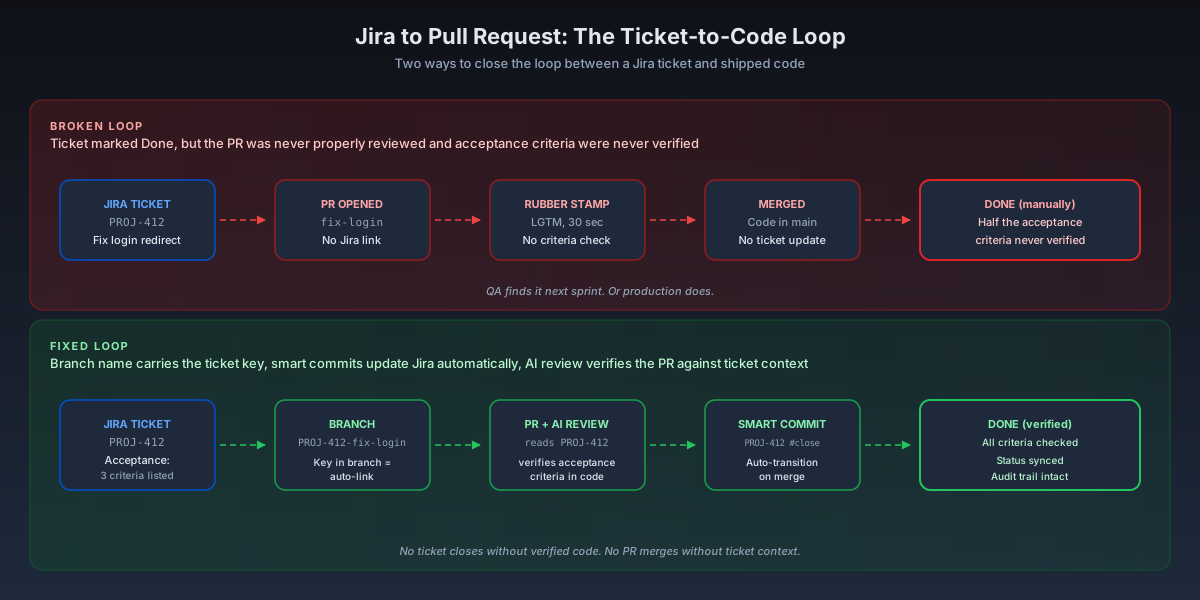
TL;DR: The most common review failure I see is not a missed bug. It's a Jira ticket marked Done while the PR was never actually reviewed against the ticket, half the acceptance criteria were never verified in code, and nobody noticed until QA caught it next sprint. The fix has three layers — branch naming, smart commits, and Jira automation — plus an AI review pass that reads the ticket alongside the diff. This guide walks through what good ticket-to-code traceability looks like on GitHub, GitLab, and Bitbucket, and where Git AutoReview slots in.
A typical week looks like this. The sprint board has 12 tickets in Done. The repo has 14 merged PRs. The two are roughly correlated but nobody can tell you which PR closed which ticket without scrolling through commit messages and reading author names. The retrospective finds three issues that "should have been caught in review" — and when you trace them back, the PRs were merged without anyone opening the Jira ticket. The acceptance criteria the product manager wrote a week earlier never made it into the reviewer's head.
This is not a tooling failure. Every Git host has Jira integration. The failure is that the loop is optional at every step, and busy engineers skip the optional parts. The article below is what the loop looks like when it's not optional — what each platform actually provides, what falls back to convention, and where AI review changes the trade-off.
Why the loop breaks for most teams
Jira holds the ticket. Git holds the code. The review happens in the Git host's PR view. None of these systems share data automatically unless a human or an integration pushes it across the boundary, and the cost of that push is paid every single PR. Most of the time, the push doesn't happen.
The Stack Overflow 2024 Developer Survey put Jira at 57.5% of professional developers — top asynchronous tool, third year running. Atlassian's Q4 FY24 shareholder letter says 84% of the Fortune 500 are customers and the company crossed 300,000 total. The population of teams using Jira and reviewing pull requests is most of the industry. The integration patterns below are not edge cases. They are the default workflow that most teams have left half-configured.
Three failure modes show up over and over.
The PR has no Jira link. A developer opens a feature branch, opens a PR titled "Fix login redirect," and merges. There is no ticket key in the branch, the commit, or the description. Jira's development panel has nothing to display. Reviewers have no path back to the original ask. The ticket sits in In Progress until someone manually clicks Done later.
The reviewer never opens Jira. The PR description has the ticket key. The development panel works. But the reviewer reads the diff, agrees the code looks fine, and clicks Approve without ever clicking through to the ticket. Acceptance criteria from the product manager — "the redirect must preserve query parameters" — sit unread. The diff implements 80% of the ask and the missing 20% ships.
Jira automation is configured but nobody trusts it. Teams wire up rules so a PR open transitions the ticket to In Review. Then a flaky webhook drops one transition, the ticket stays In Progress, and the team stops trusting the rule. They go back to manual status updates and the loop is broken again — not by the tooling, by the loss of trust in it.
The research case for traceability
The empirical work on requirements traceability is small but consistent. Rempel and Mäder's paper in IEEE Transactions on Software Engineering analyzed 24 medium-to-large open-source projects and found a statistically significant relationship between traceability completeness and defect rate — components with thorough traceability had fewer bugs, and the effect was robust across the projects.
A separate study with 71 developers measured the productivity side. Engineers who had traceability support available completed tasks 24% faster and produced 50% more correct results. Same task, same code, just access to the ticket context that explained why the change was being made.
The cost of missing context shows up at the individual review level. Dr. Gloria Mark's work at UC Irvine measured the recovery cost after an interruption at 23 minutes 15 seconds to fully return to a task. Every time a reviewer has to switch from the PR to the Jira ticket and back — without a link to follow — the switch costs real time. Linking the ticket to the PR is the simplest possible intervention. It costs nothing at commit time and saves the switch every single review.
The three linking methods
There are three ways to connect a Jira ticket to a Git commit, branch, or PR. They are additive — you can use all three on the same change — and each has a different friction profile.
1. Branch naming with the issue key
Lowest-friction option and the team default I recommend. The convention is <JIRA_KEY>-<short-description> or <type>/<JIRA_KEY>-<short-description>:
PROJ-412-fix-login-redirect
feature/PROJ-412-fix-login-redirect
bugfix/PROJ-1024-cart-total-rounding
Both GitHub's Jira app and the GitLab for Jira Cloud app detect the issue key in the branch name automatically. Bitbucket's native Jira integration does the same. Opening a PR from that branch attaches it to the ticket in Jira's development panel — no extra step.
Enforce it with a commit-msg or pre-push hook so a typo doesn't slip through:
# .git/hooks/commit-msg (or via Husky / lefthook)
#!/usr/bin/env bash
if ! grep -qE "^[A-Z]+-[0-9]+" "$1" && ! git symbolic-ref --short HEAD | grep -qE "[A-Z]+-[0-9]+"; then
  echo "Commit message or branch name must include a Jira key (e.g. PROJ-412)"
  exit 1
fi
The hook is bypass-able with --no-verify so it is a guardrail, not a gate. The actual gate sits at the PR level.
2. Smart commits with #command syntax
Smart commits are the Atlassian-specific feature that goes beyond linking. You put the issue key in the commit message and follow it with a #command to transition the ticket, add a comment, or log time. The syntax is:
<ISSUE_KEY> <optional text> #<command> <command_arguments>
Examples from real commit logs:
git commit -m "PROJ-412 fix login redirect when query string present"
# Links to PROJ-412. No transition.

git commit -m "PROJ-412 #close fix login redirect"
# Links and transitions PROJ-412 to the close status.

git commit -m "PROJ-412 #time 2h #comment fix login redirect"
# Logs 2 hours and adds a comment to PROJ-412.

git commit -m "PROJ-412 PROJ-413 #in-progress"
# One command, two tickets transitioned.
Three commands cover almost everything teams use: #comment <text>, #time <duration>, and #<transition_name>. The transition name has to match the workflow — #close works if your workflow has a Close transition, #done works if you renamed it.
Platform support matters. Smart commits work on Bitbucket Cloud out of the box once you connect the workspace to Jira. They work on GitHub via the official Jira app. They work on GitLab through the Jira Development Panel integration (the Cloud app or the DVCS connector for Data Center). The older GitLab Issues integration only supports a single closing transition.
One detail that catches every team eventually: the committer's email has to match exactly one Jira user with permission to perform the transition. The Atlassian docs put it bluntly: "Mismatched email addresses is a common reason why smart commits fail to work as expected." If your team uses corporate emails for Jira and @gmail.com for commits, smart commits will silently do nothing.
3. Jira Automation rules tied to PR events
The third path doesn't put anything in your commit messages. Instead, you configure Jira Automation to listen for PR events and update the ticket:
WHEN: Pull request created
IF: Branch name matches "*PROJ-*"
THEN: Transition issue → In Review
Same template covers PR merged → Done, PR declined → Re-open. Jira Automation lives at Project Settings → Automation. Atlassian ships starter templates for every common workflow.
The advantage over smart commits is that developers don't need to remember any syntax. The branch name does the work, the automation does the status sync. The cost is that you need to configure and maintain the rules — and trust them. Teams that wire up automation and then see one missed transition tend to abandon the whole approach.
In practice, the working combination is branch-name auto-detection plus PR-event automation. Smart commits stay useful for #time logging. Status moves are better handled by automation because they don't depend on developer behavior at every commit.
What good traceability looks like, end to end
A working loop has six visible artifacts. The Jira ticket has summary, description, and acceptance criteria written before code starts. The branch name carries the ticket key. The PR title or description carries it too. Commits include the ticket key, optionally with smart commit transitions. The Jira development panel shows the linked branch, commits, PR, and build status. Ticket status transitions follow the PR — In Review when opened, Done when merged.
The invisible piece is the reviewer's mental context. The reviewer should open the PR, see the linked ticket in the development panel, click through, read the acceptance criteria, then read the diff against them. Under a minute, one click each direction.
When all six pieces are in place, retrospectives change shape. "Which PR closed this ticket?" becomes one click. "Did the PR address all acceptance criteria?" is answerable by reading two artifacts in parallel. The audit trail is intact — required for SOC 2, ISO 27001, FedRAMP, and any compliance regime that asks "show me the requirement that motivated this change." Without it, the audit answer is a story. With it, two URLs.
How AI review strengthens the loop
AI code review tools that only see the diff can tell you if the code is correct. They cannot tell you if it does what the ticket asked. The ticket lives in Jira; the code lives in Git. A bug-finding model that never reads the ticket is no better than a fast reviewer who never reads the ticket — it catches the same class of issues and misses the same class.
The fix is feeding ticket context into the review prompt. Git AutoReview reads the Jira ticket — summary, description, acceptance criteria, labels, custom fields — through Jira's REST API, then injects that text into the AI prompt before the diff. When PROJ-412 says "the redirect must preserve query parameters" and the diff strips them on the second call, the AI flags the mismatch. Same model, same diff, completely different review because the context now includes the ask.
Three principles matter for trust here.
Read-only by design. Git AutoReview never writes to Jira. It does not create tickets, post comments, change ticket status, or modify any field. The Jira API token uses read scope only. Status changes still flow through smart commits or Jira Automation — the existing loop you already configured. We deliberately stay out of the audit trail.
No third-party cloud sees your tickets. The Jira API call goes from VS Code directly to your Jira instance. The ticket text plus the diff gets passed to the AI provider you chose (Anthropic, Google, OpenAI). We don't proxy it through our infrastructure. If your Jira instance is on-prem behind a VPN, the developer's machine needs network access to it — same as any other Jira client.
The AI can still be wrong. AI review reads the ticket and the diff and writes a verdict. The verdict can be wrong about either side. A human still owns approval. The model is fast and consistent enough to catch common acceptance-criteria mismatches; it is not authoritative on intent or design.
The combination — branch naming, smart commits, automation rules, plus AI review reading the ticket — closes the loop in a way none of them does alone. Branch naming gets the data linked. Smart commits and automation keep status accurate. AI review verifies code against the ticket text.
Try ticket-aware AI review
Git AutoReview reads Jira ticket context into every review, with read-only API access — no third-party cloud, no inbound webhooks, no ticket-status changes. Free plan includes 10 reviews/day on a single repository.
Install Git AutoReview for VS CodePlatform-specific setup
The three big Git hosts each have their own Jira integration story. The setup is broadly similar but the details differ enough to matter at production scale. Below is the verified May 2026 state for each.
GitHub + Jira
The official integration is the GitHub for Jira app, built by Atlassian on the Marketplace. It supports GitHub Cloud, GitHub Enterprise Cloud, and GitHub Enterprise Server. Setup is two steps: install the app on the Jira side, then authorize it to read your GitHub organization.
Once installed, the app syncs PRs, deployments, branches, builds, commits, and security vulnerabilities to the Jira development panel. Smart commits work. Branch creation from a Jira issue works. The Atlassian Teamwork Graph indexes the GitHub data so it's searchable through Jira's search.
Two limitations worth knowing. The app is free, but the underlying open-source repo was deprecated in early 2025 — Atlassian maintains it but you can't fork it. The Rovo AI features in the development panel are a paid Rovo add-on, not the free integration. For ticket-aware AI review on a GitHub + Jira stack, the free integration gives you the data flow; the AI layer is a separate decision.
GitLab + Jira
GitLab has two distinct integrations and the difference matters.
Jira Issues Integration is built into GitLab itself, available on every tier including CE Free. It lets you mention Jira issue IDs in commits and merge requests to create links, and supports a single transition to close the issue. Simpler path, works without installing anything extra. The trade-off: it doesn't surface GitLab activity inside Jira's development panel and doesn't support full smart commits.
Jira Development Panel is the richer integration. On Jira Cloud, you use the GitLab for Jira Cloud app — v2.0.0 shipped in April 2026, migrating from Atlassian Connect to Forge ahead of the Connect retirement in Q4 2026. On Jira Data Center or Server, you use Atlassian's DVCS connector. Both give you the development panel inside Jira, smart commits, and bi-directional syncing of branches, merge requests, commits, pipelines, deployments, and feature flags. The Cloud app syncs in real time. The DVCS connector polls every 60 minutes — slow but acceptable for most teams.
For GitLab self-managed, the DVCS connector needs Jira to reach your GitLab instance. If GitLab is fully air-gapped, the integration won't work as documented — see our GitLab Self-Managed code review guide for the trade-offs.
Bitbucket + Jira
Tightest integration of the three because Atlassian owns both products. Setup is two clicks from Bitbucket workspace settings: Settings → Workspace settings → Jira, select your Jira Cloud instance, grant mutual access. Done.
Once connected, repository sync is enabled by default. Smart commits are on by default. PRs, branches, and commits flow into Jira's development panel automatically. Bitbucket-side features that don't exist on GitHub or GitLab: stale PR detection that surfaces PRs open longer than typical (visible on the Jira dashboard), and direct branch creation from inside a Jira ticket without ever opening Bitbucket.
The integration is workspace-scoped — you control which repositories appear in Jira by moving them between workspaces. Smart commits can be enabled or disabled per repository on the DVCS accounts page.
If you are choosing a Git host primarily because of Jira tightness, Bitbucket is the path of least resistance. The development panel is richer, the setup is faster, and the data sync is real-time. The deeper Bitbucket PR automation guide walks through how to combine the Jira integration with Pipelines, merge checks, and AI review.
Enforcing the loop with PR templates and merge checks
A good PR template makes the Jira link impossible to miss. The pattern below sits in .github/PULL_REQUEST_TEMPLATE.md for GitHub, .gitlab/merge_request_templates/Default.md for GitLab, or the repository's pull request template setting for Bitbucket:
## Jira ticket

PROJ-_____

## What changed

<!-- One sentence per bullet -->

## Acceptance criteria verified

- [ ] Criterion 1 from ticket
- [ ] Criterion 2 from ticket
- [ ] Criterion 3 from ticket

## Testing

<!-- How you verified this works -->
The Jira ticket line goes at the top because that's where reviewers' eyes land. The acceptance-criteria block forces the author to copy the ticket criteria into the PR — surfacing them in the reviewer's view even before any tool checks them.
The companion is a merge check or required CI step that fails if the PR description lacks a valid Jira key. GitHub: a small Action status check. GitLab Premium: built-in push rule ("Jira reference required" from GitLab 18.3). Bitbucket: merge checks. The full pull request template guide covers the template patterns in more depth.
The combination of template + merge check + AI review is what closes the loop. Each piece individually fails some percentage of the time. Together, the failure modes don't overlap — merges without ticket context become impossible to do by accident.
Read your Jira tickets, automatically
Git AutoReview pulls ticket summary, description, and acceptance criteria into every review. Read-only API access — your Jira instance never opens an inbound connection. Free plan includes 10 reviews/day.
Install Git AutoReview for VS CodeA workflow guide for teams adopting this
If you are starting from a team that has Jira and a Git host wired up but no real traceability, here is the order I'd roll changes out. Each step is independent enough to ship on its own and each one tightens the loop a little more.
Week 1 — Branch naming convention and a git hook. Pick a pattern and write it into the team's contributing guide. Add a commit-msg or pre-push hook that rejects missing keys. The hook is bypass-able; the goal is making the default frictionless rather than enforcing a gate yet.
Week 2 — PR template with the Jira line at the top. Drop the template above into .github/PULL_REQUEST_TEMPLATE.md or the platform equivalent. The acceptance-criteria checkbox block forces the author to surface the criteria even before any tool verifies them.
Week 3 — Jira integration app on the Git host. Install the official integration (GitHub for Jira, GitLab for Jira Cloud, or the Bitbucket-Jira connector). Confirm the development panel populates on a recent ticket. Smart commits should start working without further setup.
Week 4 — Jira Automation for status sync. Add one rule to start: PR opened → transition to In Review. If it works, add merge → Done and declined → Reopen. Resist wiring up too many rules at once — every flaky rule costs trust in the whole system.
Week 5 — Merge check that requires a Jira key. GitHub: Required status check via a small Action. GitLab Premium: Built-in push rule. Bitbucket: Merge check with the ticket-link rule. After this, merging without ticket context requires actively bypassing the check.
Week 6+ — AI review with Jira context. Install Git AutoReview, connect Jira via OAuth (Cloud) or API token (Data Center), and enable Include Jira Context. The AI will start surfacing acceptance-criteria mismatches in the first week.
The whole rollout fits in two sprints. The cultural change of "no PR without a ticket, no Done without a verified PR" takes longer to land than the technical change, but the technical change is the prerequisite.
Anti-patterns to avoid
A few patterns to skip. They all look reasonable until you try to operate them at team scale.
Mandating ticket creation for every commit. A Jira ticket per typo fix is overhead with no value. Carve out an exception for chore: and docs: commits. Forcing a ticket for trivial work pushes engineers to lie about the work to get past the gate.
Smart commit transitions for every workflow step. Some teams try to wire #in-progress, #in-review, #qa, #done all through smart commits. The result is brittle. Use smart commits for #time and final-state transitions; use Jira Automation for intermediate state changes triggered by PR events.
Treating AI review as ticket sign-off. AI review can flag mismatches between the diff and the acceptance criteria. It cannot decide if the criteria themselves are right or if PM and engineer agree on intent. Treat AI output as a candidate finding, not a verdict.
Manually closing tickets when the PR is still open. Most common workflow leak — a PM or engineer marks the ticket Done because "the code is written," even though the PR is still in review. The fix is a Jira Automation rule that re-opens the ticket if it transitions to Done while the linked PR is unmerged.
Reviewing without reading the ticket. Not a tool problem, but where most value gets lost. Even with perfect linking, a reviewer who clicks Approve without opening the ticket is doing half the job. AI review helps because it reads the ticket whether the human does or not — but the team norm has to back it up.
Measuring whether the loop is working
A few metrics to track once the setup is in place.
| Metric | What it tells you | How to measure |
|---|---|---|
| % PRs with a Jira key | Template + hook are working | Grep PR titles/descriptions vs total |
| % tickets with a linked PR | Development panel is being used | Jira JQL: development[pullrequests].any = "merged" |
| % Done tickets with verified merge | Loop closes properly | Jira Automation logs every Done transition with PR state |
| Time from PR open → ticket In Review | Automation is firing fast | Jira ticket history + PR open timestamp |
| AC findings per AI review | Ticket-aware AI catches gaps | Git AutoReview review log |
Look at the first three weekly. If "% PRs with a Jira key" is below 90% a month after rollout, the hook and template need iteration. If "% Done tickets with verified merge" is below 95%, the Jira Automation rules aren't catching everything or someone is closing tickets manually.
When to stop
The minimum useful setup is branch naming plus the official Jira integration plus one Jira Automation rule for PR-opened → In Review. That covers 80% of the value. Adding the PR template, the merge check for Jira keys, and the Done-without-merged-PR rule covers another 15%. AI review reading the ticket adds the last 5% in a different dimension — it makes the acceptance-criteria check work even when the reviewer is rushed.
Beyond that, more automation usually costs trust without proportional benefit. If your team is missing acceptance criteria in code, the issue is the link between the ticket and the review, not the link between the ticket and the CI pipeline. Fix the review side first.
Related resources
- Bitbucket Pull Request Automation: Complete Guide 2026 — three-layer Bitbucket automation including the native Jira integration
- Self-Hosted Code Review: GitLab Self-Managed + VS Code 2026 — Jira integration trade-offs for on-prem GitLab
- Code Review Checklist for AI-Generated Code — 12-item checklist where item 1 is requirement alignment
- Pull Request Template Guide — full template patterns for GitHub, GitLab, Bitbucket
- GitHub Code Review Best Practices 2026 — broader review workflow with PR size targets and SLAs
- Git AutoReview Jira Integration — product page with setup walkthrough
Reviewing GitHub PRs? Git AutoReview adds AI suggestions you approve before publishing.
Frequently Asked Questions
How do smart commits actually link a commit to a Jira ticket?
Does Jira-to-Git integration work for all platforms?
Why does a Jira ticket get closed before the PR is reviewed?
What is the difference between linking a Jira ticket in a branch name vs the PR description?
Can AI code review read Jira ticket context?
How do I set up Jira automation to move a ticket when a PR opens?
Does Git AutoReview write to Jira or change ticket status?
What's the simplest way to enforce ticket-PR linking on a team?
Try it on your next GitHub PR
AI reviews your pull request. You approve what gets published. Nothing goes live without your OK.
Free: 10 AI reviews/day, 1 repo. No credit card.
Related Articles
OpenCode vs Claude Code: An Honest Comparison (2026)
OpenCode vs Claude Code compared on licence, models, cost and PR review. Verified GitHub and pricing data, plus the archived repo everyone still quotes.
Open VSX: AI Code Review in Cursor, VSCodium & Windsurf (2026)
VS Code forks cannot reach Microsoft's Marketplace. Here is the licence reason, and how to install AI code review in Cursor, VSCodium and Windsurf.
Code Review for Solo Developers 2026: Catch Bugs Without a Team
Solo developers miss bugs teams catch in peer review. Here is the cognitive reason self-review fails, 4 techniques that actually work, and how AI review fits a solo dev's ship cycle.
Get the AI Code Review Checklist
25 PR bugs AI catches that humans miss — with real code examples. Free PDF, sent instantly.
One-click unsubscribe. We never share your email.