Claude Code vs Gemini CLI for Code Review: 2026 Head-to-Head
Both ship PR review bots. One costs $15-25 per review. One is free up to 1,000 requests per day. The differences nobody covers — and why the SERP framing of choosing between them is the wrong question.
Reviewing GitHub PRs? Git AutoReview adds AI suggestions you approve before publishing.
Claude Code vs Gemini CLI for Code Review
The SERP for "claude code vs gemini cli" is dominated by ten articles benchmarking the two for code generation — building to-do apps, writing tests, refactoring. None of them cover what most teams actually need to compare: which one to use for pull request review, the part of the development cycle where the AI either earns its monthly cost or buries your team in noise.
TL;DR: Claude Code's managed Code Review GitHub App is the more polished PR experience — multi-agent analysis, severity-tagged comments, REVIEW.md customization — but costs $15-25 per pull request and gates on the Team plan at $25 per seat. The Gemini CLI GitHub Action runs the same @gemini-cli /review flow on the Gemini API free tier of 1,000 requests per day at zero cost, but with a single model and looser severity grading. Both auto-post comments without human approval. Neither covers GitLab or Bitbucket natively. The third option — running both models behind a human approval gate across all three platforms — is what Git AutoReview shipped specifically for this gap.
Quick answers for 2026
Which AI CLI is best for code review in 2026?
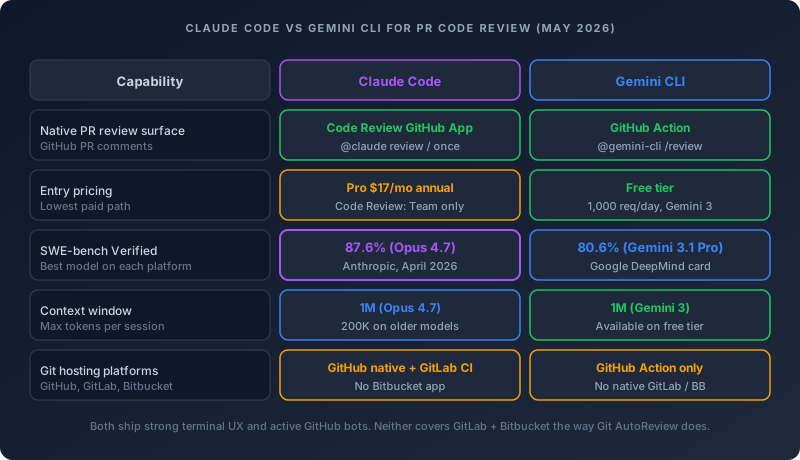
The honest answer is "depends on which platform you ship on and whether you need human approval." Claude Code's managed Code Review GitHub App ships the most production-ready PR review of any AI CLI right now — severity-tagged findings, REVIEW.md customization, verification step that filters false positives. It runs at $15-25 per pull request on the Anthropic bill and requires the Team plan or higher. The Gemini CLI GitHub Action delivers a comparable workflow at zero cost on the free tier for solo developers and small teams. Both auto-post comments to the PR without a human in the loop, which is the failure mode most teams hit by month two.
Is Claude Code or Gemini CLI cheaper for code review?
Gemini CLI is dramatically cheaper at low volume — the Google OAuth free tier covers 1,000 requests per day with full Gemini 3 access including the 1M token context window. Claude Code's Code Review service costs $15-25 per PR and is gated on Claude Team at $25 per seat or higher, billed separately as extra usage. At 50 PRs per week a 10-person team running Claude Code Review hits roughly $1,000-1,500 per month on token charges alone. The same review volume on Gemini CLI sits inside the free quota or costs $2 per million input tokens on Gemini 3.1 Pro if you blow past it.
Does Claude Code work with GitLab or Bitbucket?
Claude Code's managed Code Review GitHub App is GitHub-only. There is a separate GitLab CI/CD integration that runs Claude Code inside GitLab pipelines without the managed app — you write the workflow yourself. Bitbucket Cloud, Server, and Data Center have no first-party Claude Code app. The same pattern repeats for Gemini CLI: GitHub Action covers github.com PRs, GitLab and Bitbucket require self-built pipeline glue. Teams on multiple platforms typically end up with a third tool to standardize the AI review layer.
Can I run Claude Code and Gemini CLI on the same pull request?
Yes, and it is the pattern that consistently catches more bugs than either model alone. The mechanical answer is: install both GitHub Apps, configure both workflows, and let them post comments side-by-side. The practical answer is that you end up with two review threads, duplicate findings, and a PR comment count that doubles overnight. Running both models behind one approval gate through a tool like Git AutoReview gives you the multi-model coverage without the noise — findings deduplicate before anything reaches the PR.
What is the SWE-bench score difference between Claude Opus 4.7 and Gemini 3.1 Pro?
Claude Opus 4.7 hit 87.6% on SWE-bench Verified per Anthropic's April 2026 release, against Gemini 3.1 Pro at 80.6% per Google DeepMind's model card. That seven-point spread is the widest gap between the two providers since mid-2025 — the previous round had Opus 4.6 at 80.8% basically tied with Gemini. SWE-bench Verified is widely considered contaminated for frontier models since the test problems sit in public GitHub history that everyone trains on, so the gap matters less than how each agent loops over a real PR diff and verifies its own findings.
Picking between Claude Code and Gemini CLI used to be a tools-team conversation about which terminal to run. That changed when both providers shipped GitHub-native code review services in 2025. Now the decision is closer to picking a managed CI tool: which one to plug into your repos, which one to pay for, and which one matches how your team actually reviews pull requests. The AI PR review guide covers the broader category of dedicated review tools — this post focuses specifically on the CLI-native angle, because half the teams hitting "claude code vs gemini cli" are not actually deciding between terminal agents, they are deciding which AI to attach to their PR pipeline.
The two tools produce overlapping but distinct findings on the same diff. Claude Code's multi-agent verification step catches subtle logic bugs that Gemini's single-pass review misses, especially across files. Gemini CLI's 1M context window holds the full repo in one prompt, which surfaces a different class of issues that any 200K-context review misses entirely. Each tool finds something the other does not. The right answer for most teams ends up being "both, with a human in the loop."
What is Claude Code and what does it actually do for code review?
Claude Code is Anthropic's agentic coding tool that runs in your terminal, VS Code, JetBrains IDEs, the Desktop app, or a web browser. The repository has 122,554 stars and an active commit cadence — last pushed May 9, 2026 per the GitHub API. The CLI itself works on any project where you can run claude from a terminal, but the code review side splits into two products.
The first is the manual review flow: paste a diff into the Claude Code terminal, tell it to review your changes, and it runs git diff, opens the affected files, follows import chains, and produces severity-ranked findings. This works on every plan including Claude Pro at $17 per month annual or $20 monthly, and it is the entry point most solo developers use. The trade-off is you drive it manually — no GitHub integration, no automatic posting, no PR comments.
The second is the managed Code Review GitHub App, which is the part most "Claude Code vs Gemini CLI" comparisons miss entirely. This is a managed service that runs on Anthropic infrastructure when a pull request opens or on every push. A fleet of specialized agents analyze the diff in parallel, a verification step filters false positives, and findings post as inline comments tagged with severity markers. The whole thing averages 20 minutes per review and costs $15-25 per PR on the Anthropic bill. Code Review is in research preview, available only on Team or Enterprise plans, and is GitHub-only as of May 2026.
The customization is the part nobody talks about. You can drop a REVIEW.md file in your repo root and the contents get injected verbatim into every agent's system prompt as the highest-priority instruction block. That means you can redefine what "Important" means for your specific repo, cap the volume of "Nit" comments, skip generated files and lockfiles, and add repo-specific rules like "new API routes must have an integration test." Anyone who has burned out reviewing 200 auto-posted bot comments per week knows why this matters — without aggressive customization, every AI reviewer drowns the signal in noise within a month.
What is Gemini CLI and what does it do for code review?
Gemini CLI is Google's open-source AI agent that brings Gemini 3 directly into your terminal. The repository sits at 103,712 stars, Apache 2.0 licensed, last pushed May 11, 2026 — the same day this post went live. Installation is npm install -g @google/gemini-cli, brew install gemini-cli, or npx @google/gemini-cli for no-install runs.
The headline feature is the free tier. Sign in with a personal Google account and you get 60 requests per minute and 1,000 requests per day, with full access to Gemini 3 and the 1M token context window. That free tier is the largest of any frontier AI CLI in May 2026 — Claude Code has no free tier at all, OpenAI Codex CLI requires API credits, and Cursor's bundled access requires Cursor Pro. For solo developers running personal projects the Gemini CLI free tier is genuinely free for most use cases.
The code review side is the run-gemini-cli GitHub Action, a separate repository with 1,983 stars that wraps the CLI for GitHub workflows. Setup is: get an API key from Google AI Studio, add it as a GEMINI_API_KEY secret in your repo, drop a workflow file in .github/workflows/, and the action handles pull request reviews, issue triage, and @gemini-cli mentions in PR comments. The trigger phrase is @gemini-cli /review posted as a PR comment — analogous to Claude Code's @claude review, but the implementation runs in your own GitHub Actions runner instead of on Anthropic infrastructure.
The architectural difference matters. Because the Gemini CLI Action runs in your own runner with your own API key, your code never leaves the GitHub Actions environment — it goes directly to the Gemini API and back. Claude Code Review runs the analysis on Anthropic's managed infrastructure, which means the code path is one extra hop and the trust boundary is wider. Neither is dangerous, both are documented, but security teams running compliance audits care about the difference.
How do Claude Code and Gemini CLI compare on PR review specifically?
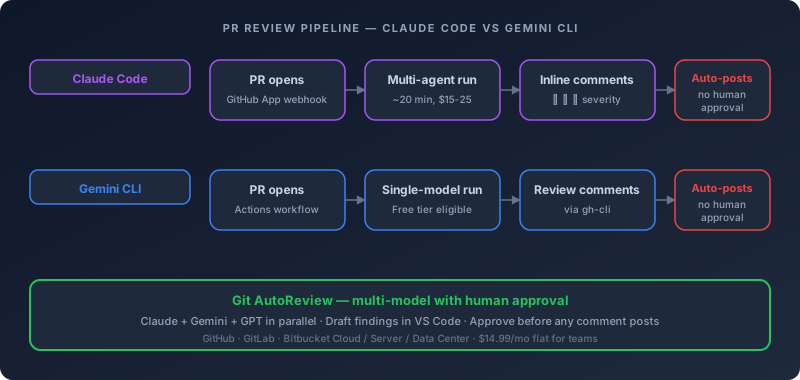
The pipelines look superficially similar — PR opens, AI analyzes the diff, comments post inline — but the implementation details produce noticeably different output. Five differences matter for production code review.
Multi-agent vs single-agent analysis
Claude Code Review spawns multiple specialized agents that each look for a different class of issue: logic bugs, security flaws, edge cases, regressions. Each agent's candidate findings then go through a verification step that checks the issue against the actual code behavior before posting. The verification step is what kills most false positives — the kind where an AI reviewer flags an issue that the code already handles elsewhere in the diff. The Gemini CLI Action runs as a single model invocation per trigger. There is no separate verification pass and no parallel agents, which means findings reach the PR faster but with higher false-positive rates on tricky logic.
Severity grading and customization depth
Claude Code Review tags every finding with 🔴 Important, 🟡 Nit, or 🟣 Pre-existing, and the REVIEW.md system lets you redefine those thresholds per repo. The Gemini CLI Action does not ship a built-in severity model — findings post as plain review comments and any prioritization comes from the prompt template you write yourself in .gemini/styleguide.md or your workflow file. Both approaches work, but Claude's defaults are calibrated out of the box while Gemini's require more upfront prompt engineering.
Trigger behavior and re-review
Claude Code Review supports @claude review to subscribe a PR to push-triggered reviews and @claude review once for a single one-shot pass. The Gemini CLI Action supports @gemini-cli /review and similar slash commands, plus auto-trigger on pull_request: types: [opened, synchronize] in the workflow file. The difference is that Gemini's behavior is whatever you wire it to in the workflow — fully customizable but you build the trigger logic yourself. Claude's behavior is a managed setting in the admin dashboard with three preset modes.
Cost per review
This is where the gap is widest. Claude Code Review averages $15-25 per pull request on the Anthropic bill, charged as extra usage on top of the Team plan ($25 per seat per month). A 10-person team doing 50 PRs per week lands at roughly $750-1,250 monthly on the Code Review service alone. The Gemini CLI Action runs on the free tier for the first 1,000 requests per day per personal account, then transitions to paid Gemini API at $2 per million input tokens and $12 per million output tokens for Gemini 3.1 Pro. At 50 PRs per week the Gemini API cost rarely exceeds $50-100 per month even at paid tier rates because each review is a single model call.
Auto-post versus human approval
Both tools auto-post comments without any human approval step. This is the failure mode most teams hit. By month two, the PR comment count doubles, reviewers start dismissing AI comments wholesale, and the signal-to-noise ratio collapses. The fix is either aggressive REVIEW.md or GEMINI.md customization to suppress nit-level findings, or running the review behind a separate tool that surfaces drafts in your editor before anything reaches the PR. Git AutoReview does the second — every finding lands in VS Code as a draft, you approve what is useful, and only approved comments reach GitHub, GitLab, or Bitbucket.
Claude, Gemini, and GPT in parallel on every PR. Drafts surface in VS Code. You approve before anything posts. 10 free reviews per day.
Install Git AutoReview Free → How AI PR review works
What does the Claude Opus 4.7 vs Gemini 3.1 Pro benchmark gap actually mean for code review?
The headline numbers are easy to quote: 87.6% versus 80.6% on SWE-bench Verified. The interpretation is harder.
Anthropic's Claude Opus 4.7 announcement on April 16, 2026 reported 87.6% on SWE-bench Verified, up from Opus 4.6 at 80.8% — a seven-point gain that put Anthropic clearly ahead of every other frontier provider on that specific benchmark. Google DeepMind's Gemini 3.1 Pro model card lists 80.6% on the same benchmark. On paper this looks like a decisive Claude win. In practice the picture splits depending on which benchmark you weight.
Gemini 3.1 Pro leads LiveCodeBench Pro at an Elo of 2887 per the same model card — roughly 200 points ahead of Claude on competitive coding problems published after the training cutoff, which makes that benchmark much harder to game than SWE-bench. Terminal-Bench 2.0 has Gemini 3.1 Pro at 68.5% on the Terminus-2 harness. Each model wins a different test. The teams getting the most accurate code review are not the ones picking the highest single score — they are the ones running multiple models on the same PR and comparing what each one catches.
The contamination problem on SWE-bench Verified is the part most "best AI for coding" articles skip. SWE-bench Verified is built from public GitHub issues that closed over the years, with the fixes available in the public commit history that every frontier model trained on. A model scoring 87% on Verified is partly demonstrating coding capability and partly demonstrating memorization. That is why third-party leaderboards like BenchLM sometimes show different numbers than the provider-reported scores — they apply contamination filters that company self-evaluations skip.
For code review specifically the benchmark gap matters less than the agent loop. Both models are competitive enough that the right system prompt, the right verification step, and the right repo-specific customization will produce more useful findings than picking the model with the higher headline number. Our benchmark deep-dive in SWE-Bench Leaderboard 2026: Claude vs GPT vs Gemini covers the full leaderboard interpretation.
How does pricing actually compare for a 10-person team?
Cost is the first thing teams compare and the place most published comparisons get wrong by mixing CLI subscription cost with managed service cost. The clean breakdown looks like this for a 10-developer team running 50 PRs per week.
Claude Code path: Claude Team at $25 per seat per month annual ($250/month for 10 seats) plus Code Review extra usage at roughly $15-25 per PR. At 50 PRs per week that lands at $750-1,250 per month in token charges. Total: $1,000-1,500 per month for the team. Individual developers get Claude Code in their terminal as part of the Team plan, plus the managed Code Review service on top.
Gemini CLI path: Free tier with personal Google accounts covers 1,000 requests per day per developer. At realistic review volumes most teams stay under that cap or migrate to paid Gemini API at $2 per million input tokens for Gemini 3.1 Pro. A 10-person team doing 50 PRs per week on paid tier rarely exceeds $50-100 per month because each review is a single model call rather than a multi-agent verification pipeline. The trade-off is fewer features — no managed service, no built-in severity grading, no verification pass. Total: $0-100 per month depending on volume.
Git AutoReview Team plan: $14.99 per month flat for the whole team, regardless of seat count. Includes Claude, Gemini, and GPT access in parallel with a human approval step before any comment posts, plus GitHub, GitLab, and Bitbucket coverage including Bitbucket Server and Data Center. BYOK is available on every plan if you prefer to pay model providers directly. For a 10-person team this comes out to roughly $179 per year — less than two months of Claude Code Review token charges on the equivalent PR volume.
The pricing gap is wide enough that it changes the buying conversation. If you are a solo developer building OSS, Gemini CLI's free tier is the obvious starting point. If you are a Claude Team customer with budget already allocated for Anthropic, the managed Code Review service is the lowest-friction setup. If you are a small or mid-sized team optimizing for monthly burn, the flat $14.99 of Git AutoReview Team plus BYOK on whichever models you trust most ends up cheapest by a wide margin once volume scales past trivial.
The AI API pricing tool lets you back out the exact API spend per model on your monthly review volume — paste in your input and output token counts per PR, sort by blended cost, and the calculator shows real numbers per provider.
When does Claude Code beat Gemini CLI for PR review?
The clean answer is "when your team is already on Claude Team or Enterprise and you need severity-tagged comments out of the box." The longer answer breaks into four scenarios.
Multi-file architectural refactors. Claude Opus 4.7 consistently catches logic bugs that span more than one file better than any single-call Gemini review. The multi-agent setup gives Claude an inherent advantage on changes that touch a service layer plus its callers plus its tests — three concurrent agents each look at a different angle, then the verification step cross-checks them. Gemini's single-pass review with 1M context can hold the same files in scope, but lacks the parallel-perspectives architecture.
Security-sensitive PRs. The Code Review service's verification step is calibrated to filter out the most common false positives in security review — flagging an issue that the code handles elsewhere in the diff, suggesting a fix that breaks existing behavior, calling out a concern that already passed an internal lint rule. Gemini CLI's GitHub Action requires you to build that calibration in your prompt template. Both can produce useful security findings, but Claude's default behavior on security review is closer to production-ready out of the box.
Repos with strict review style guides. If your team has a long list of "do this, never do this" rules, Claude's REVIEW.md system injects those rules as the highest-priority instruction block in every agent. Gemini CLI supports GEMINI.md for context, but the priority model is less explicit. For repos with 50+ specific review rules, Claude's customization is markedly easier to tune.
Teams already paying for Claude Team. The math gets simpler when the seat charges are already on the bill. Adding Code Review to an existing Claude Team subscription is a few clicks in the admin panel, with usage-based billing on top of the seats. Teams not already on Claude Team face a higher bar — $25 per seat per month plus $15-25 per PR adds up fast for organizations that have not committed to Anthropic as the primary AI provider.
When does Gemini CLI beat Claude Code for PR review?
The flip side. Four scenarios where Gemini CLI is the better pick.
Solo developers and OSS maintainers. The free tier kills the conversation. 1,000 Gemini 3 requests per day on the personal Google account plan, including the 1M token context window, is enough for any individual developer's review volume. Claude Code's manual CLI is included in Pro at $17 per month annual, but the managed Code Review service is locked behind Team — which solo developers do not need at $25 per seat per month minimum.
Cost-sensitive teams at higher volume. The cost math flips above roughly 30-40 PRs per week per team. At that volume Claude Code Review token charges start dominating the monthly bill, while Gemini API stays under $100 per month for the same volume because the architecture is lighter. If review volume is high and budget is tight, Gemini CLI wins on dollars-per-PR by an order of magnitude.
Teams that need 1M context on every review. Gemini 3 ships 1M token context on the free tier. That means the agent can hold your entire monorepo in scope for every review without truncation. Claude Opus 4.7 also reaches 1M context, but most older Claude models cap at 200K, and the managed Code Review service does not advertise full 1M context retention across the multi-agent pipeline. For very large codebases or monorepos where context truncation produces missing findings, Gemini's context handling is more reliable.
Teams that already use Google Cloud for AI. If your team has existing GCP billing, Vertex AI quotas, or Workspace-tier Gemini access, the integration is trivial. The Gemini CLI Action plugs into your existing service account and quota — no new contract negotiations, no new billing relationships, no compliance review for a new vendor.
When does running both make sense?
The pattern that consistently produces the best findings is running both models on every PR and surfacing the union of issues. The challenge is that running both naively means doubling the comment volume on every PR.
Both providers ship strong models that catch different bug classes. Claude Opus 4.7 tends to find architectural and cross-file logic bugs better, leaning on its multi-agent verification step. Gemini 3.1 Pro tends to surface issues that the 1M context view exposes — patterns visible only when the full repo sits in scope. The overlap between the two is real but not total, and the disjoint set is exactly the value proposition for multi-model review. No single model is best at every class of bug, and the gap between "best overall" and "best for your specific PR" is wide enough that running just one means accepting a real miss rate.
The infrastructure question is how to do this without doubling the noise on every PR. Three approaches work in practice.
Run Claude on every PR, Gemini on high-risk PRs only. Use Claude Code Review as the default and tag specific PRs (security-sensitive, payment-related, infra changes) to also run Gemini via a separate workflow trigger. This contains the cost and the noise to the changes that matter most.
Run Gemini on every PR, Claude on every push. Flip the pattern: Gemini CLI Action covers default review, Claude Code Review subscribes only on specific paths or labeled PRs. This is the cheaper version when budget pressure favors Gemini.
Run both behind one approval gate. Tools like Git AutoReview run Claude, Gemini, and GPT in parallel against the same diff, then deduplicate findings before surfacing them as drafts in VS Code. You approve the issues that are real, ignore the duplicates and noise, and only approved comments reach the PR. The platform coverage extends to GitHub, GitLab, and Bitbucket — including Bitbucket Server and Data Center, which neither Claude Code nor Gemini CLI cover natively.
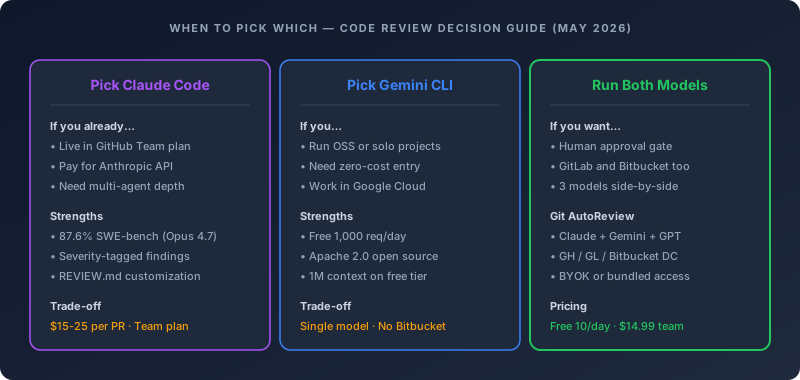
Free tier: 10 reviews per day, BYOK on every model, GitHub + GitLab + Bitbucket. Drafts in VS Code, human approval before publish.
Try Git AutoReview Free → See pricing
What does each tool's setup actually look like?
The setup steps are roughly similar on the surface but split fast in the details.
Claude Code: Code Review GitHub App setup
The official setup path goes through the Claude admin dashboard:
- An admin opens claude.ai/admin-settings/claude-code and finds the Code Review section
- Click Setup and walk through the GitHub App installation flow
- The Claude GitHub App requests Contents read/write, Issues read/write, and Pull requests read/write permissions
- Select which repositories to enable for Code Review
- Choose review behavior per repo: "Once after PR creation", "After every push", or "Manual"
- Drop a
CLAUDE.mdand optionalREVIEW.mdin each repo for customization
Total setup time: 10-15 minutes for the first repo, plus however long REVIEW.md customization takes if you have specific style rules. Requires Claude Team or Enterprise admin access on the Anthropic side and GitHub organization admin on the GitHub side.
Gemini CLI: GitHub Action setup
The Gemini CLI Action setup is more DIY but lighter on prerequisites:
- Get an API key from Google AI Studio
- Add it as a
GEMINI_API_KEYsecret in repository settings under Secrets and variables → Actions - Update
.gitignoreto exclude.gemini/andgha-creds-*.json - Run
/setup-githubin the Gemini CLI for a guided setup, or manually copy a workflow file from the examples directory into.github/workflows/ - Optionally drop a
GEMINI.mdin repo root for project-specific context
Total setup time: 5-10 minutes for the first repo, no admin gates beyond GitHub repository permissions. Works on any GitHub repo, including personal repos, with a free Google account.
Git AutoReview: VS Code extension setup
For the multi-model alternative the setup is editor-side:
- Install Git AutoReview from the VS Code Marketplace
- Open the Git AutoReview panel and connect your GitHub, GitLab, or Bitbucket account via OAuth or personal access token
- Add API keys for Anthropic, Google, and OpenAI in Settings → AI Models (BYOK), or use bundled access on the Team plan
- Trigger Quick Review or Deep Review on any PR — findings appear as drafts in the editor
Total setup time: 5 minutes. No GitHub App installation required for the read-only review flow. Credentials live in VS Code SecretStorage, which routes to the OS keychain.
What about CLI usage outside of GitHub Actions?
Both Claude Code and Gemini CLI also work as plain terminal agents for ad-hoc code review without any GitHub integration. This is the flow most articles confuse with PR review.
For Claude Code, the manual flow is cd your-project && claude, then in the conversation ask it to review your changes against main. Claude Code reads the diff via git diff, opens affected files, follows imports, and produces severity-ranked findings. This works on Pro plan and up. The output is terminal text, not PR comments — useful for pre-push self-review, not for automating team-wide PR review.
For Gemini CLI, the equivalent is gemini in your project directory, then ask it to review the current branch. The Shift+Tab keyboard shortcut cycles between Default, Auto-Edit, and Plan modes. The free tier gives you 1,000 requests per day for this kind of manual usage, which covers most solo developers indefinitely.
Both terminal flows work fine for individual developers doing their own pre-push reviews. Neither scales to team-wide PR review automation without the GitHub Action layer on top.
What are the limitations of both Claude Code and Gemini CLI for code review?
The honest list. Three shared limitations and two each that are tool-specific.
Shared: no native GitLab integration with the managed services. Both Claude Code Review GitHub App and Gemini CLI Action are GitHub-only at the managed-service level. GitLab support exists for both via self-hosted pipelines, but you write the workflow yourself and lose the polish of the managed experience.
Shared: no Bitbucket support at all. Neither Anthropic nor Google ships a Bitbucket-native review app. Teams on Bitbucket Cloud, Server, or Data Center need either a third-party tool or completely self-built pipeline integration. This is why Git AutoReview's Bitbucket coverage matters disproportionately — it covers the platform both major providers skip.
Shared: no built-in human approval step. Both tools auto-post comments to the PR without any draft review or approval gate. The fix is either aggressive REVIEW.md or GEMINI.md prompt customization to suppress nit-level findings, or layering a separate human-in-the-loop tool on top. Teams that ship "AI suggests, you decide" workflows do not get that from either CLI's default behavior.
Claude Code specific: cost scales with PR size. The multi-agent verification pipeline gets more expensive on larger PRs because each agent processes more tokens. A 50-line PR might cost $5-8 in review tokens. A 2,000-line PR can push past $50. The pricing is roughly linear in diff size, which is unusual compared to traditional code review tools.
Claude Code specific: Team plan gate. The Code Review managed service is not available on Pro at $17 per month. You need Team at $25 per seat per month annual or higher. Solo developers and very small teams can only use the manual terminal flow, which loses most of the value.
Gemini CLI specific: single-model review. No multi-agent verification pass, no parallel perspectives, no built-in severity grading. Everything you want beyond the default "review this PR" prompt requires custom prompt engineering in your workflow file. This is fine for experienced teams, painful for new adopters.
Gemini CLI specific: free tier rate caps. 1,000 requests per day is enormous for solo developers but tight for active OSS projects with frequent PRs and re-pushes. Hitting the cap means review fails silently or queues until midnight Pacific. Paid Gemini API removes the cap but adds the billing relationship most free-tier users were trying to avoid.
How do real teams actually use Claude Code and Gemini CLI in 2026?
A handful of patterns showed up consistently across teams running both in production.
The "Gemini for cheap, Claude for important" split. Solo developers and small teams configure the Gemini CLI Action as the default on every PR, then add Claude Code Review only on PRs with specific labels — security, payments, infra. The Gemini Action runs on the free tier and catches most issues. Claude Code Review runs maybe 10-20% of the time on PRs where the higher per-review cost is justified by the criticality. This pattern saves roughly 70-80% on Anthropic token spend compared to running Claude on every PR.
The "Claude Team primary, manual Gemini for context" split. Teams already on Claude Team use Code Review as the default automated layer, then run Gemini CLI manually in the terminal when they want a second opinion or full-monorepo context on a specific PR. This pattern uses Gemini as a power-user terminal tool, not as an automated reviewer. The free tier covers manual usage indefinitely.
The "third tool for cross-platform" pattern. Teams shipping to multiple Git hosting platforms — GitHub plus GitLab, or GitHub plus Bitbucket — give up on running Claude Code or Gemini CLI's managed services entirely and adopt a third-party review tool that covers all platforms. Git AutoReview is the option we built specifically for this, with Claude, Gemini, and GPT running in parallel through API access on every platform.
The "BYOK everywhere" pattern. Teams skeptical of vendor lock-in pay for raw API access to all three providers (Anthropic, Google, OpenAI) and route everything through a tool layer that consumes those keys. The benefit is independence — no vendor can change pricing or terms without an easy migration path. The cost is more complex billing across multiple providers, plus the management overhead of API key rotation and quota monitoring.
What about Claude Code vs Cursor vs Codex CLI for code review?
This article focuses on Claude Code versus Gemini CLI specifically because that is the SERP comparison most teams search for. But the broader CLI category also includes Cursor and OpenAI's Codex CLI.
Cursor's review story is different: Cursor itself is an IDE fork of VS Code with AI built in, not a CLI. The relevant comparison is Cursor's review features inside the IDE versus running Claude Code or Gemini CLI in any terminal. Cursor Pro at $20 per month bundles Claude and Gemini access through the IDE, which makes it more of an IDE choice than a review tool choice. For dedicated PR review on the GitHub side Cursor relies on the same Anthropic and Google services as everyone else.
OpenAI's Codex CLI is the third frontier CLI option, with similar capabilities to Claude Code on the terminal side. The pricing model is different — Codex CLI runs on the OpenAI API at $1.75 per million input tokens for GPT-5.3 Codex, similar to Gemini CLI's paid tier but without the same free tier generosity. For teams already paying for GitHub Copilot Enterprise the Codex CLI integration is sometimes the path of least resistance, but the managed review service equivalent is GitHub Copilot's PR review feature, which is GitHub-only and runs through the Copilot subscription rather than the OpenAI API directly.
The coderabbit alternative page covers the dedicated review tool comparison in more depth, including the Cursor Bugbot, Sourcery, and Qodo Merge angles that are usually missing from CLI-focused comparisons.
Frequently asked questions
What is the actual difference between Claude Code and Gemini CLI for code review?
Claude Code ships a managed Code Review GitHub App that runs multi-agent analysis with a verification step on Anthropic infrastructure, costs $15-25 per PR, and requires the Team plan. Gemini CLI's GitHub Action runs single-pass review in your own GitHub Actions runner, costs zero on the free tier of 1,000 requests per day, and works on personal accounts. Both auto-post comments to the PR. Both are GitHub-only at the managed-service level. The architecture difference produces different output quality — Claude tends to catch architectural bugs better, Gemini handles full-repo context better.
Is Claude Code worth $15-25 per PR for code review?
It depends on what a missed bug costs your team. For teams shipping production code where a logic bug means a customer-facing incident, $20 per PR is trivially cheap against the alternative cost. For OSS projects, prototypes, or internal tools where the failure cost is low, the Gemini CLI free tier delivers most of the value at zero spend. The honest answer is most teams should start with Gemini CLI on the free tier, validate the value, and only upgrade to Claude Code Review on the PRs where the higher cost is justified.
Can Gemini CLI's free tier handle a busy team's code review volume?
The 1,000 requests per day cap covers most teams comfortably. At realistic review volumes — say 30-50 PRs per week with re-reviews on push — a single team account stays well under the cap. The cap becomes tight on very active OSS projects with frequent PRs and re-pushes, or on monorepos where every PR triggers multiple workflows. Hitting the cap means the workflow fails silently until midnight Pacific. For teams approaching the cap the paid Gemini API tier at $2 per million input tokens is the upgrade path.
How do I customize what Claude Code or Gemini CLI flags during review?
Claude Code reads two files from your repo. CLAUDE.md gets used by all Claude Code tasks including review, with newly introduced violations flagged as nits. REVIEW.md is review-only and injects directly into every agent's system prompt as highest priority — use it to redefine severity, cap nit volume, skip generated files, and add repo-specific rules. Gemini CLI uses GEMINI.md for project-specific context and instructions, with the same general purpose. Both file formats are plain markdown.
Do Claude Code or Gemini CLI store my code on their servers?
Claude Code's managed Code Review service runs the analysis on Anthropic infrastructure, which means your diff and the surrounding code touched by the agents pass through Anthropic's API under their privacy policy. The Gemini CLI GitHub Action runs in your own GitHub Actions runner, with your code going directly from the runner to the Gemini API and back. Neither is dangerous, both are documented, but security teams running compliance audits care about the trust boundary difference. Both providers explicitly state that code submitted via API is not used for training under their standard terms.
Why do articles say Claude Code costs $20 per month when this post says $15-25 per PR?
Two different products. Claude Pro at $17 per month annual or $20 monthly is the subscription that gives you Claude Code in your terminal for manual usage. The Code Review managed GitHub App is a separate paid service billed as extra usage on top of the Team plan, averaging $15-25 per pull request in token charges. Most "Claude Code vs Gemini CLI" articles confuse the two because they focus on the terminal CLI experience and skip the managed Code Review service entirely. The terminal CLI is included in Pro. The PR review automation is not.
Does Claude Code or Gemini CLI work for GitLab pull request review?
Neither has a managed GitLab integration the way both have for GitHub. Claude Code ships a separate GitLab CI/CD setup that runs Claude inside GitLab pipelines without the managed app — you write the workflow YAML yourself, you handle the credentials yourself. Gemini CLI similarly requires manual pipeline integration. For teams that want the same managed PR review experience on GitLab that they get on GitHub, the practical option in May 2026 is a third-party tool like Git AutoReview that covers all three Git hosting platforms with the same setup flow.
Can I switch between Claude Code and Gemini CLI without rewriting my review workflow?
Not easily. The workflow files, trigger phrases, and customization formats are different between the two managed services. Migrating from Claude Code Review to Gemini CLI Action means writing a new workflow file, translating REVIEW.md rules into GEMINI.md context, and rewiring the GitHub App permissions. Teams that anticipate switching providers — or want both options without lock-in — typically adopt a tool layer that abstracts the AI provider, so the workflow stays the same while the underlying model can change. BYOK on Git AutoReview is the most common form of that abstraction.
What is the best AI for code review in 2026 overall?
No single model wins across every dimension. Claude Opus 4.7 hit 87.6% on SWE-bench Verified at its April 2026 release, since surpassed by Opus 4.8 (88.6%, BenchLM) and Claude Fable 5 (95.0%) — and, as of September 2026, by Claude Opus 5 itself, which independent evaluators (BenchLM, vals.ai) now put at 96-97%, the current public leaderboard lead. Gemini 3.1 Pro leads LiveCodeBench Pro at 2887 Elo per Google DeepMind's model card. GPT-5.3 Codex leads Terminal-Bench 2.0 for security and infrastructure work. The teams getting the most accurate code review run multiple models in parallel and compare findings, which is the multi-model pattern that Git AutoReview ships as the default workflow. Picking one model means accepting a real miss rate on issues the others would have caught.
Where does Git AutoReview fit in this comparison?
Git AutoReview wraps Claude, Gemini, and GPT behind one human approval step, then ships the result to GitHub, GitLab, or Bitbucket. The differentiation is the approval gate plus the cross-platform coverage — Claude Code Review is GitHub-only, Gemini CLI Action is GitHub-only, and neither has a Bitbucket story at all. Git AutoReview covers Bitbucket Cloud, Server, and Data Center natively, runs Claude, Gemini, and GPT in parallel on the same diff, and surfaces findings as drafts in VS Code before anything reaches the PR. Free tier covers 10 reviews per day on a single repo. Team plan at $14.99 per month flat removes the cap.
Related resources
- OpenCode vs Claude Code — the open-source agent in the same field, compared on licence, models and cost
- AI PR Review Guide 2026 — how AI-powered pull request review actually works under the hood
- SWE-Bench Leaderboard 2026: Claude vs GPT vs Gemini — full benchmark breakdown with pricing and bug examples
- Claude Code for AI Code Reviews in VS Code — manual Claude Code workflow walkthrough
- Best AI Code Review Tools 2026 — dedicated review tools beyond the CLI options
- CodeRabbit Alternative — head-to-head on pricing and platform coverage
- AI API Pricing Tool — calculate per-model cost on your monthly review volume
- Best VS Code Extensions for Bitbucket Code Review — the Bitbucket-specific extension space both CLIs skip
Reviewing GitHub PRs? Git AutoReview adds AI suggestions you approve before publishing.
Frequently Asked Questions
Should I use Claude Code or Gemini CLI for code review?
How much does Claude Code cost for code review compared to Gemini CLI?
Does Claude Code support GitLab and Bitbucket pull request review?
Does Gemini CLI support GitLab and Bitbucket pull request review?
What is the SWE-bench Verified score difference between Claude Opus 4.7 and Gemini 3.1 Pro?
Can I use Gemini CLI for free for code review on open source projects?
Why does Claude Code's Code Review service cost $15-25 per PR when Gemini CLI is free?
Which is better for a Claude Pro subscriber doing solo code review?
Do Claude Code and Gemini CLI integrate with VS Code?
What happens when both Claude Code and Gemini CLI find different issues on the same PR?
Try it on your next GitHub PR
AI reviews your pull request. You approve what gets published. Nothing goes live without your OK.
Free: 10 AI reviews/day, 1 repo. No credit card.
Related Articles
OpenCode vs Claude Code: An Honest Comparison (2026)
OpenCode vs Claude Code compared on licence, models, cost and PR review. Verified GitHub and pricing data, plus the archived repo everyone still quotes.
Open VSX: AI Code Review in Cursor, VSCodium & Windsurf (2026)
VS Code forks cannot reach Microsoft's Marketplace. Here is the licence reason, and how to install AI code review in Cursor, VSCodium and Windsurf.
Jira to Pull Request: Closing the Loop Between Tickets and Code Review 2026
Most teams mark Jira tickets Done before the PR gets a real review. Here's how to wire Jira to GitHub, GitLab, and Bitbucket so ticket context drives code review — and nothing ships unverified.
Get the AI Code Review Checklist
25 PR bugs AI catches that humans miss — with real code examples. Free PDF, sent instantly.
One-click unsubscribe. We never share your email.