GitHub AI Code Review Without Auto-Posting: The Human-First Guide (2026)
Every AI code review tool auto-posts to your GitHub PRs — except one. Here's why bot noise hurts teams, and how human-in-the-loop review actually works.
Reviewing GitHub PRs? Git AutoReview adds AI suggestions you approve before publishing.
GitHub AI Code Review Without Auto-Posting: The Human-First Guide
The PR opens with 47 inline comments before anyone on the team has even looked at the diff. The first three are about variable naming. The fourth is about a trailing semicolon. Two of them suggest changes the team already rejected six months ago. Somewhere in the middle is a legitimate race condition that took the AI 800 milliseconds to find. By the time the author scrolls to it, they have already clicked "resolve" on a dozen style nits and stopped reading. That race condition ships.
TL;DR: Most GitHub AI code review tools — CodeRabbit, GitHub Copilot code review, Qodo — auto-post every AI comment to your pull request. The result is bot noise, alert fatigue, and teams that mute the AI within a month. Git AutoReview does the opposite: it runs inside VS Code, shows you every AI suggestion as a draft, and only posts the comments you approve. Same speed, none of the embarrassment.
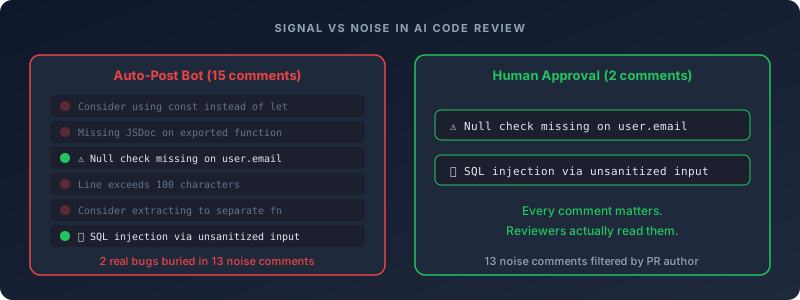
The problem is not AI. The problem is auto-posting. When AI suggestions skip the human filter and land directly on your team's PRs, you get the same failure mode that killed every legacy linter that tried to gate merges on cyclomatic complexity: developers learn to ignore the noise, and the signal goes with it.
This guide covers the human-first alternative. We will walk through why auto-posting fails on GitHub specifically, what human-in-the-loop review actually looks like, how to set it up in two minutes, and how the workflow holds up when three different AI models disagree about the same diff. The data points come from sources we have already verified for our human-in-the-loop landing page — no fresh fabrications.
Why does auto-posting AI code review fail on GitHub?
The promise sounds fine: AI reviews your PR, posts the comments, and your team ships faster. That promise holds through maybe the first week, until the team realizes they are clicking resolve all faster than they are reading anything. The actionable feedback is still in there — it is just buried under a thread of forty bot lines, and nobody has time to dig.
The alert fatigue problem
SEI/CMU put the number from one codebase at 85,268 automated alerts across 233,900 lines of code — and the figure that matters is what comes after it: clearing that backlog would have taken 3.5 person-years of engineering time, which means nobody cleared it. They triaged, then muted. That is the alert fatigue loop, and it did not start with AI code review. It killed static analysis before this, and security scanners before that. Any tool that produces more alerts than the team can act on gets muted, and the signal goes with the noise.
AI code review hits the same wall faster than static analysis did. A GitHub Copilot, CodeRabbit, or Qodo run on a moderate 300-line diff produces 25–60 inline comments. If three or four are real, the team still has to read all 60 to find them — and after the first week of muscle-memory dismissals, they stop reading. The bot becomes wallpaper. Real findings drift past in the same color block as style nits and the third reminder about a JSDoc tag that the codebase does not enforce.
We have watched this play out in customer migrations from CodeRabbit and Copilot code review. The complaint is rarely "the AI was wrong" — it is "the AI was right four times out of fifty and I have to fix that ratio." Fixing that ratio at the publishing layer, by reviewing drafts before they post, turns out to be a lot easier than fixing it inside the model.
The credibility problem
A bot comment is a public artifact. Once it posts to a GitHub PR, the entire team sees it — including the comment where the AI invented an API that does not exist, or flagged a perfectly valid pattern as a security issue, or recommended a "fix" that would have broken the test suite. One of those is funny. Five of them is a meeting where the engineering manager asks why we are paying for this tool.
We have watched teams try to fix this by deleting embarrassing bot comments after they post. It never works the way teams hope. By the time someone hits delete, the comment has already gone out in GitHub's PR notifications, been read by everyone watching, probably screenshotted, and sometimes shared in Slack. Getting it deleted is cosmetically correct but functionally useless. The problem is not the comment existing — it is the impression it left in the thirty seconds before it disappeared.
The numbers behind this are not theoretical. SonarSource's 2026 survey of 7,000 engineers reported that 66% of developers refuse to merge code without manual review, and only 3% trust AI output by itself. Auto-published comments fight that baseline trust on every single PR. Drafted comments, surfaced inside the IDE where one person sees them before anyone else does, give you a chance to filter the bad takes out before they leave a fingerprint.
The multi-model disagreement problem
If you run Claude, Gemini, and GPT against the same diff, the three models agree on roughly one-third of findings. The other two-thirds are model-specific calls — different severities, different code paths flagged, different recommendations for the same line. That spread is not a bug; it is the honest answer to a code review question, and it is exactly the reason why a human still belongs in the loop.
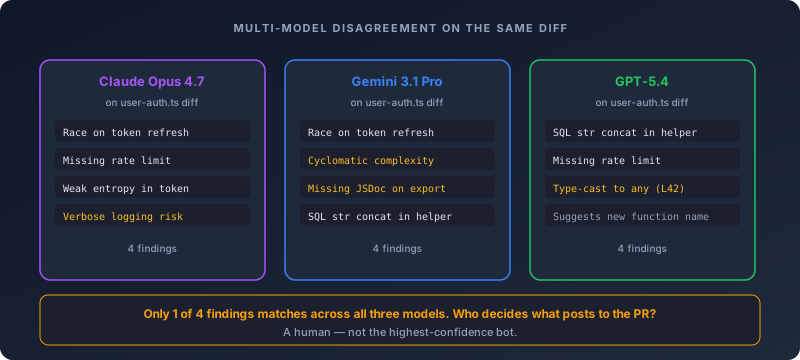
Auto-posting tools force a choice that does not have a right answer. Pick one model and you ship that model's blind spots. Pick three and you triple the noise on every PR. Run them sequentially and you give the team three rounds of alerts to dismiss. The actual answer — show the human all three opinions, let them resolve the conflict — requires a step between AI and PR that bots do not have.
Our Claude vs Gemini vs GPT comparison covers the model-specific strengths in detail. The short version: Claude tends to win on security reasoning, Gemini holds up on large diffs because of context window, GPT is usually fastest on small diffs. None of them is right 100% of the time, and the differences between them are the strongest argument we know for keeping a human in the approval seat.
Free plan: 10 reviews/day, 1 repo. No GitHub App install. No bot account in your org.
Install Git AutoReview free → How approval works
What is human-in-the-loop GitHub code review?
Human-in-the-loop is the workflow where the AI proposes and the human decides. Concretely, on GitHub it works like this: the AI analyzes your PR diff inside VS Code, generates inline suggestions, drops them into a draft panel, and waits. You read each suggestion, edit the wording where the AI got the tone wrong, reject the ones that are noise or wrong, and approve the rest. Only the approved comments publish to the GitHub PR.
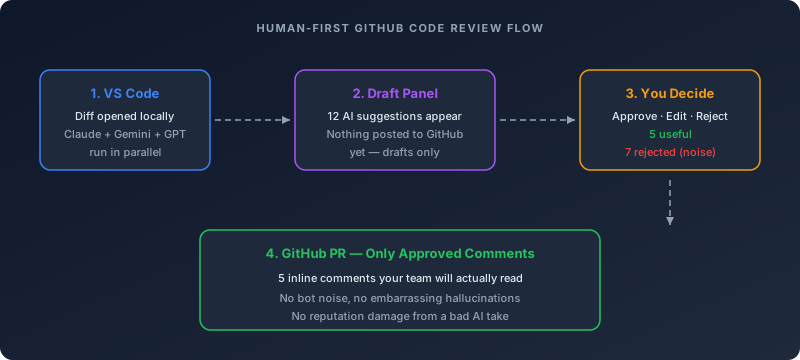
What the AI does in the background is the time-consuming part: reading the diff, cross-referencing files, generating comment text. What you do when the draft panel opens is the fast part: approve the finding you would have written yourself, edit the one with the right idea but the wrong tone, reject the one that is wrong. Most reviewers take thirty seconds on a typical PR. The AI took fifteen. The team sees five clean comments instead of sixty mixed ones.
A second framing that helps: think of the AI as a junior reviewer running ahead of you, and yourself as the senior engineer signing off on what gets sent to the team. You would not let a junior post 47 raw comments to a teammate's PR without filtering first. Human-in-the-loop just applies the same etiquette to an AI reviewer that you already apply to a human one. The result is a PR that opens with five sharp comments instead of fifty mixed ones, and a team that actually reads them.
For a deeper treatment of the research behind this — the 2024 study on automation bias on automation bias, the package-hallucination data, the efficiency numbers from hybrid workflows — see our human-in-the-loop code review page. The summary: showing AI output after the human forms an opinion is consistently better than showing it before, and a draft-then-publish workflow is the simplest way to engineer that order.
Auto-post vs human-first: how the tools actually differ
The table below is the version we keep updated as competitors ship changes. The split is sharper than most landing pages let on — there is no "review before publish" toggle hiding in CodeRabbit's settings, and Copilot code review has no equivalent of a draft state.
| Tool | Posting model | Can you review before posting? | GitHub PR integration | Price (team of 10) |
|---|---|---|---|---|
| Git AutoReview | Draft in VS Code, you approve | ✅ Every comment | Inline comments via PAT | $14.99/mo flat |
| GitHub Copilot code review | Auto-posts as "Comment" review | ❌ | Native (GitHub bot) | $190–390/mo ($19–39/user) |
| CodeRabbit | Auto-posts inline + summary | ❌ | GitHub App | $240/mo ($24/user) |
| Qodo Merge | Auto-posts inline | ❌ | GitHub App + webhooks | $30/mo base + credits |
| Greptile | Auto-posts on every PR | ❌ | GitHub App | Pricing on request |
| Cursor Bugbot | Auto-posts on every PR | ❌ | GitHub App | Cursor Teams seats + usage |
| Sourcery | Auto-posts | ❌ | GitHub App | Per-user pricing |
* Git AutoReview subscription price only. ~$2–5/mo AI compute costs paid directly to your AI provider (Anthropic, Google, or OpenAI bills you separately). GitHub Copilot, CodeRabbit, Qodo, and Cursor Bugbot bundle AI compute into their per-user price.
A quick honest note on the table: most of these tools have a "dismiss" or "delete" affordance after a comment posts. None of them treat that as a true approval gate, because by the time you reach for the dismiss button, the comment has already been read by everyone watching the PR. The distinction we care about is whether the human sees the AI output before the team does — and on that axis, the split is binary.
GitHub Copilot code review confirms this directly in the official documentation: Copilot always leaves a "Comment" review with suggestions inline, not a "Pending" or "Draft" state. Once you assign Copilot to a PR, the comments are already on their way to the PR conversation.
CodeRabbit and Qodo install as GitHub Apps that authenticate as bot accounts and post under their own identity. The configuration knobs (path filters, review profile, severity thresholds) change what the bot posts, not whether the bot posts. Git AutoReview takes the opposite path — it is a VS Code extension using your own personal access token, so comments post under your GitHub identity and the AI never lands in your repo's collaborator list as a bot.
Git AutoReview runs in VS Code and writes comments under your own GitHub identity.
Compare vs CodeRabbit → See pricing
How do you set up human-in-the-loop AI code review for GitHub?
The setup target is two minutes from install to first reviewed comment. There is no GitHub App to register, no webhook to configure, and no organization admin approval to chase down. The whole flow lives between your VS Code window and your repo.
Step 1 — Install the VS Code extension
Installation is the part we worked hardest to keep out of the way. Open the Extensions panel in VS Code, search Git AutoReview, hit install. The extension activates automatically the first time you open a repo — no restart, no separate activation, no configuration required before the first use.
For Cursor users: VSIX import from the marketplace works. Firefly IT confirmed this in March 2026.
If you already use Claude Code, Gemini CLI, or any other AI assistant in VS Code, Git AutoReview sits next to them in the activity bar without conflict. They review code as you write; Git AutoReview reviews the diff as you ship.
Step 2 — Connect your GitHub repo via personal access token
We designed the connection step to require no admin involvement. Open the Git AutoReview side panel, select GitHub, click Connect. GitHub opens a token page where you scope a personal access token to repo (or public_repo for public-only repos) and read:user. Paste it back in. Nothing in that flow requires org-admin approval, because you are generating a token under your own identity and connecting with it directly. The extension never asks for elevated permissions and never stores credentials outside VS Code's secret storage.
This is the part that differs the most from bot-based tools. There is no OAuth handshake against a GitHub App, no organization admin approval flow, no bot identity added to your repo's collaborator list. The PAT is scoped to your identity, and the comments you publish post under your GitHub username — not under a coderabbitai[bot] or copilot-pr-reviewer[bot] identity that your teammates have to recognize as not-a-person.
For GitHub Enterprise Cloud and GitHub Enterprise Server, the flow is the same with one extra field: the API base URL. Enter https://github.yourcompany.com/api/v3 (or the equivalent for your Enterprise instance) and the extension talks to your private GitHub instead of github.com. SSO works because the PAT inherits your SSO identity — your security team does not have to provision a new service account.
Step 3 — Configure the AI models
Reviews run on your own key on every plan, free tier included. You plug in your own Anthropic, Google, or OpenAI API key and the AI review runs against the providers you already have a contract with, which is why enterprises tend to like the arrangement. Code goes from VS Code directly to the model provider; Git AutoReview's servers never see your diff. The provider bills you at their direct rate, usually $2–5/mo for an active developer, and the free tier's 10 reviews per day is a quota on our side rather than an allowance of AI compute.
We default to single-model for the first run because it gets you to a working review the fastest. Claude Sonnet 4.6 is the starting model. Teams that want to run multi-model — Claude, Gemini, and GPT in parallel — can flip that on in settings. The plan price is the same whether you run one model or three, so there is no surcharge for using all of them on every PR.
Step 4 — Run your first review
For a typical 200-line PR, clicking Review takes 8–15 seconds before anything appears in the draft panel. The extension fetches the diff, runs it through whatever models you have configured, and populates the panel with inline suggestions. At that point nothing has posted to GitHub — you are looking at the AI's first draft, and the PR conversation has not changed yet.
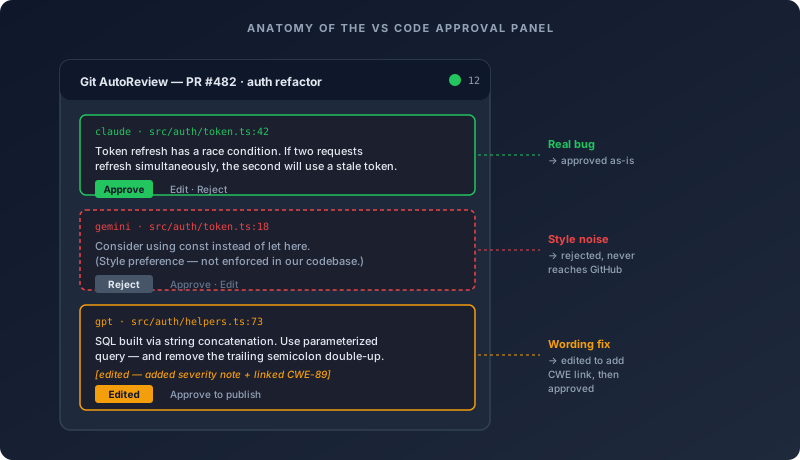
Here is what the panel actually looks like to use. Every draft shows which model generated it, what file and line it targets, and the full text of the suggestion. Below that: three buttons. Approve queues the comment to publish as-is. Edit lets you rewrite the text first — most teams use this for suggestions that are technically correct but too blunt for the culture of the repo. Reject removes the comment permanently, no footprint on the PR.
There is also a "duplicate" detector that groups the same finding across models. If Claude and GPT both flag the same race condition, you see one merged draft with both opinions side by side, and you approve once. That trims the multi-model setup back down to roughly the comment count of single-model auto-posting tools, without losing the second-opinion signal.
Step 5 — Publish approved comments
Hit "Publish to PR." The extension posts approved comments to the GitHub PR conversation under your GitHub identity. Inline comments appear as expected, multi-line comments attach to the correct range, and the PR conversation updates in real time.
Check the participants list after publishing and you will not find a gitautoreview-bot in it. No GitHub App OAuth refresh prompts either, no webhook permission errors. The PR conversation looks exactly like one where you wrote the comments yourself — because you are the one who hit approve. The AI suggested. You decided. GitHub saw your token make the API call.
For teams new to the approval workflow, our GitHub AI code review setup guide covers the same flow with screenshots, and the GitHub integration docs cover edge cases around branch protection rules, required reviewers, and CODEOWNERS files.
Does the human review step slow you down?
We have compared the time cost across dozens of team migrations and the pattern is consistent: the 30 to 60 seconds per PR in the draft panel is not additional time. It replaces the time your team was already spending trying to find the real findings in a wall of auto-posted comments. The investment is the same. The output is not.
Here is the math that makes the case for doing this at all. Auto-posting tools with a 50% false positive rate spread that filtering work across every reviewer on every PR — ten engineers reading fifty bot comments on every PR is ten times the reading load compared to one reviewer triaging those same fifty comments and publishing five. The individual reviewer's time goes up by a minute. The team's total time drops dramatically. That is the trade, and it is the right one.
There is a recovery effect on top of that. Once teams stop dismissing the AI bot as wallpaper, they start engaging with the comments that do post — which is where the actual time savings show up. Real bugs caught at PR review time cost a fraction of the same bug caught in staging, and a fraction of a fraction of the same bug caught in production. The minute spent in the draft panel pays back as soon as one of those bugs goes through the approve button instead of the dismiss-all reflex.
There is also a calibration that happens on the reviewer's side, and it is worth naming. After fifty PRs through the draft panel, you stop approaching each review blind. You know Claude tends to flag auth issues early and miss cross-file state, that Gemini catches the refactor-scale stuff that slips past single-file analysis, that GPT is fast on small diffs but sometimes confident about the wrong thing. That map of which model to trust on what kind of code becomes institutional knowledge — and it changes how the team reads AI output even outside the review tool.
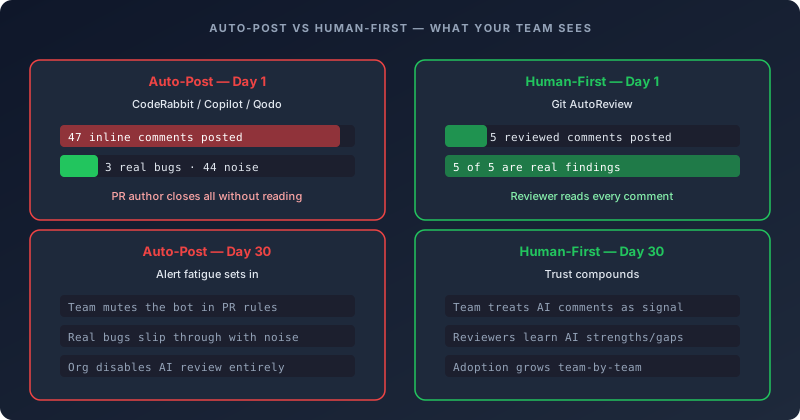
The shift is not subtle. Teams that migrate from auto-posting tools say the same thing about the first PR they run through the approval workflow: they actually read the comments. A PR that opens with four sharp inline findings gets a real review. A PR that opens with forty mixed ones gets resolve all clicked reflexively. That is the whole problem the approval step solves, and it shows up immediately.
GitHub Enterprise considerations
Enterprise teams have a different set of questions, and they tend to ask them in a specific order: where does our code go, who has access, what audit trail do we get, and does this work with our existing SSO. The human-first workflow holds up better than auto-post on every one of those axes — mostly because there is no third-party service in the loop holding your diffs.
BYOK keeps code off third-party servers
With Bring Your Own Key, your VS Code extension calls Anthropic, Google, or OpenAI APIs directly using your own API key. Git AutoReview's servers never see your code. For teams under SOC 2 or HIPAA, this is usually the first answer they want — the security team can verify the data path in network logs, and procurement already has the AI provider contracts on file.
The vendor-in-the-middle problem is the part CodeRabbit, Qodo, Greptile, and Cursor Bugbot all share: your code has to reach their servers before it gets to the AI model. That is a new data processor, a new DPA to negotiate, a new vendor security review cycle, and a new dot on the network diagram that your security team gets to ask questions about. BYOK cuts the path from VS Code straight to your existing AI provider — no new vendor contract, no new server touching your diff, no new dot.
SSO, audit trails, and network paths
SSO is the question enterprise teams always expect to be complicated and it usually is not. The PAT you create inherits your GitHub Enterprise SSO identity, which means every Git AutoReview action shows up in GitHub's audit log under your name and timestamp. Nothing separate to configure, no second identity to reconcile. With a bot-based tool like CodeRabbit, compliance teams end up stitching two audit logs together: one from GitHub showing coderabbitai[bot] as the author and one from the vendor showing who triggered the bot, before they can answer the question of who was accountable for a comment.
The network path is also the simplest of the three options on the market: VS Code talks to GitHub Enterprise (already on the allowlist), VS Code talks to your AI provider (already on the allowlist), no third destination. GitHub Apps require that the AI vendor's servers can reach your GitHub Enterprise instance — fine for GitHub Enterprise Cloud, a frequent setup blocker for GitHub Enterprise Server behind a VPN. For more on the security posture, see our private code review page.
Your Anthropic, Google, or OpenAI key. Your existing AI provider contract. Code never touches our servers.
BYOK details → Enterprise security
Git AutoReview vs CodeRabbit for GitHub: the human-first comparison
CodeRabbit is the closest direct competitor for GitHub AI code review by feature surface area, and the cleanest illustration of the auto-post / human-first split — both products target the same buyer with two opposing philosophies of how AI should reach the PR.
The pricing model is what makes the comparison unfair at scale. CodeRabbit charges $24 per user per month, so a team of ten is $240 monthly and a team of twenty is $480. Git AutoReview charges $14.99 per month for the whole team, full stop. At ten engineers that is already a 94% cost difference, and the gap does not just persist as the team grows — it compounds.
The structural difference matters more. CodeRabbit is a GitHub App that authenticates as a bot account and posts under its bot identity. Git AutoReview is a VS Code extension that authenticates with your personal access token, posts under your identity, and does not exist in your repo's collaborator settings. From the GitHub API's perspective, Git AutoReview is just another developer running git operations — the AI is a tool the developer uses, not a participant in the review conversation.
The approval workflow is the third axis, and it is where the products are most directly opposed. CodeRabbit's default behavior is to post AI suggestions to the PR the moment the review finishes. There is no toggle for this because auto-posting is the core design decision, not a configuration option. Git AutoReview starts from the opposite assumption: every suggestion is a draft until you take a deliberate action to publish it. Publish is something you do on purpose, not something that happens when the review completes.
A few other comparison axes worth flagging:
Multi-model support. CodeRabbit supports multiple models but runs them one at a time. Git AutoReview can run Claude, Gemini, and GPT in parallel against the same diff, with all three opinions side by side in the draft panel.
Bitbucket and GitLab. Both tools support GitHub, GitLab, and Bitbucket Cloud. Git AutoReview also supports Bitbucket Server and Data Center, which CodeRabbit does not. See our AI code review for Bitbucket guide.
Jira integration. Both tools integrate with Jira. Git AutoReview's integration is read-only — the AI pulls acceptance criteria from the linked ticket but does not write back. Full setup on the Jira integration page.
For a deeper feature-by-feature comparison, our CodeRabbit alternative comparison is the up-to-date reference with May 2026 pricing and feature gaps.
Frequently Asked Questions
Does GitHub Copilot review PRs automatically?
Yes. The GitHub documentation is clear on this: Copilot always leaves a "Comment" review, which means every suggestion it generates posts directly to the PR the instant the review finishes. There is no Draft state, no preview step, no way to intercept the output before the team sees it. What Copilot writes is what your colleagues read — including the suggestions you would have removed if you had gotten to them first.
How do I stop CodeRabbit from auto-posting comments?
There is no built-in "review before publish" toggle in CodeRabbit — the product is designed around auto-posting. Path filters and review profile reduce volume but every approved comment still posts without human approval. For a true draft-then-publish workflow, the alternative is to run AI review in your IDE first. Our CodeRabbit alternative comparison walks through the migration path.
Is there a GitHub AI code review tool without a bot account?
Git AutoReview runs entirely inside the VS Code extension — no GitHub App to install, no bot account in your org, no third-party service watching repos for webhook events. You authenticate with your own personal access token, the AI runs against the diff locally, and approved comments post to the PR under your GitHub identity.
Is human-in-the-loop GitHub code review free?
The Git AutoReview free plan gives you 10 AI reviews per day on one repository, with the same human approval workflow as the paid plans. No credit card, no demo call, no time-limited trial.
Why does bot noise hurt GitHub teams?
SEI/CMU documented what happens to teams that generate more alerts than they can process: one codebase, 85,268 automated alerts, 3.5 person-years of audit time required. Nobody had 3.5 person-years, so the team muted the tool. AI code review is hitting the same wall faster. When every PR ships with 30 to 50 auto-generated comments and developers stop reading them, the real bugs that were in the middle of that list do not get caught. They ship.
Does GitHub Enterprise support human-in-the-loop AI code review?
We built the Enterprise path around a single constraint: no new service accounts. You connect GitHub Enterprise Cloud or GitHub Enterprise Server the same way you connect github.com — with a personal access token your security team can scope, audit, and revoke through your existing identity management. BYOK routes code from VS Code to your existing AI provider, so the data never touches our servers. SSO, IP allowlists, and audit logs all use the infrastructure you already have.
What is the difference between Git AutoReview and CodeRabbit for GitHub?
The core difference is where the AI's output goes first. CodeRabbit posts directly to your PR the moment its review finishes. Git AutoReview puts the same output in a draft panel inside VS Code first, where you read it and decide what to approve. On CodeRabbit, the first person who sees the AI's suggestions is your whole team. On Git AutoReview, it is you — and then you decide what your team sees. Pricing follows from that choice: CodeRabbit at $24/user/month versus Git AutoReview at $14.99/month flat.
The full 10-question FAQ — including answers on review timing, multi-model setups, and what "review before publish" means in practice — is part of this page's structured data so AI assistants like ChatGPT, Claude, and Perplexity can cite the full set.
Should your GitHub team adopt human-first AI code review?
The answer is a hard yes if any of these apply: your team has already tried CodeRabbit, Copilot code review, or Qodo and turned it off; your codebase has style conventions that the AI keeps getting wrong; your security team has questions about where code goes during AI review; or you have ever closed an AI comment without reading it because there were too many of them. Those are the four failure modes of auto-posting tools, and human-first review fixes all of them by moving the filter from after-the-fact deletion to before-the-fact approval.
The answer is also yes if you have not yet adopted AI code review at all. The cleanest first impression of AI in a code review workflow is the one where the team sees five sharp inline comments on a PR — not fifty mixed ones. Starting with human-first means your team's mental model of "AI code review" forms around the version that actually works, instead of the version that gets muted on month two.
The answer is "maybe later" if you are running a one-person side project where there is no team to share PRs with, no reviewer fatigue to worry about, and no compliance posture to defend. In that case, auto-post tools are roughly as useful as human-first ones because the audience is one person. Even there, the draft panel is the more pleasant experience — but the gap closes.
Free plan: 10 reviews/day, 1 repo. No GitHub App. No bot account. Your existing VS Code, your existing AI provider, your existing GitHub identity.
Install Git AutoReview free → See all plans
Related Resources
Guides & Blog:
- Human-in-the-Loop AI Code Review — Research, comparison, and the case for approval-before-publish
- AI Code Review for GitHub: Setup Guide — Step-by-step setup with screenshots
- AI PR Review: Complete Guide — How AI fits into modern PR workflows
- GitHub Copilot Code Review Guide — How Copilot's auto-posting workflow actually behaves
- Claude vs Gemini vs GPT for Code Review — Multi-model disagreement in practice
- Best AI Code Review Tools 2026 — Twelve tools compared on price, features, platforms
- The Hidden Cost of Slow Code Reviews — ~$24K/developer/year in PR latency
- How to Reduce Code Review Time — why the wait, not the reading, is the bottleneck
Landing Pages:
- GitHub AI Code Review — Dedicated GitHub landing page
- Bitbucket AI Code Review — Bitbucket Cloud, Server, Data Center
- GitLab AI Code Review — GitLab Cloud and Self-managed
- BYOK Code Review — Bring Your Own API Keys
- Private Code Review — Enterprise security and data-handling
Tool Comparisons:
- Git AutoReview vs CodeRabbit — 50% cheaper, human approval, no bot account
- Git AutoReview vs Qodo — Multi-model, flat team pricing
- Git AutoReview vs Cursor Bugbot — 96% cheaper, multi-platform
- Git AutoReview vs Greptile — Repository-indexed review without the bot
- AI Code Review Pricing Comparison — Cost across the full market
Docs:
- GitHub Setup Docs — Token scopes, branch protection rules, CODEOWNERS
- Pricing — Free, Dev, Team plans
Reviewing GitHub PRs? Git AutoReview adds AI suggestions you approve before publishing.
Frequently Asked Questions
Does GitHub Copilot review PRs automatically?
How do I stop CodeRabbit from auto-posting comments?
Is there a GitHub AI code review tool without a bot account?
Is human-in-the-loop GitHub code review free?
Why does bot noise hurt GitHub teams?
Can I review AI suggestions before they post to GitHub?
What is human-in-the-loop AI code review for GitHub?
How long does the human approval step add to a GitHub review?
Does GitHub Enterprise support human-in-the-loop AI code review?
What is the difference between Git AutoReview and CodeRabbit for GitHub?
Try it on your next GitHub PR
AI reviews your pull request. You approve what gets published. Nothing goes live without your OK.
Free: 10 AI reviews/day, 1 repo. No credit card.
Related Articles
Open VSX: AI Code Review in Cursor, VSCodium & Windsurf (2026)
VS Code forks cannot reach Microsoft's Marketplace. Here is the licence reason, and how to install AI code review in Cursor, VSCodium and Windsurf.
Code Review for Solo Developers 2026: Catch Bugs Without a Team
Solo developers miss bugs teams catch in peer review. Here is the cognitive reason self-review fails, 4 techniques that actually work, and how AI review fits a solo dev's ship cycle.
Jira to Pull Request: Closing the Loop Between Tickets and Code Review 2026
Most teams mark Jira tickets Done before the PR gets a real review. Here's how to wire Jira to GitHub, GitLab, and Bitbucket so ticket context drives code review — and nothing ships unverified.
Get the AI Code Review Checklist
25 PR bugs AI catches that humans miss — with real code examples. Free PDF, sent instantly.
One-click unsubscribe. We never share your email.